









Hostinger VPS in India: run n8n, AI agents and big apps on your own server
Real rupee prices from the cart, which plan fits which job, and how to set it up.
 By Pritam SononeUpdated 23 Oct 2026Reviewed by Pritam SononePrices re-checked regularly against the brand’s own website.How we test →
Affiliate links: we may earn a commission at no extra cost to you. It never changes our verdicts.
Hostinger VPS is the best-value VPS for most Indian users in 2026. KVM 2 (2 vCPU, 8 GB RAM, 100 GB NVMe) costs ₹779 a month on a 24-month term, or ₹19,855 in total with GST after code DIGITALPRITAM10. It has an India data centre, one-click n8n and AI agent templates, and a 30-day refund. It is self-managed, so pick it if you are happy to run a server, or use the templates to skip most of the work.
- Hostinger VPS starts at ₹599 a month (KVM 1, 1 vCPU, 4 GB RAM) and KVM 2 is ₹779 for 2 vCPU and 8 GB, on a 24-month term paid upfront plus 18% GST.
- Code DIGITALPRITAM10 works on VPS: in our cart test on 23 Oct 2026 it cut KVM 2 from ₹22,061 to ₹19,855 for 24 months, GST included.
- There is an India server location; the cart showed 8 ms from Pune, against 60 ms for the next nearest (Malaysia).
- KVM 2 is the sweet spot for n8n, AI agents and Docker apps. Local AI models need KVM 4 or more, since there is no GPU.
- Budget for renewal: KVM 2 goes from ₹779 to ₹1,199 a month after the first term.
What is a VPS, in plain words
What is it?A VPS (virtual private server) is your own slice of a powerful physical server. The slice has fixed CPU cores, RAM and storage that nobody else can use, its own operating system, and full root access, so you can install anything that runs on Linux.
| Feature | Shared hosting | VPS | Cloud hosting | Dedicated server |
|---|---|---|---|---|
| Resources | Shared with hundreds of sites | Reserved for you | Pooled over many servers | A whole machine |
| Root access | No | Yes | Usually no | Yes |
| Run Docker, n8n, Node.js, Python | No | Yes | Limited | Yes |
| Who manages it | The host | You (with templates and an AI helper) | The host | You |
| Hostinger price from | ₹139/mo | ₹599/mo | Higher than VPS | Not sold |
| Best for | Blogs and small sites | Apps, automation, AI, busy stores | Busy sites without server work | Very large workloads |
Think of shared hosting as a hostel bed, a VPS as your own flat in a building, and a dedicated server as the whole building.
Do you actually need a VPS?
Answer honestly.
Get a VPS if you
- Want to self-host n8n, Make-style automations or AI agents
- Build an app in Node.js, Python, Go or with Docker
- Run a WooCommerce store or site that outgrew shared limits
- Need root access, custom ports, cron jobs or background workers
- Want to replace paid SaaS tools with self-hosted ones
- Host many client sites and want one bill
Stay on shared hosting if you
- Run one or two normal WordPress blogs
- Never want to see a terminal or touch updates
- Get modest traffic that shared plans handle well
- Need email hosting with the site in one place
- Want the host to handle all security for you
- Are still testing an idea with no traffic
Still on the fence? Read our Hostinger review for the shared plans, or the Hostinger price in India guide.
Hostinger VPS plans and prices in India
From hostinger.com/in/vps-hosting and the cart on 23 Oct 2026. Prices are for the 24-month term, paid upfront, and exclude 18% GST unless stated.
KVM 1
One automation box, a bot or a small app
24 months paid upfront, ₹16,964 with GST. Renews at ₹999/mo.
- 1 vCPU AMD EPYC
- 4 GB RAM
- 50 GB NVMe
- 4 TB bandwidth
KVM 2
n8n, AI agents, Docker apps, busy WordPress
24 months paid upfront, ₹22,061 with GST. Renews at ₹1,199/mo.
- 2 vCPU AMD EPYC
- 8 GB RAM
- 100 GB NVMe
- 8 TB bandwidth
KVM 4
Small local AI models, WooCommerce, many apps
24 months paid upfront, ₹31,124 with GST. Renews at ₹2,399/mo.
- 4 vCPU AMD EPYC
- 16 GB RAM
- 200 GB NVMe
- 16 TB bandwidth
KVM 8
Agencies, SaaS, heavy databases and AI
24 months paid upfront, ₹62,276 with GST. Renews at ₹4,399/mo.
- 8 vCPU AMD EPYC
- 32 GB RAM
- 400 GB NVMe
- 32 TB bandwidth
Every plan includes AMD EPYC CPUs, NVMe storage, a 1 Gbps port, free weekly backups, a managed firewall, Wanguard DDoS filtering, the AI web terminal, a public API and a free domain for one year.
In US dollars (hostinger.com, same day, before tax): KVM 1 $6.49 a month, renews $11.99, KVM 2 $8.79 a month, renews $14.99, KVM 4 $12.99 a month, renews $28.99, KVM 8 $25.99 a month, renews $49.99.

What you can run on a Hostinger VPS
One server, many jobs.
n8n and workflow automation
Self-host n8n and run unlimited workflows and executions with no per-task fee. Connect Gmail, Sheets, WhatsApp, CRMs and any API, and keep your data on your own server.
Apps: n8n, Activepieces, Node-RED
Plan: KVM 1 to start, KVM 2 for daily useAI agents that run 24/7
Agents need a machine that never sleeps. Hostinger has one-click templates for OpenClaw, Hermes Agent, Agent Zero and Dify, so an assistant can answer messages, watch inboxes and run tasks while your laptop is off.
Apps: OpenClaw, Hermes Agent, Agent Zero, Dify
Plan: KVM 2Private AI and local models
Run small open models with Ollama and Open WebUI so prompts and documents never leave your server. On a CPU-only VPS, keep to 7B or 8B quantised models and expect slower replies than a GPU.
Apps: Ollama, Open WebUI, 9router
Plan: KVM 4 or KVM 8Big web apps, SaaS and APIs
Deploy Node.js, Python, PHP, Go or Laravel apps with Docker. Coolify or Dokploy give you a Heroku-style git push deploy with free SSL, on a server you control.
Apps: Coolify, Dokploy, Docker + Traefik
Plan: KVM 2 to KVM 8High-traffic WordPress and WooCommerce
When shared hosting starts throttling, a VPS gives your store its own CPU and RAM. Use a free panel like CloudPanel or CyberPanel for one-click WordPress, SSL and caching.
Apps: WordPress, WooCommerce, CloudPanel, CyberPanel
Plan: KVM 2 for one busy storeYour own private cloud
Replace paid subscriptions with self-hosted apps: files, photos, passwords and uptime checks, all under your own domain.
Apps: Nextcloud, Immich, Vaultwarden, Uptime Kuma
Plan: KVM 2Developer box and staging
A cloud dev machine you can reach from anywhere: VS Code in the browser, a staging copy of client sites, CI runners and databases.
Apps: VS Code Server, PostgreSQL, GitHub runners
Plan: KVM 1 or KVM 2Agency and client hosting
Host many client sites on one server with a panel, set limits per site and stop paying per-site prices.
Apps: CyberPanel, HestiaCP, Plesk, cPanel (licence extra)
Plan: KVM 4 or KVM 8Bots, game servers and home automation
Telegram and Discord bots, a Minecraft server for friends, scheduled scrapers, Home Assistant remote access and anything that must stay online.
Apps: Python, Docker, Home Assistant, Minecraft
Plan: KVM 1, KVM 2 for game serversWhich plan for which job
Our sizing advice, with headroom for the operating system, Docker and updates.
| What you run | Start with | Why |
|---|---|---|
| n8n, under 20 light workflows | KVM 1 | 4 GB RAM is plenty for n8n with SQLite and a few scheduled flows |
| n8n with AI steps, queue mode, many webhooks | KVM 2 | 8 GB leaves room for Postgres, Redis and parallel executions |
| AI agents calling an API (OpenClaw, Hermes, Dify) | KVM 2 | The model runs at the API provider; the VPS only runs the agent and its tools |
| Local LLM with Ollama (7B to 8B) | KVM 4 | Hostinger’s guide puts these models at about 6 to 7 GB; 16 GB keeps the rest of the server usable |
| Coolify or Dokploy with a few apps | KVM 2 | Coolify asks for at least 2 cores and 2 GB RAM, plus room for each app |
| One busy WooCommerce store | KVM 2 | Its own CPU and RAM for PHP workers, database and object cache |
| Nextcloud or Immich for a family or team | KVM 2 | Nextcloud recommends 512 MB per PHP process; photos and previews need more |
| Agency: 10 to 30 client WordPress sites | KVM 4 | Enough RAM for many PHP pools behind one panel |
| SaaS app plus database plus workers | KVM 4 or KVM 8 | Split web, workers and database across cores |
Not sure? Start one size smaller. You can upgrade from the dashboard without reinstalling, but you cannot shrink a plan mid-term.
What it really costs
The monthly number is not what you pay.
| Plan | Pay today, 24 months (with GST) | With DIGITALPRITAM10 | Then renews at |
|---|---|---|---|
| KVM 1 | ₹16,964 | ₹15,267 | ₹999/mo |
| KVM 2 | ₹22,061 | ₹19,855 | ₹1,199/mo |
| KVM 4 | ₹31,124 | ₹28,011 | ₹2,399/mo |
| KVM 8 | ₹62,276 | ₹56,048 | ₹4,399/mo |
We checked the KVM 2 line in the cart: ₹16,826.40 after the code, plus ₹3,028.75 GST, total ₹19,855.15, with a free domain. Other rows use the same 10% and 18% GST.
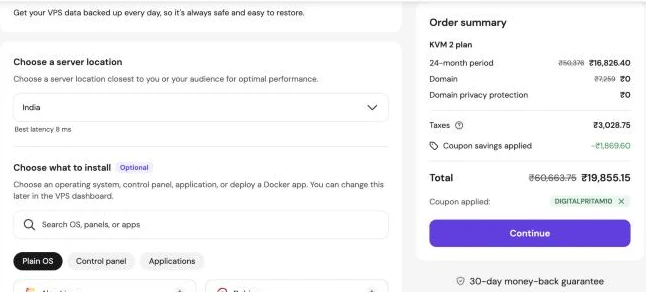
From our own cart test, 23 Oct 2026: KVM 2 with the India location and code DIGITALPRITAM10 came to ₹19,855.15 for 24 months including ₹3,028.75 GST, a saving of ₹2,206 on the same cart without the code. The India location showed 8 ms latency from Pune; Malaysia showed 60 ms, the UK 125 ms and the US 201 ms.
Opens Hostinger in a new tab and copies the code for checkout.
Hostinger VPS vs other VPS providers
Entry plans from each official pricing page, read on 23 Oct 2026. Foreign prices exclude GST; Indian buyers pay 18% on top.
| Provider and plan | Specs | Price | India server | Backups | Note |
|---|---|---|---|---|---|
| Hostinger KVM 2 | 2 vCPU, 8 GB, 100 GB NVMe | ₹779/mo (24 months) | Yes | Weekly free | AI assistant, 1-click n8n and AI agent templates |
| Hostinger KVM 1 | 1 vCPU, 4 GB, 50 GB NVMe | ₹599/mo (24 months) | Yes | Weekly free | Same panel and templates |
| MilesWeb Cloud VPS SM-L1 | 1 vCPU, 4 GB, 50 GB NVMe | ₹549/mo, renews ₹949 | Yes | Check plan | Indian company, INR billing |
| DigitalOcean Basic | 2 vCPU, 4 GB | $24 (about ₹2,279)/mo | Yes, Bangalore | Paid add-on | Hourly billing, strong docs |
| AWS Lightsail | 2 vCPU, 4 GB, 80 GB SSD | $24 (about ₹2,279)/mo | Yes, Mumbai | Paid snapshots | Half the transfer in Mumbai |
| Contabo Cloud VPS 8 | 8 vCPU, 24 GB, 150 GB NVMe | €11.20/mo (24 months) | Yes | Paid add-on | Most RAM per rupee, slower support |
| Hetzner Cloud | From 2 vCPU, 4 GB | From €5.99/mo | No | Paid add-on | Great value in Europe, far from India |
Hostinger gives the most RAM per rupee among hosts with an India location and the simplest panel. Contabo gives more raw RAM but has no AI helper and slower support. DigitalOcean and Lightsail cost more but bill by the hour, which suits short tests. See also Hostinger vs Cloudways if you want a managed server instead.
How to buy Hostinger VPS, step by step
The order screen as it looked on 23 Oct 2026. It takes about five minutes.
Open the VPS page through our link
Go to Hostinger VPS and pick a plan.
Keep the 24-month term
The sale price shown is for 24 months.
Skip or add daily backups
Weekly backups are free.
Choose India as the location
For Indian visitors pick India.
Choose what to install
Pick a plain OS (Ubuntu), a control panel (CloudPanel, CyberPanel) or an app template (n8n, OpenClaw, Coolify).
Apply code DIGITALPRITAM10
Click Have a coupon code? and enter DIGITALPRITAM10. It took a further 10% off the plan in our test.
Set a root password and add an SSH key
After payment the setup asks for a root password.
Point your domain and add SSL
Create an A record for your domain or subdomain (for example n8n.yourdomain.in) to the VPS IP.
Set up n8n on your VPS
The easy way is the n8n template at checkout or in the dashboard (Operating system > Applications > n8n).
Prefer doing it by hand on plain Ubuntu? This is the whole install:
# n8n with Docker on a plain Ubuntu VPS (skip if you used the n8n template)
docker volume create n8n_data
docker run -d --name n8n --restart unless-stopped -p 5678:5678 \
  -e N8N_HOST=n8n.yourdomain.in -e N8N_PROTOCOL=https \
  -e WEBHOOK_URL=https://n8n.yourdomain.in/ -e GENERIC_TIMEZONE=Asia/Kolkata \
  -v n8n_data:/home/node/.n8n docker.n8n.io/n8nio/n8n
Put n8n behind a reverse proxy with SSL (Traefik, Caddy or Nginx) before you add credentials. Self-hosted n8n has no execution limits; your only limit is the server size. Docs: n8n hosting guide.
Five things to do on day one
A VPS is yours to protect.
# 1. Update the server
apt update && apt upgrade -y

# 2. Create your own user and give it sudo
adduser pritam && usermod -aG sudo pritam

# 3. Copy your SSH key, then turn off root and password logins
#    in /etc/ssh/sshd_config set:
#    PermitRootLogin no
#    PasswordAuthentication no
systemctl restart ssh

# 4. Install security updates automatically
apt install unattended-upgrades -y && dpkg-reconfigure -plow unattended-upgrades

# 5. Block brute-force attempts
apt install fail2ban -y
Use the Hostinger firewall
Allow only ports 22, 80 and 443 (and any app port you need) in the panel firewall.
Take a snapshot first
Snapshot before every big change, so one click brings the server back.
Keep secrets out of code
Store API keys in environment files or n8n credentials, never in workflows you share.
What is good and what to watch
Good
- Server in India, 8 ms from Pune in our cart test
- 8 GB RAM for ₹779 a month is strong value
- One-click templates for n8n, OpenClaw, Coolify, Dokploy, CloudPanel and more
- AI web terminal runs commands from plain English
- Free weekly backups, firewall and DDoS filtering
- Coupon DIGITALPRITAM10 works on VPS
- 30-day money-back guarantee
Watch out for
- Self-managed: you own updates, security and your apps
- Full term paid upfront; no hourly billing
- Renewal roughly doubles the monthly price
- No GPU, so local AI is limited to small models
- Daily backups cost extra (₹589/mo)
- Changing data centre later needs a rebuild
- Support does not debug your own code or workflows
Ready to run your own server?
KVM 2 is ₹779 a month on 24 months. Add code DIGITALPRITAM10 for 10% more off, choose India, and pick the n8n or AI agent template.
Compare Hostinger VPS
Head-to-heads with the other VPS options Indian buyers look at.
 Best VPS hosting in India
 Hostinger VPS vs DigitalOcean
 Hostinger VPS vs Contabo
 Hostinger VPS vs MilesWeb VPS
 Hostinger VPS vs Cloud hosting
Get every deal the day it goes live
One email per big WordPress and hosting deal, in rupees with GST. Plus the free Hostinger setup checklist.
Free. Unsubscribe any time. Privacy policy
Hostinger VPS: FAQ
What is Hostinger VPS price in India?
Hostinger VPS starts at ₹599 a month for KVM 1 (1 vCPU, 4 GB RAM) on a 24-month term, paid upfront. KVM 2 is ₹779, KVM 4 ₹1,099 and KVM 8 ₹2,199 a month. Add 18% GST. Prices checked on 23 Oct 2026.
Does Hostinger have a VPS server in India?
Yes. India is one of the VPS locations in the cart, and it showed 8 ms latency from Pune in our test. Pick it at checkout if most of your users are in India.
Does the DIGITALPRITAM10 coupon work on Hostinger VPS?
Yes. In our 23 Oct 2026 cart test it took 10% off the KVM 2 plan price: the 24-month total fell from ₹22,061 to ₹19,855 with GST.
Is Hostinger VPS good for n8n?
Yes. Hostinger has a one-click n8n template, and self-hosted n8n has no per-execution fee. KVM 1 handles a few light workflows; KVM 2 with 8 GB RAM is the safer choice once you run many workflows or AI steps.
Can I run AI models on Hostinger VPS?
Small ones. The VPS has no GPU, so local models run on the CPU. Hostinger’s own guide puts 7B to 8B models at about 6 to 7 GB of memory, so use KVM 4 (16 GB) or larger. For AI agents that call an API like Claude or GPT, KVM 2 is enough.
Is Hostinger VPS managed or unmanaged?
Self-managed. You get full root access and handle the software yourself. Hostinger helps with the server, network and its panel, and its AI assistant can run commands for you, but it does not fix your own apps or code.
VPS or shared hosting: which should I buy?
Stay on shared hosting for one or two normal WordPress sites. Move to a VPS when you need root access, Docker, n8n, AI agents, Node.js or Python apps, or when a busy site keeps hitting shared limits.
Is the price monthly or upfront?
Upfront. The monthly figure is the total divided by the months in the term. KVM 2 on 24 months is ₹18,696 plus GST, paid at checkout.
What happens at renewal?
The plan renews at the regular rate: KVM 1 at ₹999, KVM 2 at ₹1,199, KVM 4 at ₹2,399 and KVM 8 at ₹4,399 a month for the next 24 months.
Can I get a refund?
Yes. Hostinger offers a 30-day money-back guarantee on VPS plans.
Are backups included?
Weekly automatic backups are free. Daily backups were an add-on at ₹589 a month in our cart test. You can also take manual snapshots before big changes.
Can I upgrade later?
Yes. You can move up to a bigger KVM plan from the VPS dashboard without reinstalling. Moving to another data centre needs a backup and a fresh setup, so choose the location carefully.
About this page
Pritam Sonone
Founder of Digital Pritam. WordPress developer and designer, WordCamp Kolhapur 2025 speaker. Builds WordPress sites for clients.
How we checked
- Plan prices read on hostinger.com/in/vps-hosting on 23 Oct 2026
- KVM 2 checked in the Hostinger India cart with code DIGITALPRITAM10 and the India location, 23 Oct 2026
- Hardware needs from official docs (Coolify, Nextcloud, n8n) and Hostinger’s own Ollama guide
- Competitor prices from each official pricing page the same day
- We have not run a long-term benchmark on Hostinger VPS yet, so this page has no star score
Sources: Hostinger VPS · Hostinger n8n VPS · Hostinger server locations · Coolify requirements · Nextcloud requirements
Related guides
 Hostinger VPS Black Friday 2026KVM 2 at Rs 779/mo, live now
 VPS Black Friday deals 2026Which VPS sales are live
 Hostinger review 2026Tested on our own sites
 Hostinger price in IndiaEvery plan in rupees, 1-year and 4-year cost
 Free Hostinger setupWordPress set up free with our link
 Hostinger vs CloudwaysPrice, renewal and Indian servers compared
Affiliate links: we may earn a commission at no extra cost to you. It never changes our verdicts.