









Best Cache Plugin for Hostinger (2026): 6 Plugins Tested
Same Hostinger server, same article, default settings.
 By Pritam SononeTested 17 Oct 2026Reviewed by Pritam SononePrices re-checked regularly against the brand’s own website.How we test →
Affiliate links: we may earn a commission at no extra cost to you. It never changes our verdicts.
Use LiteSpeed Cache on Hostinger: free, 49 ms server response against 321 ms with no plugin, and the only one Hostinger’s CDN cached at the edge. WP Fastest Cache and W3 Total Cache were equally fast at the server (47 ms). FlyingPress (60 ms) scored a perfect 100 on mobile PageSpeed out of the box. WP Rocket (107 ms) and WP Super Cache (114 ms) were slower because they served pages through PHP.
What is it?A cache plugin saves a finished copy of each WordPress page so it can be served in milliseconds instead of being rebuilt from the database each time.
Best cache plugins for Hostinger, ranked
Median server response of 11 requests after a warm-up, from India, 17 Oct 2026. Lower is better.
| Plugin | Price | Server response | Cached by Hostinger CDN | Note |
|---|---|---|---|---|
| 1. LiteSpeed Cache | Free | 49 ms | Yes: Hostinger’s CDN cached it at the edge | Built for Hostinger’s LiteSpeed servers; we run it on this site |
| 2. FlyingPress | $59/yr | 60 ms | No | Best paid pick: PageSpeed 100 on mobile with default settings |
| 3. WP Fastest Cache | Free (Premium extra) | 47 ms | No | Simplest settings; server sends the saved file directly |
| 4. W3 Total Cache | Free (Pro extra) | 47 ms | No | Fast, but the most complex settings |
| 5. WP Rocket | $60/yr | 107 ms | No | Easiest all-in-one with Delay JS and Remove Unused CSS |
| 6. WP Super Cache | Free | 114 ms | No | Simple mode serves pages through PHP |


New test, 2 Nov 2026: xSpeed Cache
On the same lab page and server, the free xSpeed Cache with its Balanced preset answered in a median 87 ms (290 ms without cache that day), scored PageSpeed 100 on mobile and desktop and gave a mobile LCP of 0.98 s. FlyingPress measured 60 ms here. Tuned by Claude or ChatGPT through its MCP server it reached 53 to 73 ms. Its page cache is off until you run the setup wizard. Read our xSpeed Cache review.
Why some plugins were twice as fast
About 47 to 49 ms
- LiteSpeed Cache: the LiteSpeed server and Hostinger’s CDN serve the page
- WP Fastest Cache and W3 Total Cache: server rules send the saved HTML file, PHP never starts
About 105 to 115 ms
- WP Rocket and WP Super Cache (Simple mode): the saved page is served through PHP
- Still about 3x faster than no cache (321 ms)
How we tested
On our lab site (digitalpritam.in/lab/), the same Hostinger server as this site.
Clean WordPress, no other plugins
WordPress 7.1.3, Twenty Twenty-Five, a 2,000-word article with 4 images.
One plugin at a time, page cache on
Default settings; only the page cache switched on where the plugin ships with it off.
A fresh copy of the article for each plugin
So no plugin benefited from another plugin’s cached page at Hostinger’s CDN.
12 timed requests each
With curl from India; the first request warms the cache and is not counted.
Removed after each test
Plugin, cache files, server rules and settings, before the next one.
What we run on this site
Read from digitalpritam.in on 17 Oct 2026.
| Setting | Value |
|---|---|
| Plugin | LiteSpeed Cache 7.9.1 |
| Page cache | On |
| Cache lifetime | 7 days (default) |
| CSS, JS and HTML optimisation | Off: our pages ship their own small CSS and an external JS file |
| Image lazy load and WebP | Off: we upload WebP images ourselves |
Start with defaults, then turn on one optimisation at a time and check your pages; our WP Rocket settings guide explains what each option does.
Raw data
Every timed request after the warm-up, in milliseconds.
| Setup | 11 requests (ms) |
|---|---|
| No cache plugin | 279 · 319 · 1325 · 326 · 321 · 297 · 354 · 320 · 1299 · 1335 · 293 |
| LiteSpeed Cache 7.9.1 | 45 · 59 · 1049 · 43 · 45 · 45 · 90 · 52 · 50 · 49 · 45 |
| WP Rocket 3.23.3.3 | 107 · 112 · 148 · 106 · 102 · 107 · 102 · 101 · 237 · 106 · 253 |
| W3 Total Cache 2.10.7 | 47 · 47 · 57 · 41 · 1048 · 47 · 45 · 47 · 49 · 56 · 41 |
| WP Super Cache 3.1.4 | 117 · 102 · 110 · 257 · 105 · 114 · 108 · 114 · 1111 · 125 · 101 |
| WP Fastest Cache 1.5.3 | 45 · 42 · 51 · 43 · 39 · 44 · 48 · 47 · 1051 · 51 · 50 |
| FlyingPress 5.6.5 | 62 · 56 · 56 · 54 · 60 · 91 · 53 · 105 · 1061 · 67 · 54 |
The single 1 s request in most runs is server-side variation seen with every setup. Free to reuse with a link (CC BY 4.0).
How to set up LiteSpeed Cache on Hostinger, step by step
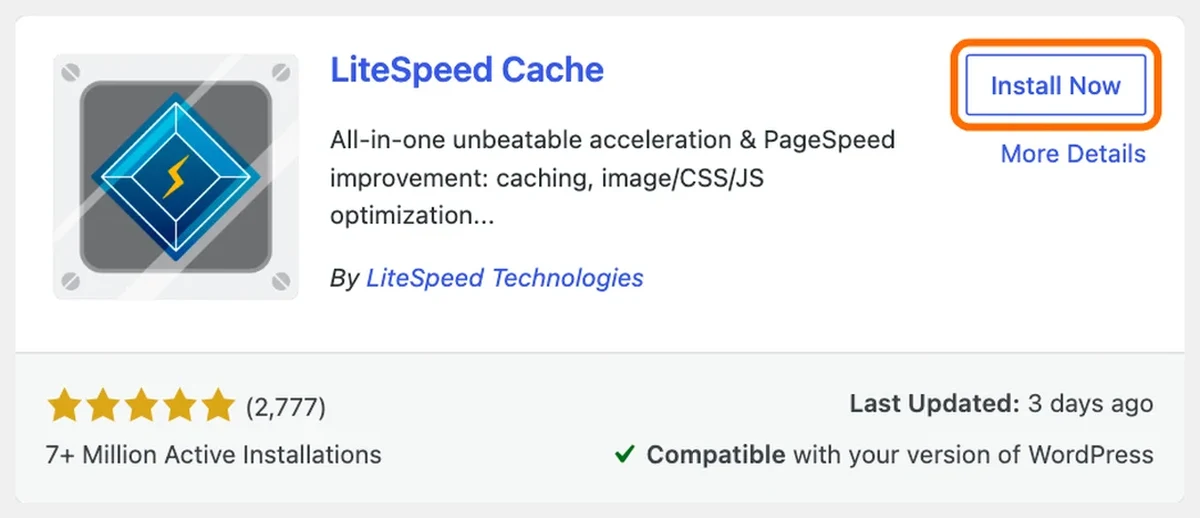
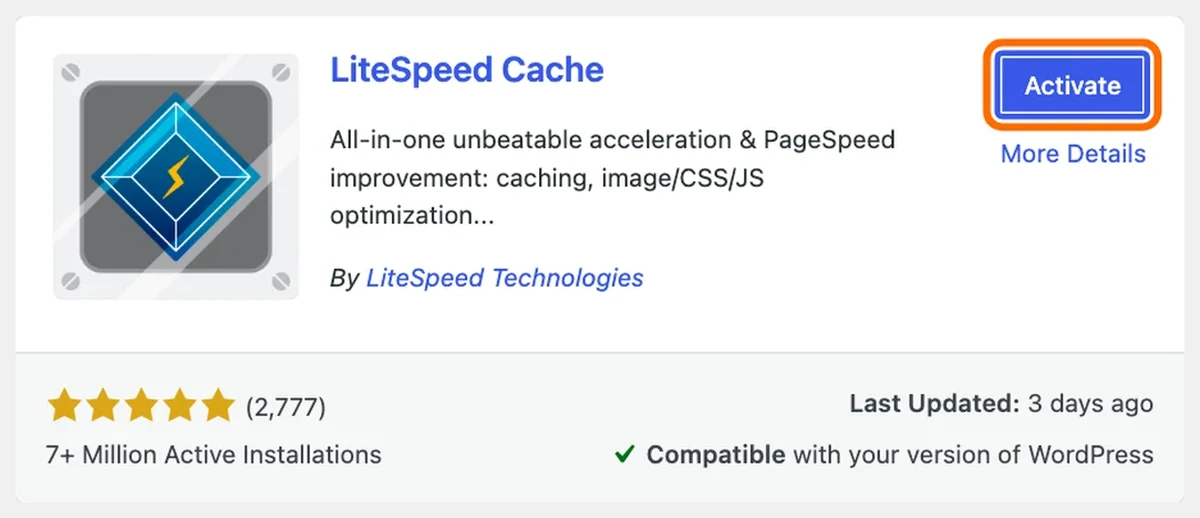
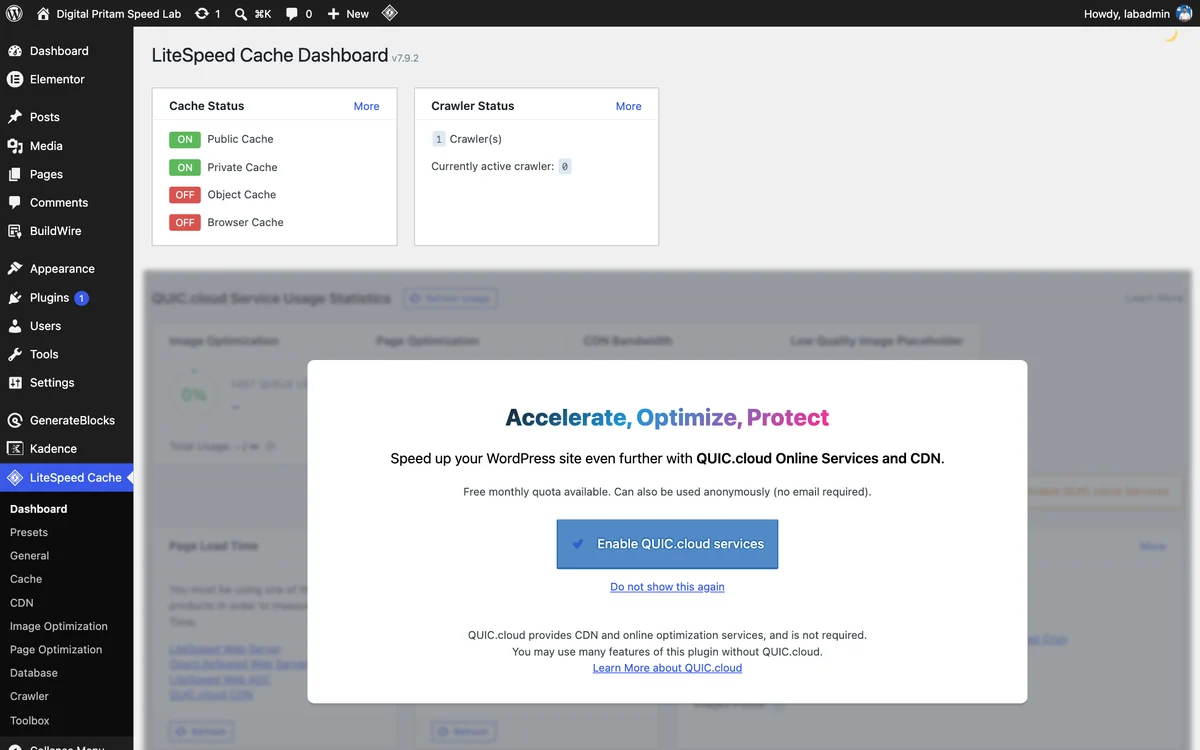
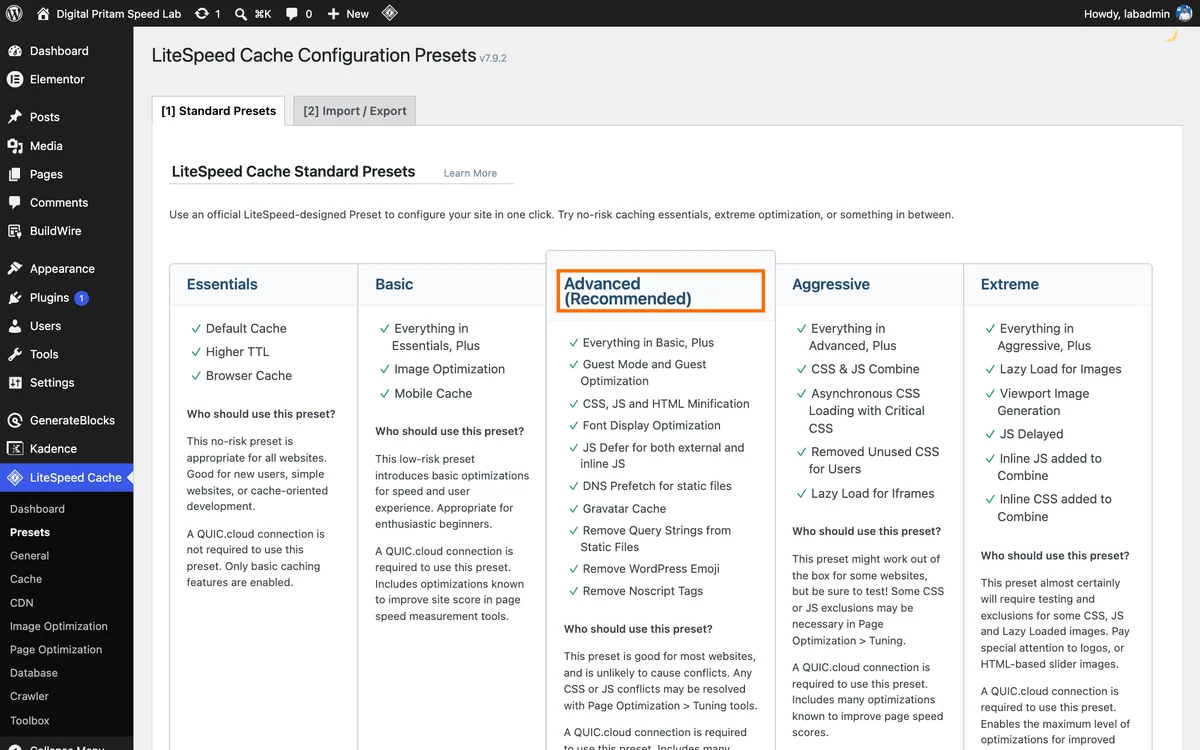
Every screenshot is from a fresh install of LiteSpeed Cache 7.9.2 on our lab site, on the same Hostinger LiteSpeed server as this site, 24 Oct 2026. The orange outline shows what to click.
Tap any screenshot to open it full size. We did not connect QUIC.cloud, so the CDN, image optimization and critical CSS features were not tested.
- 1
Install the plugin
Plugins, Add New, search “LiteSpeed Cache” and click Install Now. It is free and made by LiteSpeed Technologies.
LiteSpeed Cache in the WordPress plugin directory, Install Now - 2
Activate it
Click Activate. A LiteSpeed Cache menu appears in the left sidebar.
Activate LiteSpeed Cache - 3
Check the dashboard
Public and private cache show ON straight away on a Hostinger LiteSpeed server. The QUIC.cloud box is optional; we did not connect it.
LiteSpeed Cache dashboard with cache status - 4
Pick a preset (optional)
Presets apply a bundle of settings in one click. Essentials works without QUIC.cloud; Basic and above need a free QUIC.cloud connection.
LiteSpeed Cache standard presets - 5
Confirm Enable Cache is on
Cache, [1] Cache: Enable Cache is ON by default. Leave the logged-in and commenter options as they are unless you know you need them.
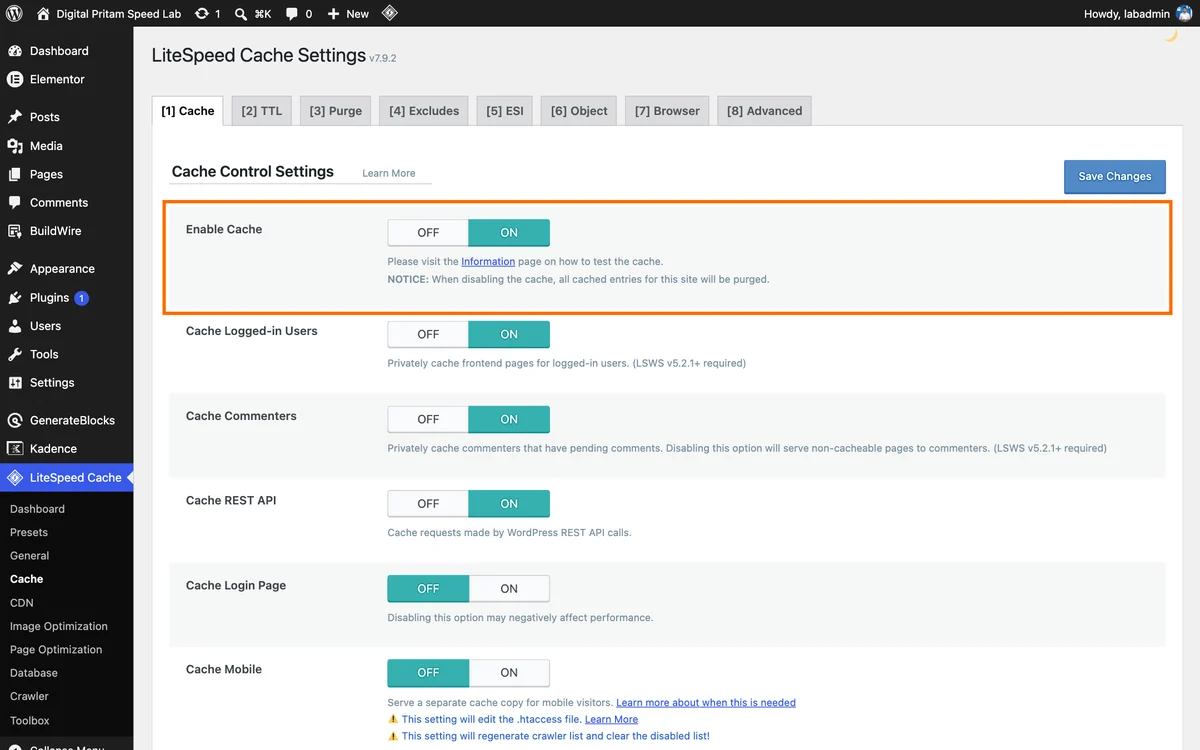
LiteSpeed Cache settings, Enable Cache ON - 6
Turn on CSS and JS options one at a time
Page Optimization is OFF by default. Switch on CSS Minify, save, and check your site before turning on the next option.
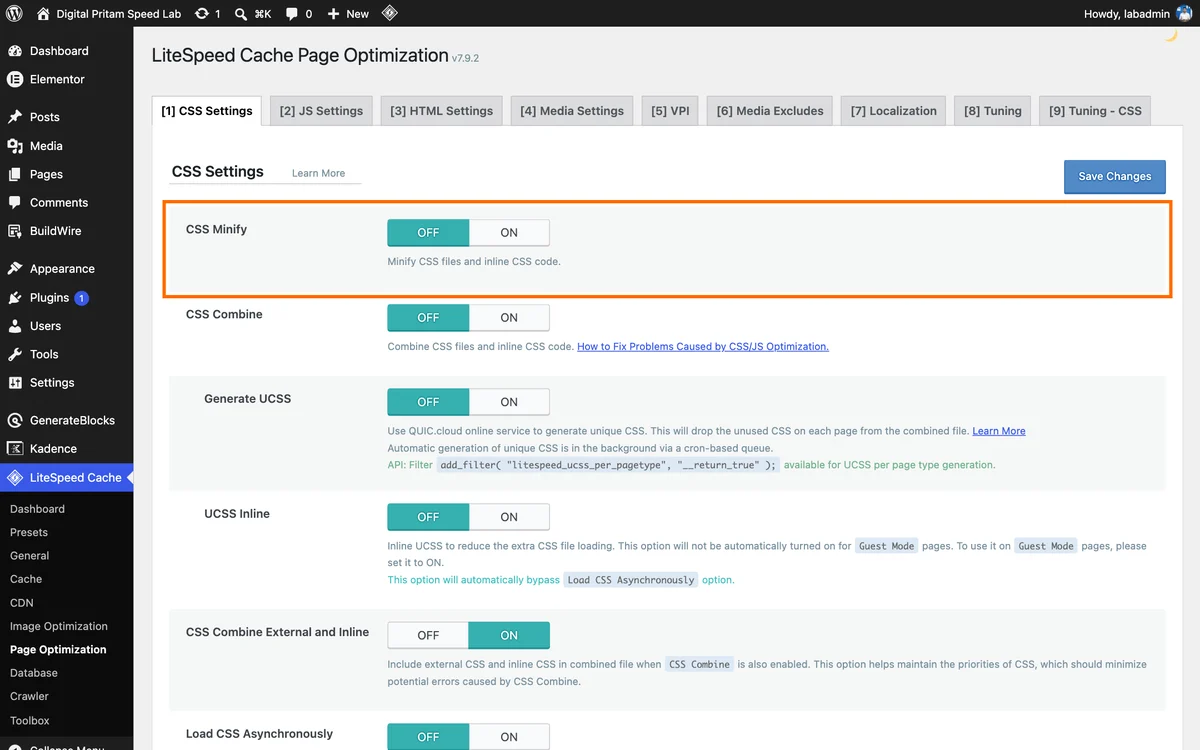
LiteSpeed Cache Page Optimization, CSS Minify - 7
Image optimization needs QUIC.cloud
Image Optimization sends images to QUIC.cloud for WebP conversion. Without a connection this screen does nothing; we left it off.
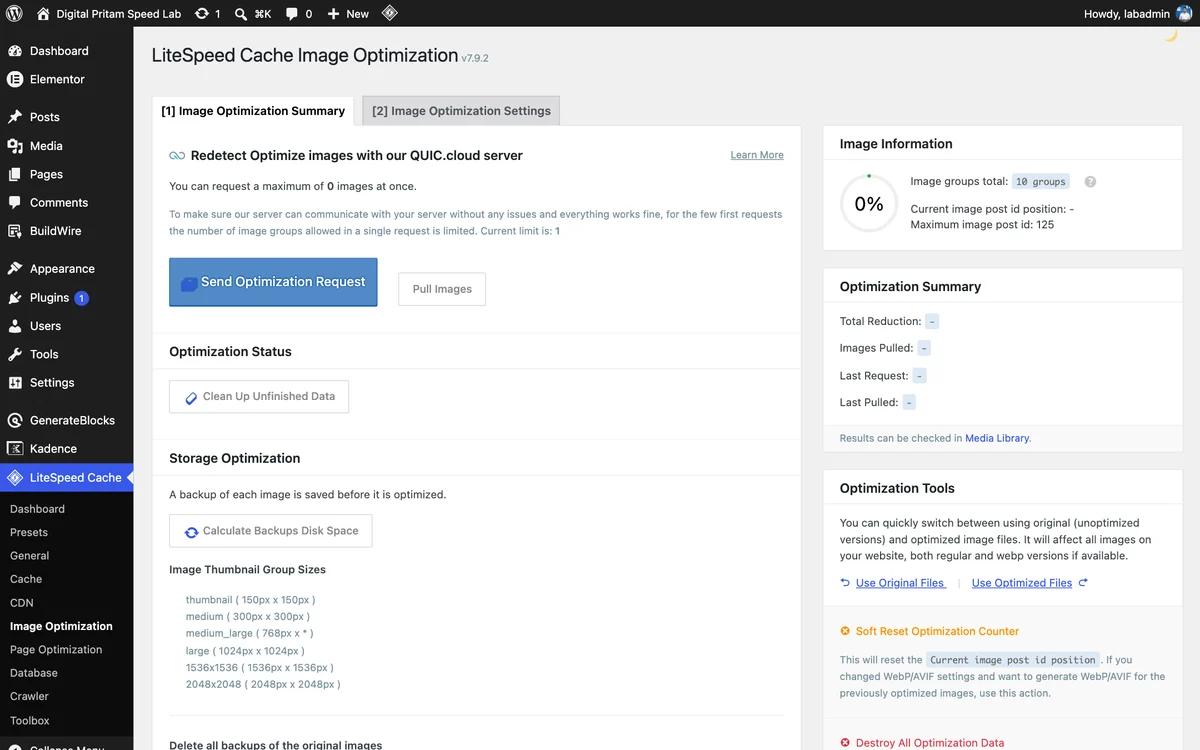
LiteSpeed Cache Image Optimization summary - 8
Purge after big changes
Toolbox, Purge, Purge All clears the page cache after a theme or design change.
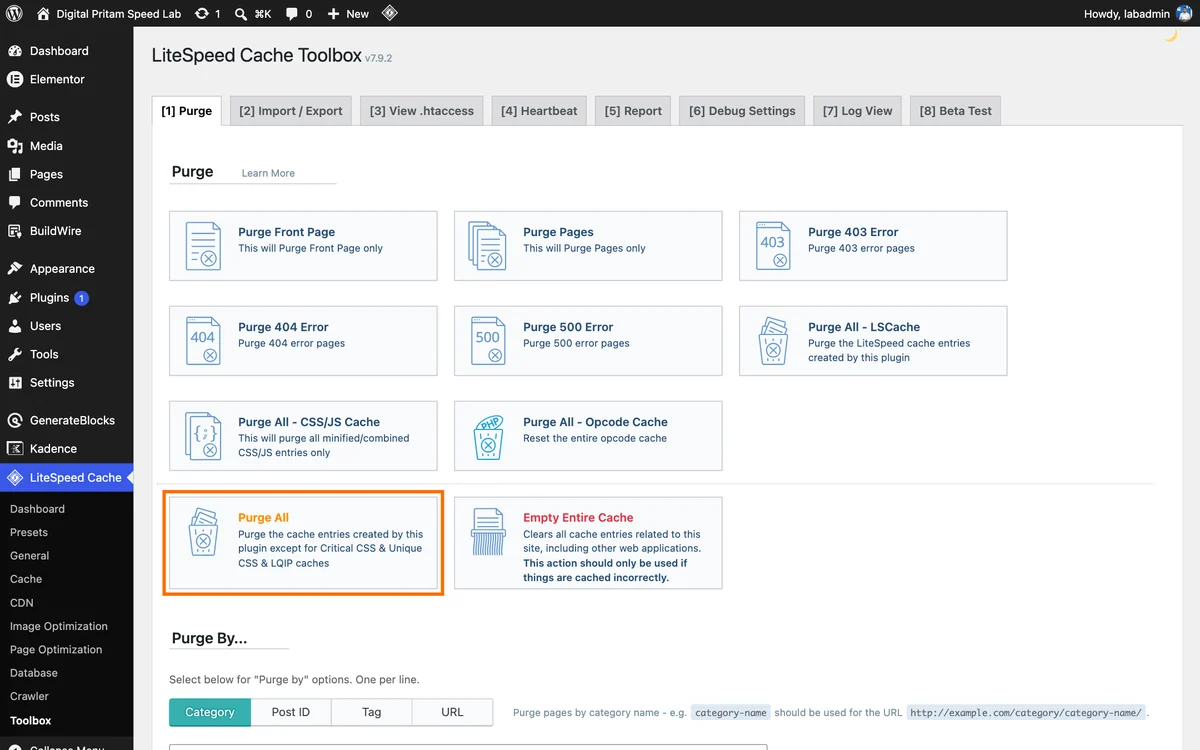
LiteSpeed Cache Toolbox, Purge All - 9
Check the cache is working
Request a page twice. The first answer is x-litespeed-cache: miss, every one after is hit, served from cache.
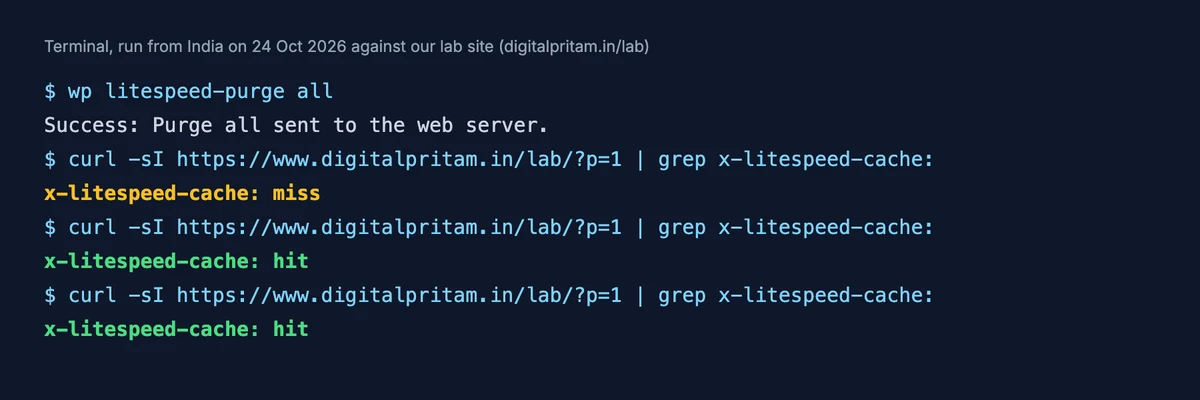
Real curl output from our lab: miss, then hit
Pick a free checklist. Get the best deals too.
Plus an email when each big hosting, WordPress and AI tool sale opens, with the price checked by us.
Sent to your inbox instantly. Unsubscribe in one click. Privacy policy
Best cache plugin for Hostinger: FAQ
What is the best cache plugin for Hostinger?
LiteSpeed Cache. In our test on a Hostinger server it cut server response from 321 ms to 49 ms, and it was the only plugin whose pages Hostinger’s CDN cached at the edge. It is free and it is what this site runs.
Is FlyingPress better than LiteSpeed Cache on Hostinger?
For PageSpeed, slightly: FlyingPress scored 100 on mobile with default settings against 98 for LiteSpeed Cache. At the server, LiteSpeed Cache was faster (49 ms against 60 ms) and free. See our FlyingPress review.
Is WP Rocket better than LiteSpeed Cache on Hostinger?
Not for speed in our test: WP Rocket answered in a median 107 ms against 49 ms for LiteSpeed Cache. WP Rocket’s strengths are simple settings and its Delay JavaScript and Remove Unused CSS features for heavy sites. See our Speed Lab test.
Why were WP Fastest Cache and W3 Total Cache as fast as LiteSpeed Cache?
They write rules that let the server send the saved HTML file without starting PHP, so the server answered in about 47 ms. WP Super Cache in its recommended Simple mode, and WP Rocket on our test, served pages through PHP and took about 105 to 115 ms.
Does Hostinger already cache my site?
Hostinger’s servers run LiteSpeed and its CDN can cache pages, but WordPress pages only get cached when a plugin sends the right signals. Without a plugin our test page took 321 ms and the CDN passed it through.
Which LiteSpeed Cache settings should I use on Hostinger?
Start with the defaults: page cache on. That is what we run on this site, and it gave the 49 ms result. Turn on CSS, JS and image options one at a time and check your pages after each change.
Can I use two cache plugins together?
No. Two page caches conflict and can serve stale or broken pages. Pick one.
Methodology
How this page was built, so you can check it.
| Detail | |
|---|---|
| Date | 17 Oct 2026 |
| Environment | Clean WordPress 7.1.3 with Twenty Twenty-Five on our Hostinger LiteSpeed server (digitalpritam.in/lab/), no other plugins |
| Versions | LiteSpeed Cache 7.9.1, FlyingPress 5.6.5, W3 Total Cache 2.10.7, WP Rocket 3.23.3.3, WP Fastest Cache 1.5.3, WP Super Cache 3.1.4 |
| Procedure | One plugin at a time on default settings, a fresh copy of a 2,000-word test article with 4 images for each, 12 timed requests with curl from India (the first is a warm-up and not counted), then PageSpeed Insights once on mobile and desktop. Each plugin and its files were removed afterwards. |
| Measured | Time to first byte, median of 11 requests per plugin |
| Limits | Server response only for five of the six plugins; PageSpeed was run for the main contenders. One light page, one location |
About this page
Pritam Sonone
Founder of Digital Pritam. WordPress developer and designer, WordCamp Kolhapur 2025 speaker. Builds WordPress sites for clients.
How we checked
- Tested on our lab site (digitalpritam.in/lab/) on the same Hostinger LiteSpeed server as this site, 17 Oct 2026
- Six plugins, one at a time, page cache on, a fresh article copy each; 12 timed requests per plugin
- This site’s own LiteSpeed Cache settings read from WordPress the same day
Sources: LiteSpeed Cache · W3 Total Cache · WP Fastest Cache · WP Super Cache · WP Rocket pricing
Related guides
 xSpeed Cache review 2026Tuned by Claude and ChatGPT
 Hostinger review 2026Tested on our own sites
 FlyingPress review 2026Tested against 5 cache plugins
 LiteSpeed Cache vs WP RocketSpeed Lab: tested on Hostinger
 Best WordPress Cache Plugin 2026LiteSpeed Cache, WP Rocket and more compared
 WP Rocket review 2026Tested on our own site: real scores and settings
Affiliate links: we may earn a commission at no extra cost to you. It never changes our verdicts.