









Yoast to Rank Math Migration: Switch Without Losing Rankings
The 8 steps we follow, from backup to Search Console, based on moving our own sites from Yoast to Rank Math.
 By Pritam SononeUpdated 24 Oct 2026Reviewed by Pritam SononePrices re-checked regularly against the brand’s own website.How we test →
Affiliate links: we may earn a commission at no extra cost to you. It never changes our verdicts.
back up, install Rank Math, import from Yoast in the setup wizard, check a few posts, then deactivate Yoast and submit Rank Math’s sitemap. Titles, descriptions, focus keywords and redirections come across, so rankings stay put.

Security note, 24 Oct 2026
- Rank Math PRO 3.0.123 shipped malware through official downloads and updates during 15 to 16 October 2026. Rank Math says 3.0.124 is the clean build. If you activated 3.0.123, treat the site as compromised: restore a backup made before 16 Oct 01:32 IST, run a malware scan and change every password and API key. The free plugin was not part of this incident. Rank Math’s notice.
On digitalpritam.in we run the free Rank Math (not PRO), so we were not affected. The free import steps below are unaffected. Need help cleaning a hacked site? Malware cleanup, Rs 4,999.
How to switch from Yoast to Rank Math
Allow about 30 minutes for a typical blog.
Back up your site
Take a full backup, including the database, before changing SEO plugins.
Note your current numbers
Save your top pages and queries from Search Console so you can compare after.
Install Rank Math
Add the free plugin from Plugins, Add New.
Run the setup wizard and import
Rank Math detects Yoast and offers to import settings, post titles and descriptions, focus keywords and redirections.
Check a few posts
Open 3 to 5 important posts and confirm titles, descriptions and canonical URLs match.
Deactivate Yoast
Only after the check.
Check sitemaps and schema
Open /sitemap_index.xml and test a post in Google’s Rich Results Test.
Submit the new sitemap
Add /sitemap_index.xml in Search Console and watch rankings for 2 to 4 weeks.
What moves across, and what to check
Imported by Rank Math
- Plugin settings
- SEO titles and meta descriptions
- Focus keywords
- Redirections
Check by hand
- Custom schema you added in Yoast
- Breadcrumb settings in your theme
- Sitemap URL in Search Console and robots.txt
- Any code that relies on Yoast functions
Why we switched
From our Rank Math review.
Yoast felt limited for free
Redirects and extra keywords needed Premium, priced per site.
Rank Math included more
Up to 5 focus keywords, a redirect manager and a 404 monitor free.
It has held up for five years
We now run it on 5+ sites with no front-end CSS or JS.
Yoast to Rank Math: FAQ
Will I lose rankings switching from Yoast to Rank Math?
Not if titles, descriptions and URLs stay the same. Rank Math imports them from Yoast, and we did not see ranking drops when we switched five years ago.
What does Rank Math import from Yoast?
Settings, post and term titles and descriptions, focus keywords, and redirections, through its import tool under Status & Tools.
Should I delete Yoast after switching?
Deactivate it first, check the site for a week, then delete it.
Can I run Yoast and Rank Math together?
No. Two SEO plugins output duplicate meta tags and schema.
Is Rank Math free?
Yes. Everything in this guide works with the free version.
Yoast to Rank Math, step by step with screenshots
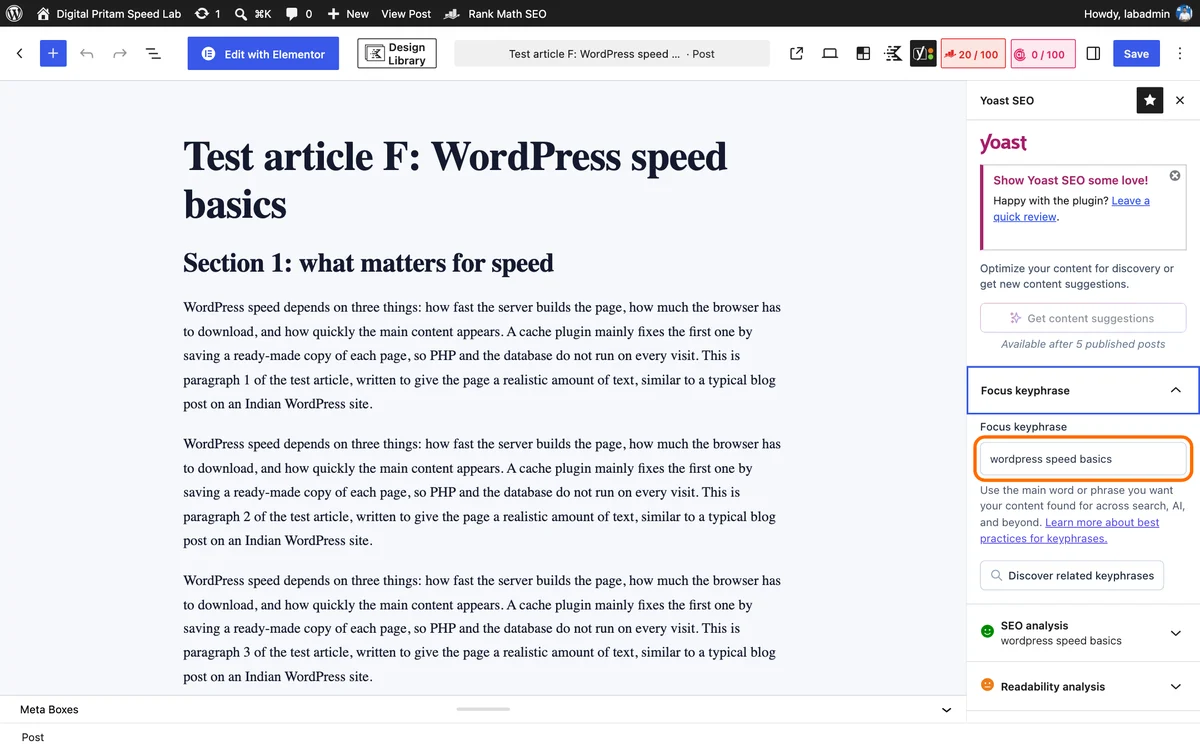
We ran the whole switch on our lab site on 24 Oct 2026: Yoast SEO 28.7 to Rank Math 1.0.280. First we gave a test post its own Yoast title, description and focus keyphrase, so we could check that each one came across.
Tap any screenshot to open it full size. Our lab post is a test article, so this shows that the data moves across, not how rankings change. Back up your site before you start.
- 1
See what Yoast holds now
Open a post you care about and note its Yoast focus keyphrase, SEO title and meta description. You will compare them after the import.
Yoast SEO sidebar with the focus keyphrase on our test post - 2
Install Rank Math, keep Yoast on
Plugins, Add New, search “Rank Math SEO” and click Install Now. Leave Yoast active, because the import reads its data.

Rank Math SEO in the WordPress plugin directory - 3
Activate Rank Math
Click Activate on the Rank Math SEO row.

Activate Rank Math SEO on the Plugins screen - 4
Ignore the two-plugin warning for now
Rank Math warns that two SEO plugins are active. Do not click Deactivate yet; import first.

Rank Math warning: keep only one SEO plugin active - 5
Open the Yoast import
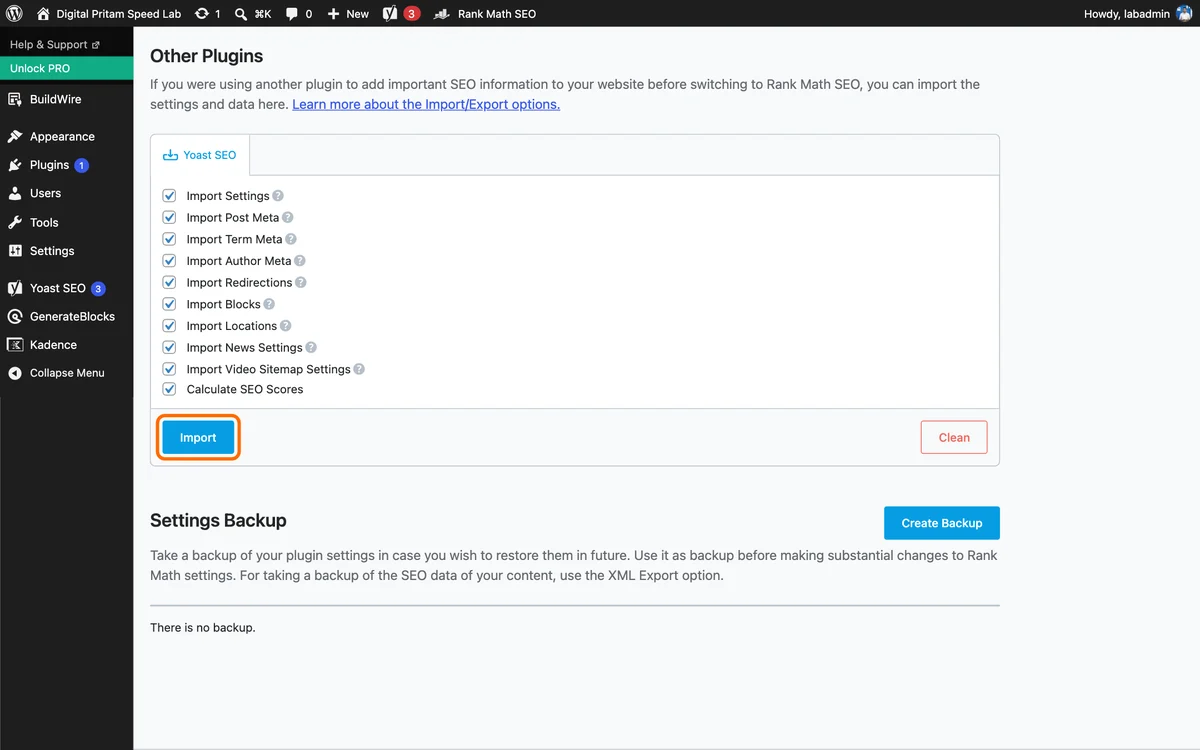
Rank Math SEO, Status & Tools, Import & Export. Under Other Plugins, Yoast SEO is listed with every option ticked. Click Import.
Rank Math Import and Export, Other Plugins, Yoast SEO - 6
Watch the import log
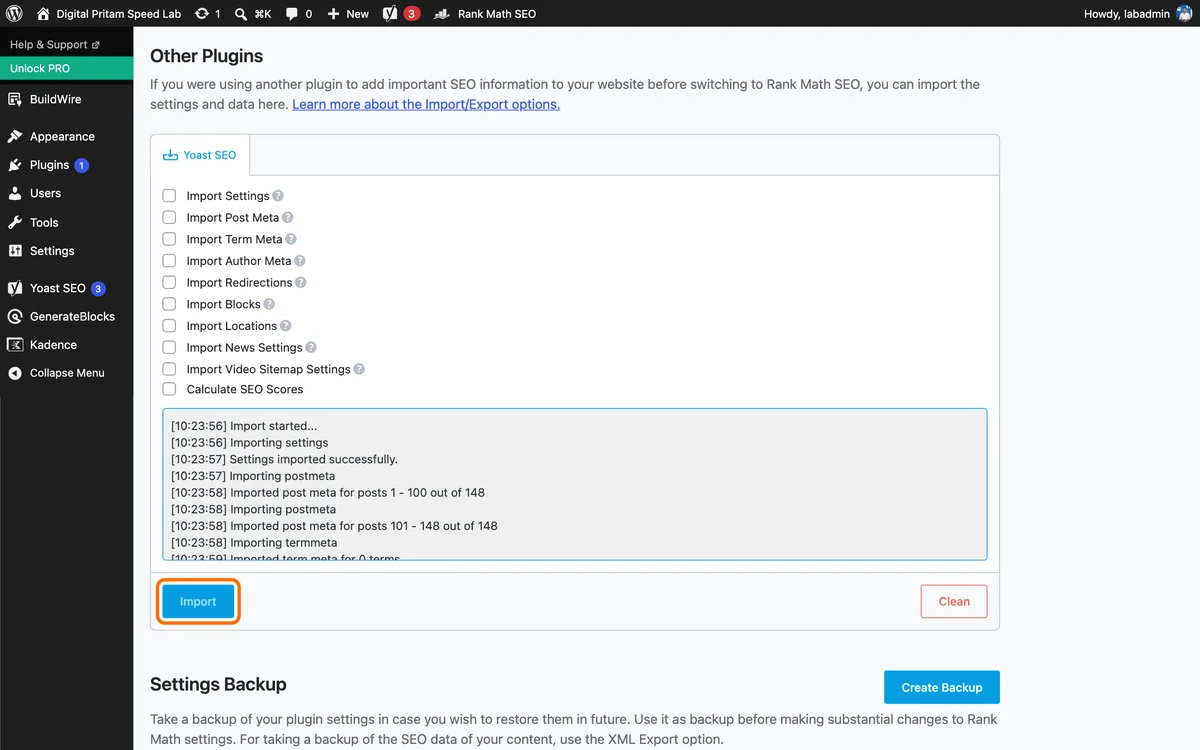
The log shows settings, post meta, term meta and redirections. On our lab it worked through all 148 items within a few seconds.
Rank Math import log for Yoast SEO - 7
Check the same post in Rank Math
Open the post again and click the Rank Math icon. Our title, description and focus keyword were all there.
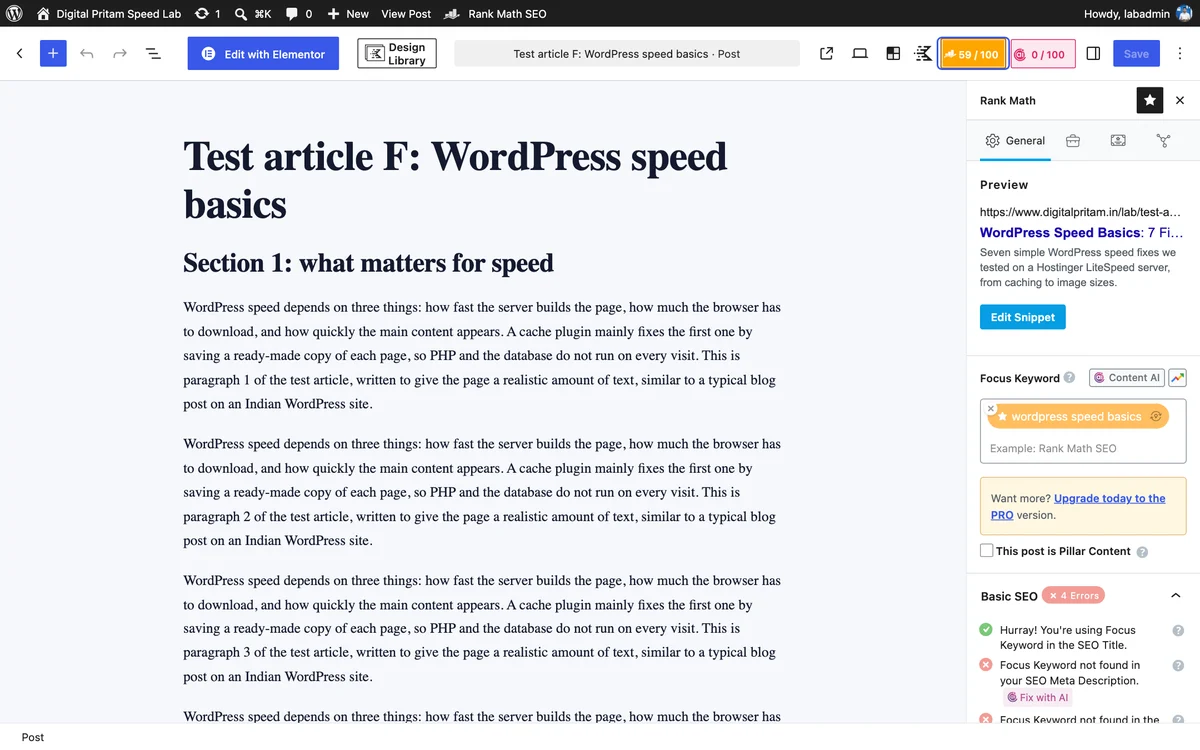
Rank Math sidebar showing the imported title, description and focus keyword - 8
Make sure Yoast is off
On our lab Yoast was already deactivated when the import finished. If yours is still active, deactivate it now. Delete it only after a week of checks.

Yoast SEO inactive on the Plugins screen after the import - 9
Check the page source
The live page now prints Rank Math’s tags with the same title and description. Yoast’s %%sep%% became Rank Math’s %sep%, which outputs the same dash.
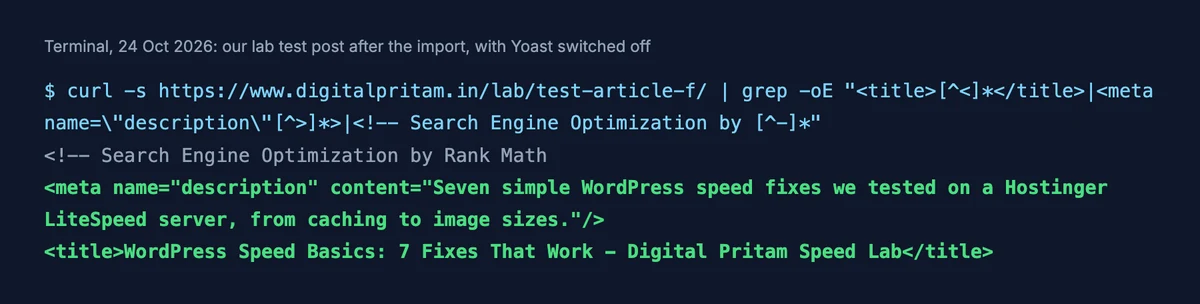
Real curl output from our lab post after the switch - 10
Submit the new sitemap
Rank Math uses /sitemap_index.xml, the same address as Yoast. Resubmit it in Google Search Console so Google fetches the new version.
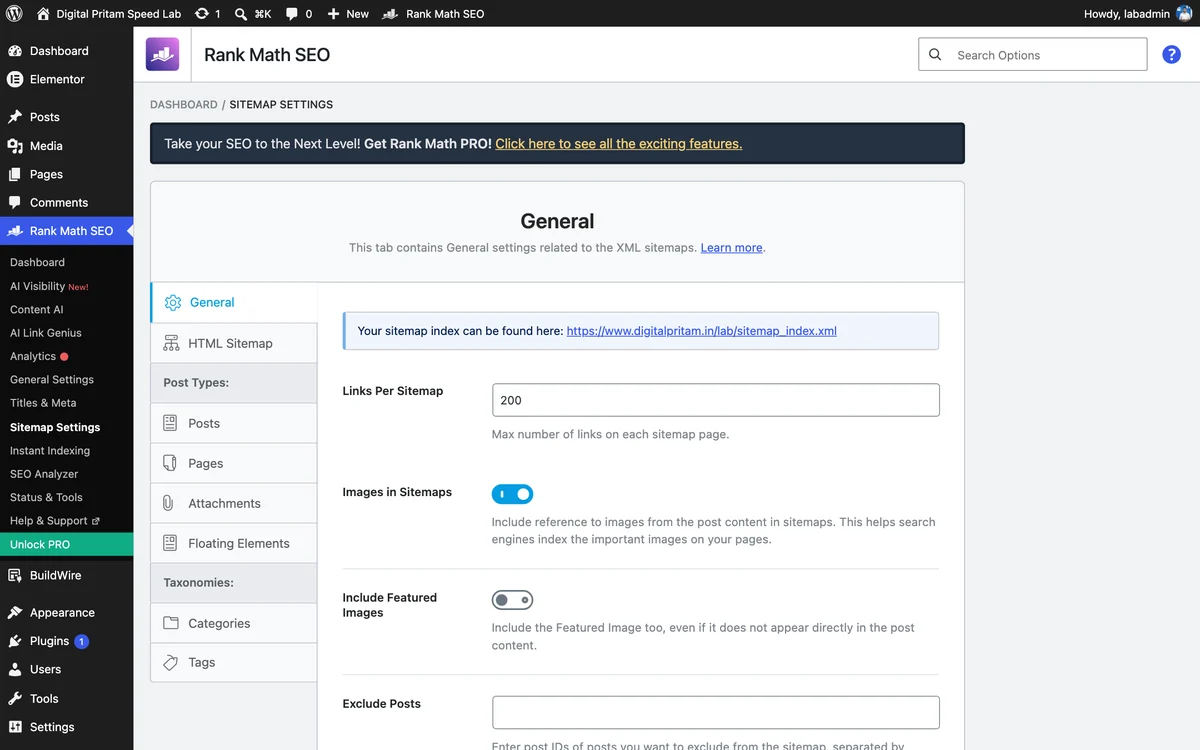
Rank Math Sitemap Settings with the sitemap index URL
About this page
Pritam Sonone
Founder of Digital Pritam. WordPress developer and designer, WordCamp Kolhapur 2025 speaker. Builds WordPress sites for clients.
How we checked
- Steps based on our own switch from Yoast to Rank Math in 2020, used since on 5+ sites
- Import features from Rank Math’s own documentation
- Checked against Rank Math free 1.0.280 on digitalpritam.in
Sources: Rank Math import and export · Google Rich Results Test
Related guides
 Rank Math review 20265 years on our own sites, with real data
 Best WordPress SEO Plugin 2026Rank Math, Yoast, AIOSEO and SEOPress
 Rank Math Black Friday 2026Pro price today and last year’s deal
 Rank Math PRO Price in IndiaEvery plan in rupees with GST, renewals and free vs PRO
 SEO tools Black Friday 2026Semrush, Ahrefs, Rank Math and more, compared
 How we test dealsOur price checks, labels and corrections
Affiliate links: we may earn a commission at no extra cost to you. It never changes our verdicts.