









WP Rocket review 2026: tested on a live site
We run WP Rocket 3.23 on our own site, investmarathi.com.
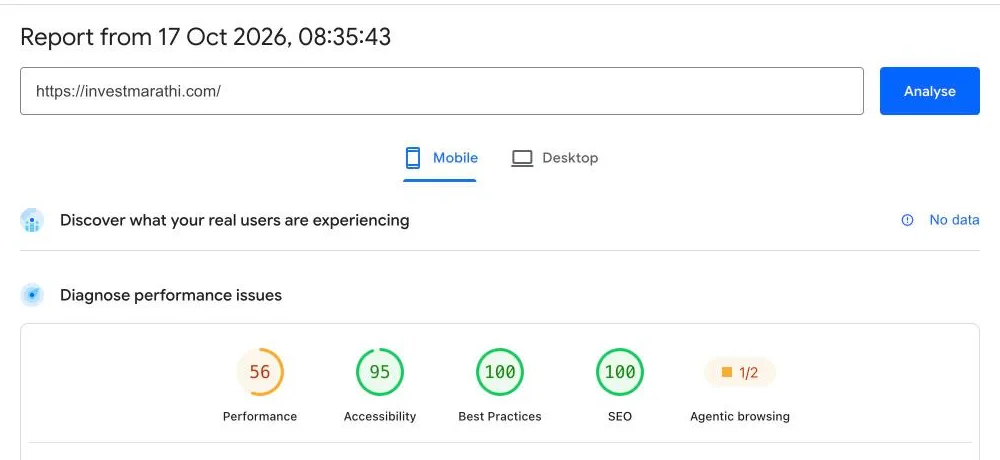
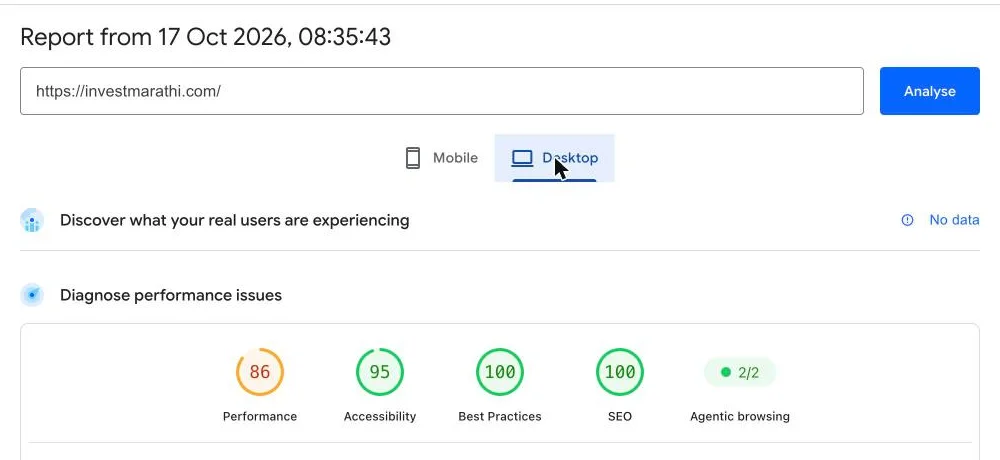
Short answer: WP Rocket is worth it if your host does not cache pages for you. On our site it cached every page, cut Total Blocking Time to 0 ms and scored 86 on desktop. Mobile scored 56 with two big settings still off, so it is not a one-click fix for mobile.
Our WP Rocket test results
PageSpeed Insights on investmarathi.com, 17 Oct 2026, 8:35 AM IST.
| Metric | Mobile | Desktop |
|---|---|---|
| Performance score | 56 | 86 |
| Largest Contentful Paint | 9.2 s | 1.7 s |
| First Contentful Paint | 5.9 s | 1.3 s |
| Total Blocking Time | 0 ms | 0 ms |
| Cumulative Layout Shift | 0.121 | 0 |
| Speed Index | 5.9 s | 2.1 s |
Lighthouse 13.5, one run each; mobile emulates a Moto G Power on slow 4G. Server response measured 0.10 to 0.12 s over three requests. Open the full PageSpeed report.
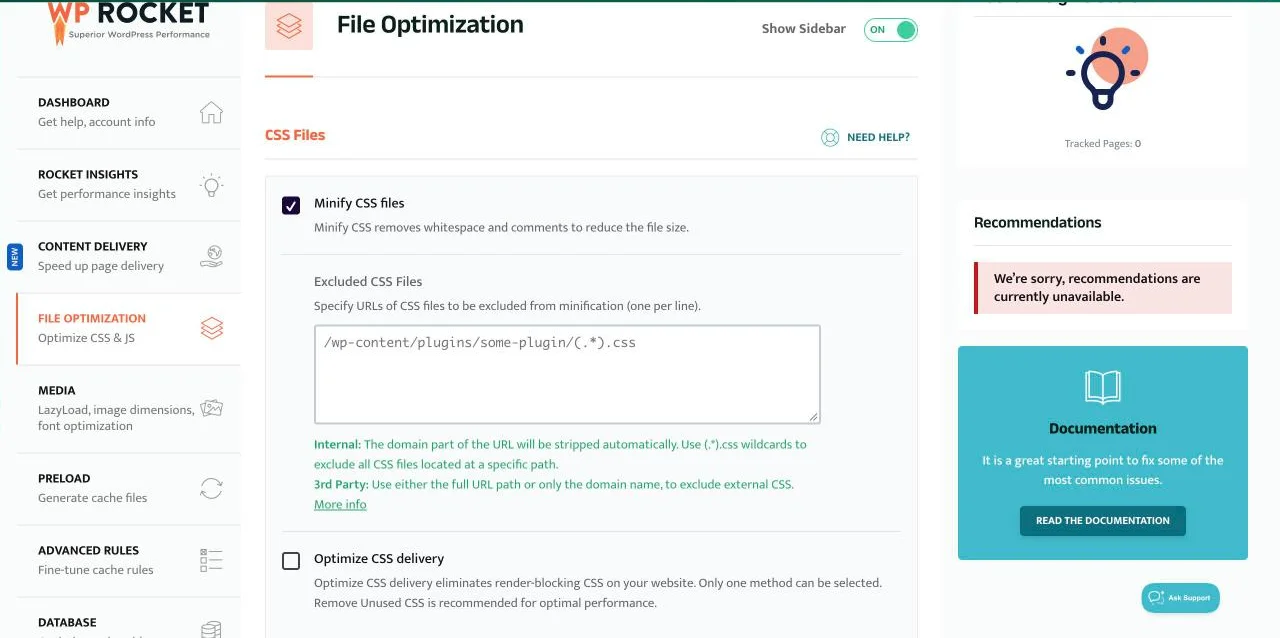
The exact WP Rocket settings we use
Read from the WP Rocket dashboard on investmarathi.com.
| Setting | Status | What it did for us |
|---|---|---|
| Page cache | On | Pages served from cache; WP Rocket’s cached stamp in the page source |
| Minify CSS and JS | On | Smaller files |
| Load JavaScript deferred | On | Total Blocking Time 0 ms on both tests |
| Delay JavaScript execution | Off | Next setting to test |
| Optimize CSS delivery (Remove Unused CSS) | Off | Next setting to test |
| LazyLoad images, iframes, YouTube preview | On | Fewer bytes on first load |
| Add missing image dimensions | On | Helps layout stability |
| Preload cache and links | On | Cache warmed before visitors arrive |
| Self-host Google Fonts | Off | Worth testing |
| Heartbeat control | On | Less admin load on the server |
| Database cleanup | Off | Run manually when needed |
What we will test next
Mobile LCP is the weak spot.
Turn on Remove Unused CSS
Cuts render-blocking CSS, the main cause of slow mobile paint.
Turn on Delay JavaScript execution
With safe mode first, then one-click exclusions if anything breaks.
Self-host Google Fonts
Removes a third-party request before text can show.
Fix the 0.121 layout shift
Reserve space for the elements that move on load.
WP Rocket pros and cons
What we liked
- Caching worked out of the box: ~0.1 s server response
- Deferred JavaScript gave 0 ms Total Blocking Time
- Clear settings; nothing broke on our site
What to know
- Mobile still needs the advanced settings
- No free version, unlike LiteSpeed Cache
- Renews at the full yearly price
WP Rocket price
From wp-rocket.me/pricing, 17 Oct 2026.
| Licence | Price | Websites | Refund |
|---|---|---|---|
| Single | $59.95/yr | 1 | 14 days |
| Plus | $119.95/yr | 3 | 14 days |
| Multi | $299.95/yr | 50 | 14 days |
Buying soon? Wait for Black Friday
Deal trackers reported 40% off new licences in 2025. See our Black Friday page for the 2026 sale.
WP Rocket review: FAQ
Is WP Rocket worth it in 2026?
Yes if your host does not do page caching (Apache or Nginx) or you want the simplest setup. On our site it cached pages correctly (about 0.1 s server response) and scored 86 on desktop. On LiteSpeed hosting, try the free LiteSpeed Cache plugin first.
What PageSpeed score did WP Rocket get?
On investmarathi.com on 17 Oct 2026: 56 on mobile and 86 on desktop in PageSpeed Insights, with Remove Unused CSS and Delay JavaScript still switched off.
Why is the mobile score lower?
Mobile tests use a slow 4G connection and a mid-range phone. Our Largest Contentful Paint was 9.2 s there. The settings we have not enabled yet, Remove Unused CSS and Delay JavaScript, target exactly that.
How much does WP Rocket cost?
$59.95 a year for 1 site, $119.95 for 3 and $299.95 for 50, per WP Rocket’s pricing page. There is a 14-day refund.
Does WP Rocket work on Hostinger?
Yes. Our test site runs WP Rocket on Hostinger. Hostinger also supports the free LiteSpeed Cache plugin; use one page cache, not both.
WP Rocket vs LiteSpeed Cache?
LiteSpeed Cache is free and caches at server level on LiteSpeed hosts. WP Rocket works on any host and is easier to set up. See our cache plugin comparison.
About this page

Pritam Sonone
Founder of Digital Pritam. WordPress developer and designer, WordCamp Kolhapur 2025 speaker. Builds WordPress sites for clients.
How we checked
- Tested on our own site, investmarathi.com, with WP Rocket 3.23.3.3 (Infinite licence)
- Settings read from the WP Rocket dashboard on 17 Oct 2026; nothing changed for the test
- PageSpeed Insights run on 17 Oct 2026, 8:35 AM IST; server response timed with three requests
Sources: PageSpeed report · WP Rocket pricing · WP Rocket refund policy
Related guides
 FlyingPress review 2026Tested against 5 cache plugins
 Best cache plugin for Hostinger6 plugins tested on a Hostinger server
 LiteSpeed Cache vs WP RocketSpeed Lab: tested on Hostinger
 WP Rocket best settings 2026Every tab, tested on a live site
 Best WordPress Cache Plugin 2026LiteSpeed Cache, WP Rocket and more compared
 WP Rocket Black Friday 2026Licence prices and whether you need it
Affiliate disclosure: some links on this page are affiliate links. If you buy through them, Digital Pritam may earn a commission at no extra cost to you. We only list deals we have checked on the brand’s own website, and commissions never change our picks. Prices can change at any time; always confirm the final price at checkout. Read our full affiliate disclosure.

Pritam Sonone
Pritam is a full-time blogger, YouTuber, author, and public speaker. He founded and leads Digital Pritam. With over 14 years of blogging expertise, he has assisted numerous aspiring bloggers in achieving their dreams of creating successful blogs.