









Tutor LMS review 2026: we built a course with the free version
A real course on our lab site: what the free version does, what it adds to your site, and when Pro is worth it.
Short answer: Tutor LMS free is good enough to launch a course: we built one with topics, lessons and a quiz in minutes. Course pages are heavy (334.6 KB, 25 files) yet scored 97 on mobile, and the rest of the site stays light. Buy Pro ($199 a year) only when you need assignments, interactive quizzes or the content bank.
Tutor LMS is a WordPress learning management system plugin for creating, selling and delivering online courses.
What we built
On our lab site (digitalpritam.in/lab/, WordPress 7.1.3, Twenty Twenty-Five, Hostinger) on 17 Oct 2026.
Installed Tutor LMS 4.1.3 free
It added 20 database tables and created 5 pages, including Cart and Checkout.
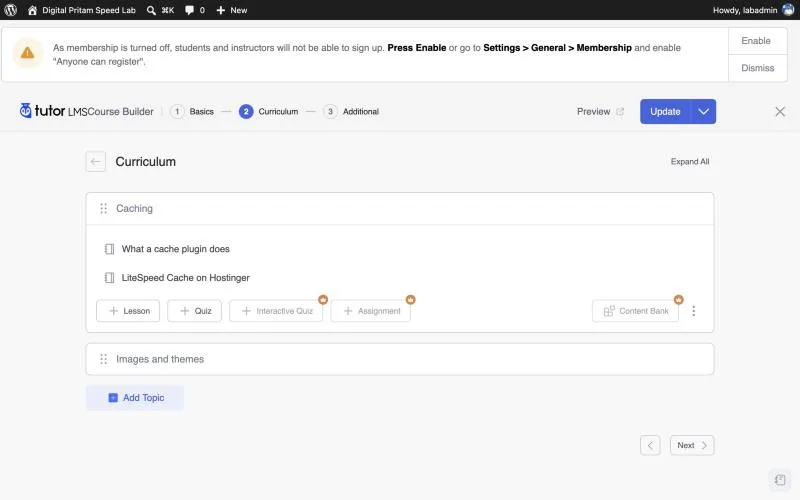
Built a free course
2 topics, 4 lessons and a quiz, with level, duration and what students will learn.
Measured the result
Course page, course list and a normal blog post: every CSS and JS file plus HTML, gzipped, and PageSpeed on the course page.
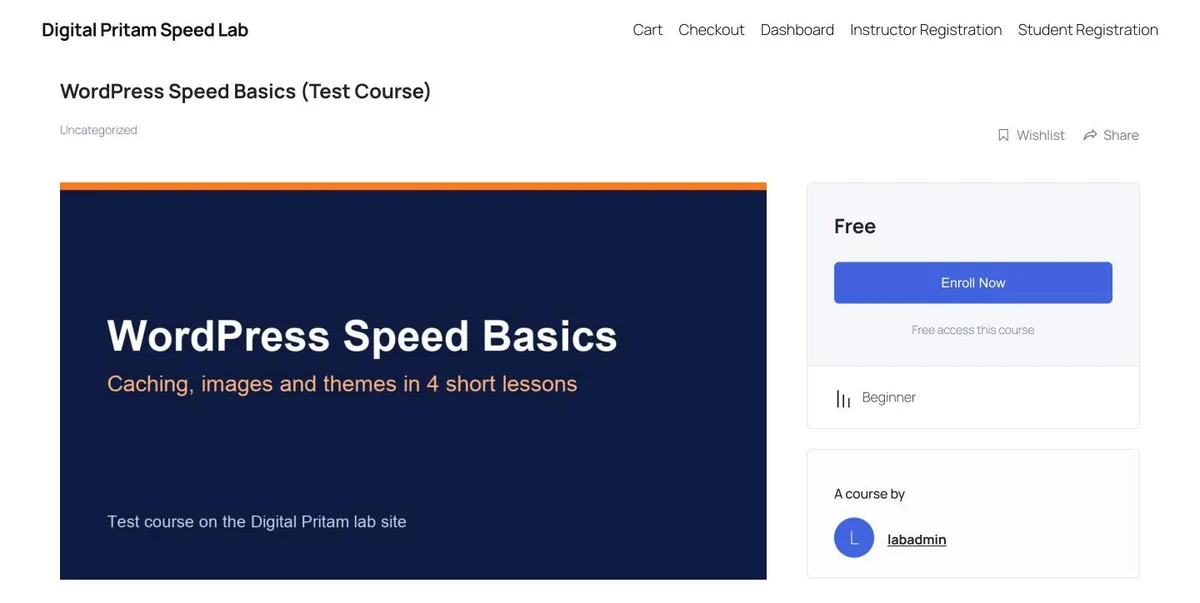
Tutor LMS on a real site: the numbers
Measured 17 Oct 2026.
| What we measured | Result |
|---|---|
| Plugin size on disk | 34 MB |
| Database tables added | 20 |
| Pages it created | 5 (Cart, Checkout, Dashboard, Instructor and Student Registration) |
| Course page weight (gzipped) | 334.6 KB in 25 files |
| Tutor’s own files on that page | 9 files, 169.2 KB |
| Also loaded on course pages | React, Moment.js, jQuery and jQuery UI |
| Weight on a normal blog post | 19.8 KB, 3 files: nothing added |
| Course page PageSpeed | 97 mobile ↗, 99 desktop |

Tutor LMS free vs Pro
Free is enough if
- You sell or give away a few courses
- Lessons, quizzes and the student dashboard cover your needs
- You want to test before paying
Get Pro if
- You need assignments or interactive quizzes
- You want the content bank to reuse lessons
- You want pro themes, AI Studio or priority support
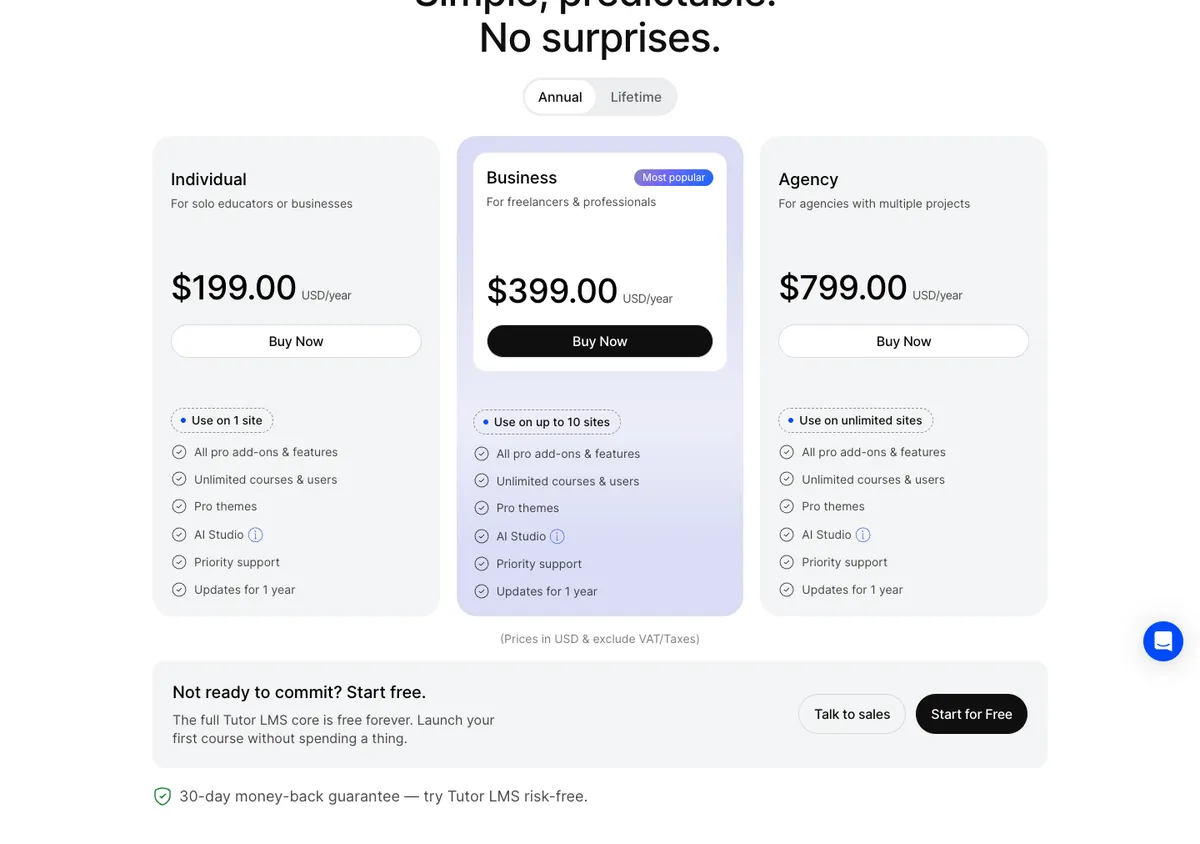
Tutor LMS price
From tutorlms.com/pricing, 17 Oct 2026. Add 18% GST and your card’s forex fee in India.
| Plan | Sites | Yearly | Lifetime |
|---|---|---|---|
| Free | Unlimited | $0 | – |
| Individual | 1 | $199/yr | $499 |
| Business | Up to 10 | $399/yr | $999 |
| Agency | Unlimited | $799/yr | $1,999 |
Tutor LMS review: FAQ
Is Tutor LMS free?
Yes. The free plugin on WordPress.org includes the course builder, lessons, quizzes, a student dashboard and its own cart and checkout pages. We built a free course with it on our lab site. Pro adds features such as assignments, interactive quizzes and the content bank.
Tutor LMS free vs Pro: what is the difference?
In the free course builder we tested, Interactive Quiz, Assignment and Content Bank carry a Pro badge. Pro also adds pro themes, AI Studio and priority support. Pro starts at $199 a year for one site.
How much is Tutor LMS Pro?
Yearly: $199 for 1 site, $399 for up to 10 sites, $799 for unlimited sites. Lifetime: $499, $999 and $1,999. There is a 30-day money-back guarantee.
Does Tutor LMS slow down WordPress?
Not on normal pages: our blog post stayed at 19.8 KB with nothing added. Course pages are heavy at 334.6 KB across 25 files, but still scored 97 on mobile PageSpeed because the scripts do not block rendering.
Tutor LMS vs LearnDash: which should I choose?
Tutor LMS if you want to start free and pay less ($199 against $399 a year). LearnDash if you need its long track record with groups and reporting. See our LMS comparison.
Did you use Tutor LMS Pro?
No. This review covers the free version 4.1.3, tested on our lab site on 17 Oct 2026. Pro features and prices come from Tutor LMS’s own pages.
Methodology
How this page was built, so you can check it.
| Detail | |
|---|---|
| Date | 17 Oct 2026 |
| Environment | Clean WordPress 7.1.3 with Twenty Twenty-Five on our Hostinger LiteSpeed server (digitalpritam.in/lab/), Tutor LMS only |
| Versions | Tutor LMS 4.1.3 (free) |
| Procedure | Built a free course with 2 topics, 4 lessons and a quiz, then measured the course page, the course list and a normal post, and ran PageSpeed Insights on the course page |
| Measured | Files and gzipped size per page; database tables and pages added on install |
| Limits | Free version only; no payments, students or video were tested |
About this page

Pritam Sonone
Founder of Digital Pritam. WordPress developer and designer, WordCamp Kolhapur 2025 speaker. Builds WordPress sites for clients.
How we checked
- Tested Tutor LMS 4.1.3 free on our lab site (digitalpritam.in/lab/) on Hostinger, 17 Oct 2026
- Weight measured on the course page, course list and a normal post; PageSpeed run on the course page
- Pro features and prices from tutorlms.com; we did not test Pro
Sources: Tutor LMS pricing · Tutor LMS on WordPress.org · PageSpeed report
Related guides
 Best WordPress LMS pluginTutor LMS, LearnDash, LifterLMS, MemberPress
 Best WordPress hosting in India8 hosts compared in rupees
 LiteSpeed Cache vs WP RocketSpeed Lab: tested on Hostinger
 WordPress cost calculatorYour real budget in rupees
 GST on WordPress pluginsWho pays 18% and how reverse charge works
 How we test dealsOur price checks, labels and corrections
Affiliate disclosure: some links on this page are affiliate links. If you buy through them, Digital Pritam may earn a commission at no extra cost to you. We only list deals we have checked on the brand’s own website, and commissions never change our picks. Prices can change at any time; always confirm the final price at checkout. Read our full affiliate disclosure.

Pritam Sonone
Pritam is a full-time blogger, YouTuber, author, and public speaker. He founded and leads Digital Pritam. With over 14 years of blogging expertise, he has assisted numerous aspiring bloggers in achieving their dreams of creating successful blogs.