








Disclosure: some links on this page are affiliate links. If you buy through them we may earn a commission, at no extra cost to you.
TubeBuddy lists Pro at $12.00 and Legend at $26.39, with a cheaper one-payment option of $144.00 and $316.68. Enterprise is custom. Cancel any time, with a 30-day refund. Pro, Star and Legend are for individual creators only.
The plans at a glance

Or $144.00 in one payment, which saves $36.00.
- Best start for a new creator with one channel
- One user seat
- Cancel any time, 30-day refund
Or $316.68 in one payment, which saves $79.20.
- Everything to scale and monetise, per TubeBuddy
- 2 user seats
- Same individual-creator limits as Pro
No list price is shown on the page.
- Unlimited seats, as negotiated
- For businesses and many channels
- Talk to TubeBuddy before you pay
Prices as shown on tubebuddy.com on 13 Nov 2026, in US dollars. Pro and Legend are for individual creators only.
I read every price on this page from the official page of TubeBuddy on 13 Nov 2026, and I explain each one in plain words below.
Key Takeaways
- At a glance: Pro: $12/mo; Legend: $26.39/mo; Refund: 30 days; Prices: USD.
- Our pick: Pro. A new creator with one channel.
- We have not tested TubeBuddy’s tools for this page, so there is no star score and no results claim.
- Prices were read on 13 Nov 2026. Check the vendor’s page again before you pay, because prices change.
On this page17 sections
What is TubeBuddy?
Plain answer first, then what the official pages say.
- TubeBuddy describes itself as an all-in-one optimization platform for YouTube SEO, keyword discovery, content intelligence and analytics.
- Its home page says the tools work directly inside YouTube and that you can install it in 60 seconds.
- It is built for creators of any size, from a first video to a media brand.
- Plans are sold by yearly or monthly licence: Pro, Legend and Enterprise on the pricing page, with Starter and Star named in its licence notes.
Is there a free TubeBuddy plan?
Yes. The home page has a Get Started FREE button, and the pricing page says that when you cancel a paid plan, your channel is downgraded to the free plan. The pricing page itself lists only the paid plans, and it does not list what the free plan includes, so check the limits after you install.
| Where | What it says |
|---|---|
| Home page | Get started free, no risk and no credit card |
| Pricing page | Pro, Legend and Enterprise are listed with prices; no free plan is shown there |
| What the free start includes | Not shown on either page, so check it when you sign up |
Read again on tubebuddy.com, 15 Nov 2026. TubeBuddy also states a 30-day refund policy.

Installing TubeBuddy (the extension)
How it fits into your workflow, from the home page.
- The home page says it works inside YouTube, so you do not switch to another website.
- Install takes about 60 seconds, as its home page states.
- The home page install button points to the Chrome Web Store, where the extension is listed as TubeBuddy for YouTube.
- Compare it with a similar tool in vidIQ vs TubeBuddy.
On 15 Nov 2026 the Chrome Web Store listing showed 3.5 out of 5 from 8.5K ratings, 1,000,000 users, version 2271, a Featured badge and an update date of 6 November 2026 (as shown from India). TubeBuddy’s home page badge says 4.8 with 10K plus reviews. The two numbers come from different places, so read the store reviews yourself before you install.

TubeBuddy plans and prices
| Plan | Price shown | One-payment option | Saves | User seats | With 18% GST (price shown) |
|---|---|---|---|---|---|
| Pro | $12.00 | $144.00 | $36.00 | 1 | ₹1,345 |
| Legend | $26.39 | $316.68 | $79.20 | 2 | ₹2,957 |
| Enterprise | Custom | Custom | Not shown | Unlimited | Custom |
As shown on tubebuddy.com on 13 Nov 2026. Starter and Star prices were not shown in the page text we read. Dollar prices are converted at the 16 Oct 2026 ECB rate (US$1 = ₹94.96) and include 18% GST.
Prices read again on tubebuddy.com/pricing on 15 Nov 2026 and unchanged since 13 Nov. The $12.00 and $26.39 are per month on the Per Year toggle, which says save 20%.

Pro, Star and Legend are for individual creators only. More than one channel, 50,000 or more subscribers, 3 or more channel managers or 50 or more employees can rule you out.
Pro, Legend and Enterprise side by side
The pricing page shows four things per plan: the price, the one-payment price, the seats and who may buy.
| Pro | Legend | Enterprise | |
|---|---|---|---|
| Price shown | $12.00 | $26.39 | Custom |
| One payment | $144.00 | $316.68 | Custom |
| What one payment saves | $36.00 | $79.20 | Not shown |
| User seats | 1 | 2 | Unlimited, as negotiated |
| Who may buy | Individual creators | Individual creators | Businesses and teams |
| Refund and cancelling | 30-day refund, cancel any time | 30-day refund, cancel any time | Set in your contract |
| With 18% GST on the price shown | ₹1,345 | ₹2,957 | Custom |

Starter and Star. The page names a Starter and a Star licence in its rules (both are single-seat), but the plan cards in the text we read did not show their prices. We do not guess them. Open tubebuddy.com/pricing to see whether they are on sale for your channel.
From tubebuddy.com/pricing, read 13 Nov 2026. Rupee figures use the 16 Oct 2026 ECB rate and 18% GST.
The one-payment price is the cheaper way to pay for a year: it saves $36.00 on Pro and $79.20 on Legend.
Which plan should you pick?
Pick by what you need most.
Pick Pro ifOur pick- A new creator with one channel
- $12.00 on the page, or $144.00 in one payment (saves $36.00)
- One user seat
- Not for businesses or channels with 50k or more subscribers.
Pick Legend if- A growing channel with a helper: 2 user seats
- $26.39 on the page, or $316.68 in one payment (saves $79.20)
- Everything you need to scale and monetise, per TubeBuddy
- Same individual-creator limits as Pro.
Which plan fits which creator?
Needs keyword research, tag help and SEO scoring. Watch out: Pro is for individual creators only.
Pro, $12.00Needs thumbnail and competitor analysis. Check whether the tool you want sits in Pro or Legend before you pay.
Pro or LegendTwo people in one account. Watch out: a third channel manager can push you out of the creator plans.
Legend, 2 seatsBulk updates, many channels, brand permissions. You must talk to sales: there is no list price.
Enterprise, custom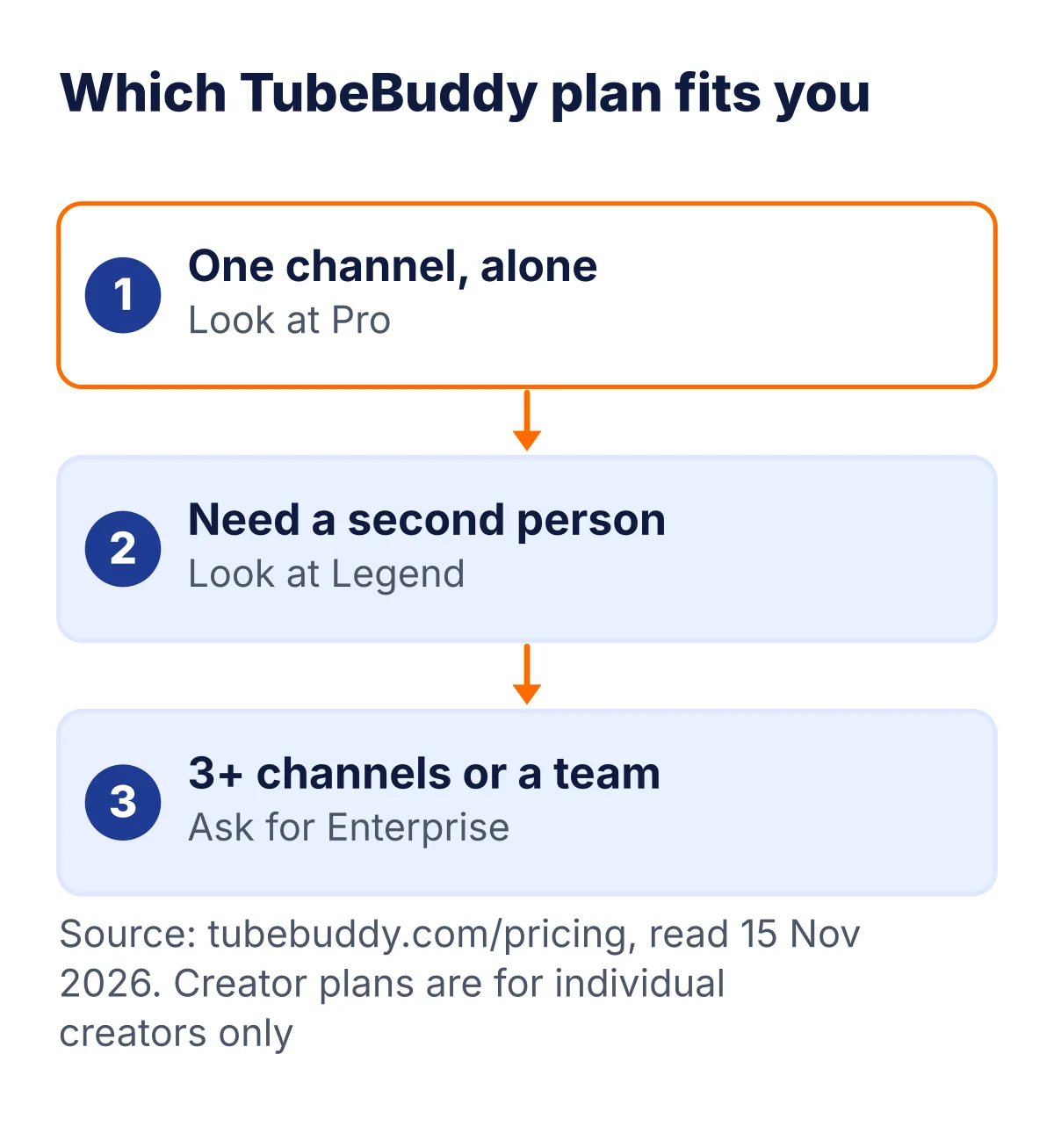
The creator packages (Pro, Star and Legend) are not sold to businesses, TubeBuddy says. The page lists the signs it looks at: more than one YouTube channel on TubeBuddy, 50,000 or more subscribers, 3 or more channel managers, or 50 or more employees. If any of those fit you, ask TubeBuddy which plan you may buy before you pay.
Three example creators and the plan to look at
These are made-up examples built from the plan rules on the page.
| Creator | What they need | Plan to look at | Why |
|---|---|---|---|
| Asha runs a cooking channel alone with 3,000 subscribers | Titles that match what people search, and better thumbnails | Pro | One seat, the lowest paid price shown ($12.00), and she is an individual creator under 50,000 subscribers |
| Ravi makes tutorials and has an editor who uploads for him | Two people logged in, with scheduling and bulk edits | Legend | Legend lists 2 user seats; Pro lists 1 |
| A school brand runs 3 channels with 4 managers | Bulk updates across channels and many people | Enterprise, ask sales | Multiple channels and 3 or more channel managers are on the page’s list of reasons the creator plans may not be sold |
Before you pay in any of these cases, write one sentence: I am buying this to do ___ every week. If you cannot fill the blank, wait.
Every TubeBuddy tool in plain words
TubeBuddy’s home page, read 13 Nov 2026, sorts its tools into four groups.
| Group | Tools TubeBuddy lists | What the group is for |
|---|---|---|
| SEO and ranking (7) | Keyword Explorer, SEO Studio, Rank Tracker, Search Explorer, Tag Management, Insta-Suggest, Click Magnet | Finding the words people type into YouTube, and putting them in your title, tags and description |
| Growth and creation (8) | A/B Testing, Thumbnail Analyzer, Thumbnail Generator, Title Generator, Next Video Ideas, Topical Analysis, Niche Insights, Suggested Shorts | Getting more clicks on each video and finding what to make next |
| Content and productivity (7) | Video Scheduling, Chapter Editor, Default Upload Profiles, Bulk Find Replace and Append, Bulk Card Editor, Bulk End Screen Editor, Related Video Manager | Saving time: change many old videos at once and keep every upload the same |
| Analytics and insights (6) | Channel Insights, Channelytics, Retention Analyzer, SEO Score Health Report, SEO Studio Competitor Analysis, Opportunity Finder | Seeing what works on your channel and on channels like yours |
That is 28 tools in all. Most small channels will only use a handful of them. The pricing page tells you which plan unlocks which tools, so read the plan table before you pay for features you will not touch.
The four big ideas behind the tools
- Keyword discovery. TubeBuddy says Keyword Explorer finds the words your viewers search, shows search volume data, and helps you pick topics with high volume and low competition.
- Ranking optimization. SEO Studio scores a video in real time, TubeBuddy says, and tells you what to change in the title, tags and description. The tag generator works with it.
- Click-through rate (CTR). The A/B testing tool rotates two or more thumbnail or title versions, measures real clicks and declares a winner, as the page describes it.
- Performance analytics. Channelytics, the health report and similar tools track rankings, impressions and revenue so you can see which videos to copy.
From tubebuddy.com, read 13 Nov 2026. Tool names are TubeBuddy’s own. We describe what the page says; we have not tested any tool.
How TubeBuddy billing works, in plain words
The page gives you a price and a cheaper way to pay.
TubeBuddy shows Pro at $12.00 and says you save $36.00 by paying $144.00 in one payment. If $144.00 is $36.00 cheaper, the same year bought month by month must cost about $180.00, which is $15 a month. The same sum for Legend: $316.68 plus $79.20 is about $395.88 for twelve months, or about $32.99 a month.
So the honest way to read the page is this: the lower number is what you pay each month if you pay once for the year. This is our reading of the page, not a line TubeBuddy prints. Check the checkout screen before you pay.
| Plan | One payment (year) | Same year paid monthly (our sum) | You keep |
|---|---|---|---|
| Pro | $144.00 | About $180.00 | $36.00 |
| Legend | $316.68 | About $395.88 | $79.20 |
- Currency. Prices are in US dollars. Your card pays the dollar amount plus your bank’s forex markup, and GST can apply as well. Our GST guide explains how GST works on foreign software.
- Cancelling. The page says there are no contracts and you can cancel any time, with a 30-day refund policy. Ask support for the refund inside the 30 days.
- Renewal. We did not see a renewal price on the page. Look at the checkout and your invoice for the date and amount of your next payment.
A tool-by-tool guide to the 28 TubeBuddy tools
TubeBuddy lists 28 tools in four groups.
| Tool | Group | Plain meaning | Where the meaning comes from |
|---|---|---|---|
| Keyword Explorer | SEO and ranking | Shows the phrases viewers type into YouTube and how often | TubeBuddy’s description |
| SEO Studio | SEO and ranking | Scores a video in real time and says what to change in title, tags and description | TubeBuddy’s description |
| Rank Tracker | SEO and ranking | Follows where your videos rank for chosen phrases | TubeBuddy lists rankings tracking |
| Search Explorer | SEO and ranking | Lets you explore YouTube search results | The tool’s name |
| Tag Management | SEO and ranking | View and copy tags, and manage them on your videos | A link on TubeBuddy’s page says View and Copy Tags |
| Insta-Suggest | SEO and ranking | Listed with the ranking tools; the name points to instant phrase suggestions | The tool’s name |
| Click Magnet | SEO and ranking | Listed with the ranking tools; the name points to getting more clicks | The tool’s name |
| A/B Testing | Growth and creation | Rotates thumbnail or title versions, measures real clicks and declares a winner | TubeBuddy’s description |
| Thumbnail Analyzer | Growth and creation | Checks a thumbnail and gives feedback | TubeBuddy lists it under thumbnail optimization |
| Thumbnail Generator | Growth and creation | Helps you make thumbnails | The tool’s name |
| Title Generator | Growth and creation | Helps you write titles | The tool’s name |
| Next Video Ideas | Growth and creation | Gives you ideas for what to make next | The tool’s name |
| Topical Analysis | Growth and creation | Looks at topics around your niche | The tool’s name |
| Niche Insights | Growth and creation | Looks at what is going on in your niche | The tool’s name |
| Suggested Shorts | Growth and creation | Suggests ideas for YouTube Shorts | The tool’s name |
| Video Scheduling | Content and productivity | Plans uploads for a set time | The tool’s name |
| Chapter Editor | Content and productivity | Adds chapters to a video | The tool’s name |
| Default Upload Profiles | Content and productivity | Saves your usual title, tag and description settings for each upload | The tool’s name |
| Bulk Find, Replace and Append | Content and productivity | Changes text in many videos at once | The tool’s name |
| Bulk Card Editor | Content and productivity | Edits cards on many videos at once | The tool’s name |
| Bulk End Screen Editor | Content and productivity | Edits end screens on many videos at once | The tool’s name |
| Related Video Manager | Content and productivity | Manages related-video links | The tool’s name |
| Channel Insights | Analytics and insights | Shows facts about your channel | The tool’s name |
| Channelytics | Analytics and insights | An analytics dashboard for rankings, impressions and revenue | TubeBuddy’s description |
| Retention Analyzer | Analytics and insights | Looks at how long viewers stay in a video | The tool’s name |
| SEO Score Health Report | Analytics and insights | A health report on your channel | TubeBuddy lists a Channel Health Report |
| SEO Studio Competitor Analysis | Analytics and insights | Compares your videos with competitors | TubeBuddy lists competitor analysis |
| Opportunity Finder | Analytics and insights | Points to chances you could use | The tool’s name |
Read from tubebuddy.com on 13 Nov 2026. Which tools each plan unlocks is on the pricing page; check it before you buy.
We have not tested TubeBuddy's tools. Everything here is read from the official pages, so there is no star score and no results claim.
TubeBuddy in rupees for a full year
Our arithmetic on the page’s prices, with 18% GST at the 16 Oct 2026 ECB rate.
A full year in rupees (with 18% GST)
Our arithmetic on the page's prices at the 16 Oct 2026 ECB rate.
Per month in rupees, Pro on the one-payment price is about ₹1,345 and Legend about ₹2,957. If you work with an editor and each of you needs a seat, remember Pro has one seat and Legend has two, so two Pro plans would cost about ₹32,271 a year against ₹35,485 for one Legend. The page does not say whether two people may share one Pro, and its rules say sharing beyond the seat limit breaks the terms.
How to read the claims on the TubeBuddy home page
The home page quotes creators and shows big results.
- Creator quotes are opinions. They are the creators’ words on TubeBuddy’s own page, not our experience.
- Result numbers come from TubeBuddy. We repeat none of them, because we have not checked them.
- User counts differ across the page. We saw two different totals in different places, so we quote neither.
- The honest test is yours. Use the free start on your own channel, change one thing at a time, and look at your own numbers in YouTube Studio.
- Videos still decide. Better titles and thumbnails help people click. They do not make a weak video good.
How to start with TubeBuddy, step by step
TubeBuddy runs inside your browser next to YouTube.
How to start, step by step
- 1Open tubebuddy.com
Look at the home page and the pricing page.
- 2Install the extension
The home page has an Install Extension button that opens the TubeBuddy page in the Chrome Web Store.
- 3Sign in with the Google account that owns your channel
TubeBuddy works with your YouTube channel, so it needs to know which one.
- 4Open YouTube
TubeBuddy says it works directly inside YouTube.
- 5Try the free start
TubeBuddy's home page says there is a forever plan that needs no card.
- 6Compare Pro and Legend before you pay
If you need a second seat for an editor, Legend is the plan with 2 seats.
- 7Set a reminder for day 25
Put a note in your calendar five days before the 30-day refund window ends, so you can decide with real use behind you.
A simple first-month plan (our suggestion)
Our own suggestion for getting your money’s worth, built on how the tools are described.
| Week | Do this | Tool group |
|---|---|---|
| 1 | Pick 3 topics. For each, write down the exact phrases people might type into YouTube. Check the suggestions TubeBuddy shows for them. | SEO and ranking |
| 2 | Write your next title and description using those phrases. Compare your draft with the on-page score before you publish. | SEO and ranking |
| 3 | Make two thumbnails for one video. Run the A/B test so real viewers pick the winner instead of you. | Growth and creation |
| 4 | Look at your last 10 videos. Which ones got the most views? Write down what they have in common, then plan 3 videos like them. | Analytics and insights |
At the end of week 4 ask one question: did I use the tools more than twice a week? If not, stay on the free start or cancel inside the 30 days.
A 90-day plan for your first three months (our suggestion)
A slow, simple routine for a small channel.
| Month | Focus | What to do each week | What to look at in YouTube Studio |
|---|---|---|---|
| 1 | Find better phrases | Pick one topic. Write 10 phrases around it. Choose one for your next title. | Impressions and click-through rate on the new video |
| 2 | Improve thumbnails | Make two thumbnails for each video. Test them for a few days. | Which version got the higher click-through rate |
| 3 | Repeat what works | List your top 3 videos by views. Plan one new video for each in the same style. | Views, watch time and returning viewers |
At the end of month 3, decide with numbers. If your click-through rate and views rose, keep the tool. If nothing changed, cancel and keep what you learned. This is our suggested routine, not a TubeBuddy claim.
Before you buy: mistakes and a checklist
- Who can buy. Pro, Star and Legend are Creator License Packages for individual creators only, at TubeBuddy’s discretion. Multiple channels, 50k or more subscribers, 3 or more channel managers or 50 or more employees can rule you out.
- Seats. Starter, Pro and Star allow one user; Legend allows 2; Enterprise is unlimited.
- Refund and cancelling. A 30-day refund is stated, and ‘No contracts, cancel any time’.
- Not shown. Starter and Star prices and the free plan limits were not in the page text, so they are not listed.
- Compare. See vidIQ vs TubeBuddy for the other popular tool.
Mistakes to avoid before you buy
Seven things that waste money with creator tools.
- Buying Legend when Pro is enough. Legend costs about 2.2 times Pro per month on the page. It adds a second seat. If you work alone, you may not need it.
- Buying Pro for a business channel. The creator packages are for individual creators. A brand with several channels or 50k or more subscribers may need Enterprise.
- Forgetting the forex fee. A $12 plan on an Indian card costs more than the sticker price once GST and the bank markup land.
- Paying for a year before you try it. The one-payment price saves money only if you will still use the tool in month 12. Try a month first.
- Treating tools as a shortcut. Keyword and thumbnail tools help, but a boring video still gets few clicks. The tool helps you aim, not shoot.
- Ignoring the refund window. Thirty days goes fast. Note the date.
- Not checking which tools your plan includes. Open the plan table, find the one or two tools you want, and make sure they are in the plan you pick.
A checklist before you click Pay
- I know which two or three tools I will use every week.
- I checked that those tools are in the plan I picked.
- I am an individual creator with one channel and fewer than 50,000 subscribers, or I have asked TubeBuddy which plan I may buy.
- I know the price in rupees with GST and the bank fee.
- I put the 30-day refund date in my calendar.
- I know how to cancel: in my TubeBuddy account, or through support.
Five questions to ask about any YouTube tool, not just TubeBuddy
If you also look at vidIQ or another tool, ask the same five things.
- Which exact tools do I need, and are they in the plan I am buying?
- What does it cost in rupees after GST and the bank fee?
- Can I try it free, and what is limited on the free start?
- How many seats and channels does the plan allow?
- How long is the refund window, and how do I claim it?
Words you will see on a TubeBuddy page
New to YouTube? These are the words used on the page.
| Word | What it means |
|---|---|
| Keyword | A word or phrase people type into YouTube search, like how to bake bread |
| Search volume | How many people look for that phrase. A bigger number means more people searching |
| Competition | How many other videos already target that phrase |
| SEO | Search engine optimization: giving YouTube the clues it needs to show your video to the right people |
| Tags | Short words you attach to a video to describe it |
| Impressions | How many times YouTube showed your thumbnail to someone |
| CTR | Click-through rate: of the people who saw your thumbnail, the share who clicked it |
| A/B test | Showing two versions, such as two thumbnails, to different viewers and keeping the one that wins |
| Retention | How much of a video people watch before they leave |
| End screen and cards | Boxes inside the video that point viewers to another video or link |
| Seat | One person who may use the account. Pro has 1 seat and Legend has 2 |
| Creator licence | A plan for individual creators, not for businesses |
What the TubeBuddy screen looks like
TubeBuddy works inside YouTube. It is a browser extension, so its tools appear next to your videos and in YouTube Studio. TubeBuddy’s home page says you can install it in 60 seconds.
Its tools sit in four groups on the home page:
- SEO and Ranking: 7 tools, including Keyword Explorer, SEO Studio and Rank Tracker.
- Growth and Creation: 8 tools.
- Content and Productivity: 7 tools.
- Analytics and Insights: 6 tools.
The home page also says there is a forever plan with no credit card needed. It does not list what the free plan includes. Check what you get after you install it.
We have not used the TubeBuddy screen ourselves, so we do not rate how easy it is. See the steps in this guide to start it.
What TubeBuddy says it does for creators
These are TubeBuddy’s own claims, from its home page. We have not tested them.
- Find topics: keyword tools to see what viewers search for.
- Rank higher: SEO Studio scores a video and suggests fixes to the title, tags and description.
- Get more clicks: A/B testing for thumbnails and titles. TubeBuddy rotates the versions and picks a winner.
- See what works: analytics for rankings, impressions and revenue.
The page shows creator quotes and big numbers on average growth. Treat those as marketing. Your own results will depend on your videos.
TubeBuddy alternatives
TubeBuddy is not the only YouTube tool. The best known rival is vidIQ. Read our vidIQ vs TubeBuddy page to see them side by side.
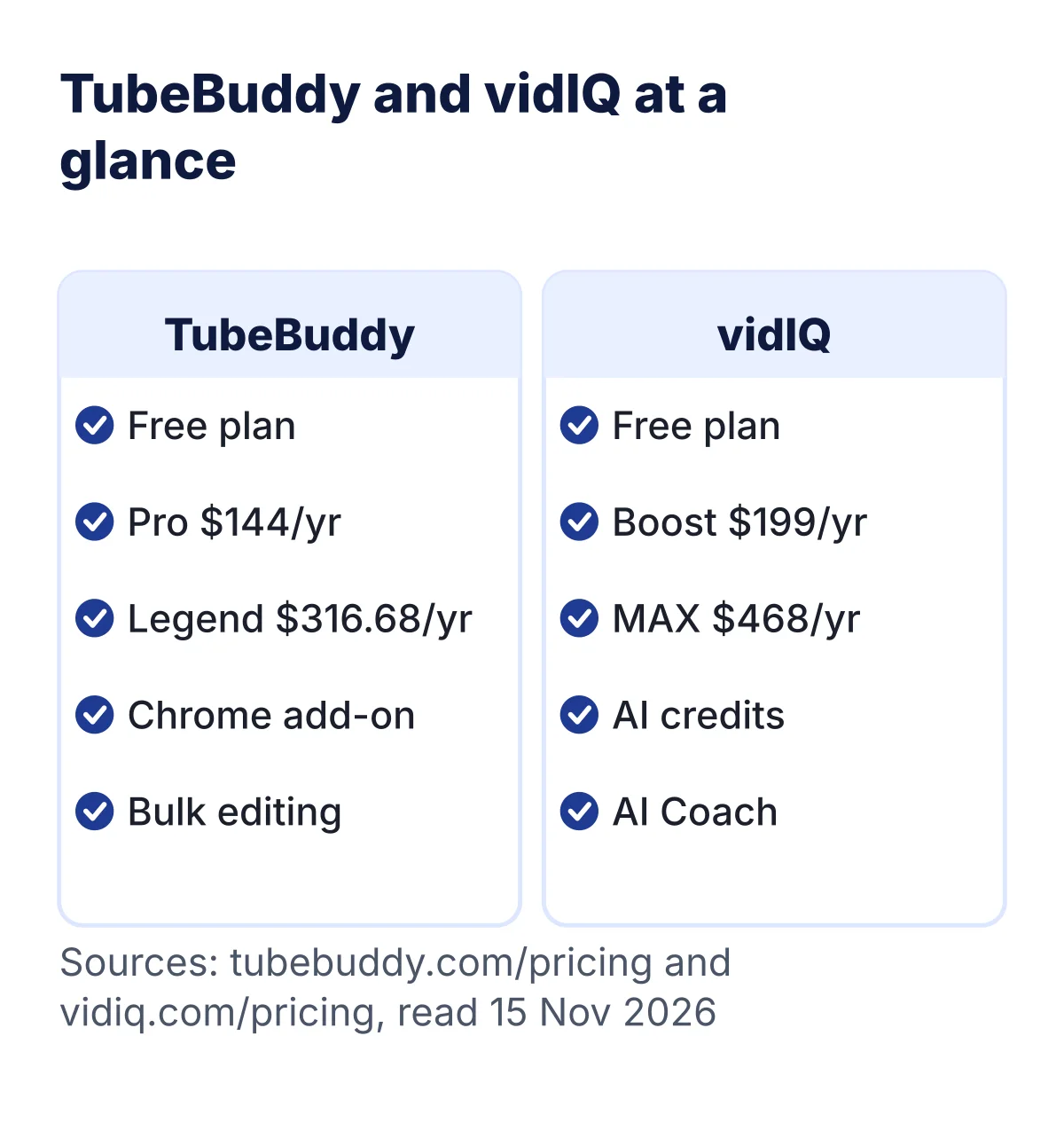
Waiting for a sale? See our TubeBuddy Black Friday page and the YouTube tools Black Friday roundup, both checked 15 Nov 2026.
Before you switch, ask which tool has the features you use, how many channels each licence covers, and what the yearly price is. Use the checklist in this guide for both.
How we chose
Frequently asked questions
Is TubeBuddy free?
Yes, there is a free plan. The home page says get started free, and the pricing page says a cancelled paid plan drops back to the free plan. The free plan limits are not listed on the pricing page.
Which browser does TubeBuddy work in?
The install button on the home page points to the Chrome Web Store, where it is listed as TubeBuddy for YouTube. Check tubebuddy.com for other browsers.
What is the difference between Pro and Legend?
Seats and price on the page: Pro has one seat at $12.00, Legend has two at $26.39. Check the plan table for tool differences.
Who can buy Pro and Legend?
Individual creators only. Businesses, channels with 50k or more subscribers, multiple channels, 3 or more channel managers or 50 or more employees may not qualify.
How much is TubeBuddy in rupees?
Pro is about ₹1,345 with 18% GST at the 16 Oct 2026 ECB rate; Legend is about ₹2,957. TubeBuddy bills in US dollars.
Do I pay again every year?
We did not see a renewal line. Check your checkout and invoice for the next billing date.
How do I cancel?
The page says cancel any time. Use your TubeBuddy account or contact support and ask for the refund inside 30 days.
Can I switch plans later?
Plan changes are made in your TubeBuddy account. We did not test the steps, so check the screen before you confirm.
What if I have two channels?
Multiple YouTube channels on TubeBuddy is on the list of reasons a creator plan may not be sold to you. Ask TubeBuddy.
Does TubeBuddy work on a phone?
TubeBuddy is sold as a browser extension and web tools. We did not see phone app details on the pages we read, so check tubebuddy.com.
Is it better than vidIQ?
We have not tested either. Our vidIQ vs TubeBuddy page sets out what we know.
Does TubeBuddy guarantee more views?
No tool can promise that. The testimonials on TubeBuddy’s page are the creators’ own words, not our results.
About this page

- WordPress developer and designer, builds sites for clients
- WordCamp Asia Communication Co-Lead
- 14K+ subscribers on the DigitalPritam YouTube channel
How we checked
Updated 13 Nov 2026What to do next
Open the official page, check the price on the day you buy, and keep the date of this page in mind (15 Nov 2026). More to read: vidIQ vs TubeBuddy, Free tools, How we test deals, WordPress deals and coupon codes. You can also read how we test. Questions? Contact me and I will reply.
Sources
- TubeBuddy pricing page, retrieved 15 Nov 2026.
- TubeBuddy on the Chrome Web Store, read 15 Nov 2026.
- vidIQ pricing page, read 15 Nov 2026, for the comparison graphic.
- Every price and limit read on tubebuddy.com/pricing on 13 Nov 2026 and read again on 15 Nov 2026.
- Dollar and euro prices converted at the 16 Oct 2026 ECB rate, with 18% GST added.
- Anything the page did not show is marked ‘not shown’ and left out.
- No hands-on test for this page: no star score, no performance claim.
Keep reading
 vidIQ vs TubeBuddy
 Free tools
 SE Ranking pricing
Check the price on the day you buy. Plans and rules change.
 FREE PDF
Get the Hostinger setup checklist, plus every sale alert
The exact steps we use on our lab sites, and an email when each big hosting sale opens.
Sent instantly. Deal alerts until 1 Dec. Unsubscribe in one click.


 Pritam Sonone