







Start with three tips: write for people first, match the reason behind each search, and make every page easy to read. Then work down the list of 19.
Every tip below comes from Google’s own guides, and I link the pages at the end. I read them on 15 Nov 2026. I also read the tool prices from the makers’ own pages on the same day.
What we tested and what we only read. The plugin screens, settings and checks on this page are real screenshots from a throwaway local WordPress test site. The tips themselves come from Google's documentation. We have not run an SEO experiment, so none of this is a ranking promise and none has a traffic claim.
Tools that make the tips easier

5 lookups every 24 hours.
- Find keywords for tips 3 and 19
- 15 related keywords per lookup
- More than 65,000 locations
$226.20 a year, about ₹25,346 with GST.
- Tracks 200 keywords, weekly updates
- 100 keyword lookups a day
- 48-hour money-back promise

$129 if you pay monthly. About ₹1,38,766 a year with GST.
- Tracks 2,000 keywords daily
- Website and on-page audit
- 14-day free trial, no card
From mangools.com and seranking.com, read 15 Nov 2026. US dollars before tax.
On this page21 sections
Why SEO still matters in 2026
SEO means search engine optimization. Google describes it as helping search engines understand your content, and helping people find your site and decide whether to visit.
People still search every day, and AI answers now sit on top of many results. You might think that changes the rules. Google says it does not.
Google’s guide says the usual SEO practices still apply to AI Overviews and AI Mode, with no extra requirement. A page must be indexed and able to show with a snippet. That is all.
Google is also plain about one thing. There are no secrets that will automatically rank a site first. Helpful pages, built carefully, are the whole game.
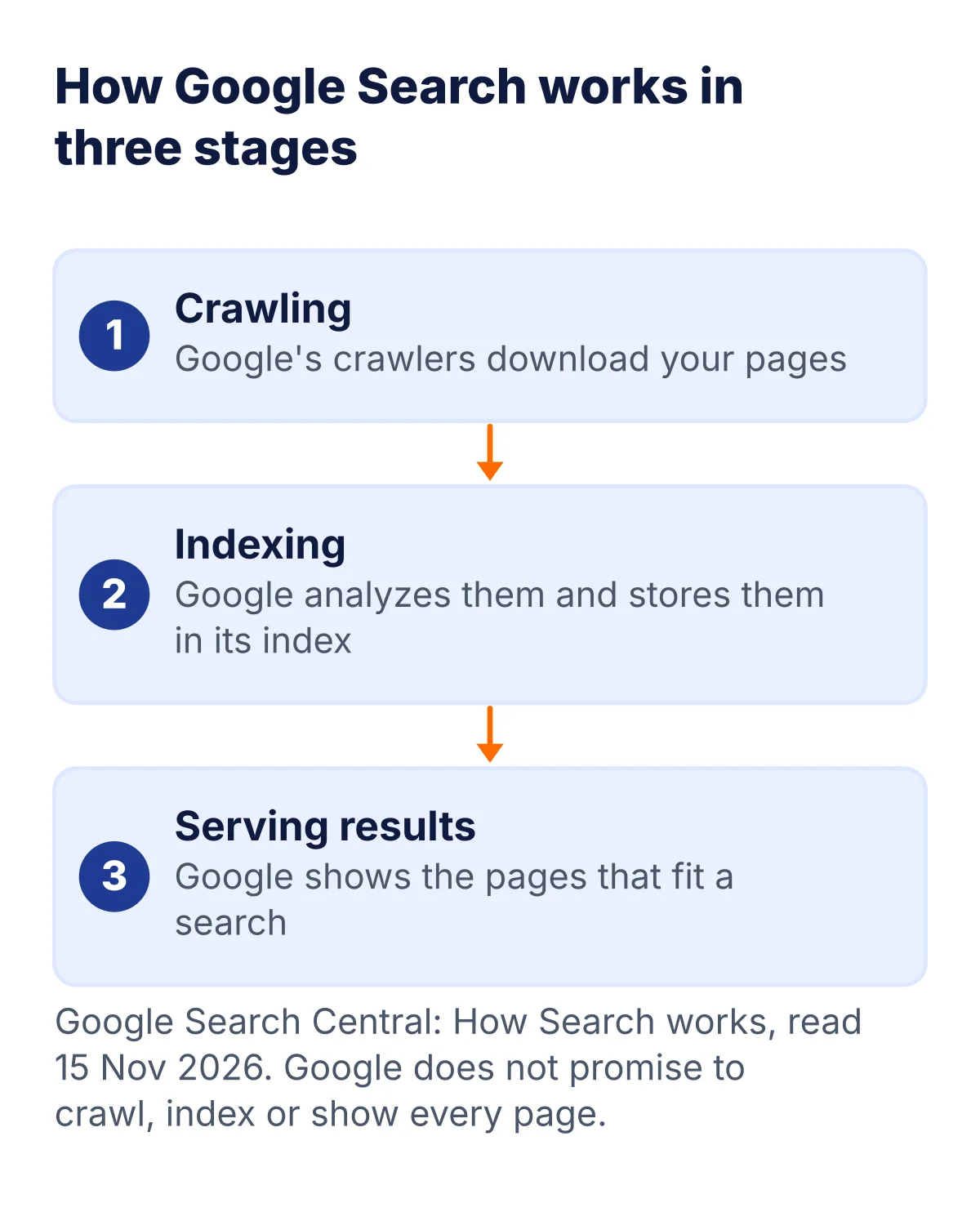
To see where SEO fits, look at what Google does. It finds pages, it stores them, and it shows the best match for each search. Google says it does not promise to crawl, index or show every page.
Everything in this guide helps one of those three steps. A page that cannot be found, stored or understood cannot be shown.
This guide gives you 19 careful steps. Pick three, do them this week, and come back for the rest.
How I picked these 19 tips
I did not collect tips from other blogs. I read Google’s SEO Starter Guide, its guide to helpful content, its page on AI features, its note on title links and the Core Web Vitals guide.
Each tip is something Google says in its own words. I turned it into a plain step you can do today.
I order the tips from the most important to the more technical. Content first, then the page, then the technical basics, then growth.
Where I could not check a number on a vendor’s own page, I left it out. I have also not tested these tips on a live experiment, and I say so.
The 19 tips at a glance
| Tip | What to do | Effort (our estimate) |
|---|---|---|
| 1. Write for people first | Answer the reader’s question fully | Medium |
| 2. Match search intent | Build the page type people expect | Low |
| 3. Do keyword research | Find the words your readers use | Medium |
| 4. Write a clear title | Short, descriptive, one idea | Low |
| 5. Write a unique description | One or two sentences per page | Low |
| 6. Make text easy to read | Short paragraphs and clear headings | Low |
| 7. Use descriptive URLs | A few plain words, no clutter | Low |
| 8. Show who wrote it | Add an author page and an About page | Medium |
| 9. Add something original | Share your own knowledge or data | High |
| 10. Keep pages up to date | Review old posts and fix them | Medium |
| 11. Link your own pages | Use clear link text | Low |
| 12. Link to trusted sources | Use nofollow when you do not trust one | Low |
| 13. Use images with alt text | Place sharp images near matching text | Low |
| 14. Pass Core Web Vitals | Aim for 2.5 s, 200 ms and 0.1 | High |
| 15. Let Google find your pages | Check indexing in Search Console | Low |
| 16. Avoid duplicate pages | One page, one URL | Medium |
| 17. Skip tricks and heavy ads | No stuffing, no blocking pop-ups | Low |
| 18. Learn from Search Console | Read the Performance report | Low |
| 19. Answer follow-up questions | Cover related questions for AI answers | Medium |
Prices from mangools.com and seranking.com, read 15 Nov 2026. US dollars before tax.
Which tips matter most?
Google says creating content that people find compelling and useful will likely influence your presence in search more than any other suggestion in its guide. That is why the content tips come first.
If you have only one weekend, use this order.
| When | Tips | Why |
|---|---|---|
| Do first | 1, 2, 4 and 6 | They shape what readers see and whether they stay |
| Do next | 3, 8, 9 and 11 | They add depth, trust and a clear path through your site |
| Then fix the basics | 5, 7, 13 and 14 | Small page details and a smooth experience on phones |
| Then tidy up | 10, 12, 15 and 16 | Old facts, outside links and duplicate pages |
| Keep going | 17, 18 and 19 | Habits you repeat every month |
Prices from mangools.com and seranking.com, read 15 Nov 2026. US dollars before tax.
Do not try to finish all 19 in a day. Pick the first group, do it well, then move on.
Tips 1 to 6: Content that helps people
Tip 1: Write for people first
Google says its ranking systems aim to reward helpful, reliable content made to benefit people. They aim to avoid content made to trick search engines.
A simple test: would you bookmark this page or send it to a friend? If not, make it better before you publish.
Do this today: write down the one question your page answers. Check that the first paragraph answers it.
Tip 2: Match the reason behind each search
Search intent is why someone typed a search. Some people want to learn. Some want to compare. Some want to buy.
Search for your keyword and look at the top results. If they are all how-to guides, a sales page will not fit. Build the type of page people expect.
Do this today: open the top five results for your main keyword and note what type of page each one is.

These four labels are common in the SEO world. They are not an official Google list, but they help you decide what kind of page to build.
- Learn: the reader wants an answer. Build a guide.
- Compare: the reader is choosing. Build a table and a clear pick.
- Buy: the reader is ready. Build a page with prices and a button.
- Find a site: the reader wants one website. Make sure yours is easy to find by name.
Tip 3: Do keyword research first
Think about the words readers use. Google gives an example: some people search for “charcuterie” and others for “cheese board”. Experts and beginners often use different words.
Google adds that you need not guess every version, since its systems can match your page to many searches. Still, research shows you the main phrases and questions.
Do this today: follow the five steps in our keyword research guide and pick one main keyword.
Tip 4: Write a clear title
The title is often the first thing people see in a result. Google says to write a descriptive, concise title. Avoid vague words like “Home” and avoid long, wordy titles.
There is no length limit, but Google cuts long titles to fit the screen. It also says to avoid repeating the same words. Say it once, clearly.
Do this today: read your title aloud. If it does not say what the page is about, rewrite it. A WordPress SEO plugin such as Rank Math lets you set a title for each page. See our WordPress SEO plugin comparison.
Here is a real example. I wrote a short demo post about growing tomatoes on a Pune balcony, on a throwaway local WordPress test site. Then I opened the Rank Math snippet editor. Rank Math is a free WordPress SEO plugin. It shows a preview of the search result and a length bar for the title.

Before, the title lacks the main keyword. After, the title says the main thing in 52 characters and the bar is in the green zone. Rank Math measures length in pixels as well as characters, since titles are cut by width.
Google may show a different title than the one you wrote. It builds the title link from several places on the page. A clear title still gives it a good source.
Tip 5: Write a unique description
A meta description is a short summary of the page. Google says a good one is short, unique to one page and includes the most relevant points.
Google may not always show it. Sometimes the snippet comes from the page text. Write a good one anyway, since it can help people choose your result.
Do this today: write one or two sentences for each key page. Never copy the same text across pages.
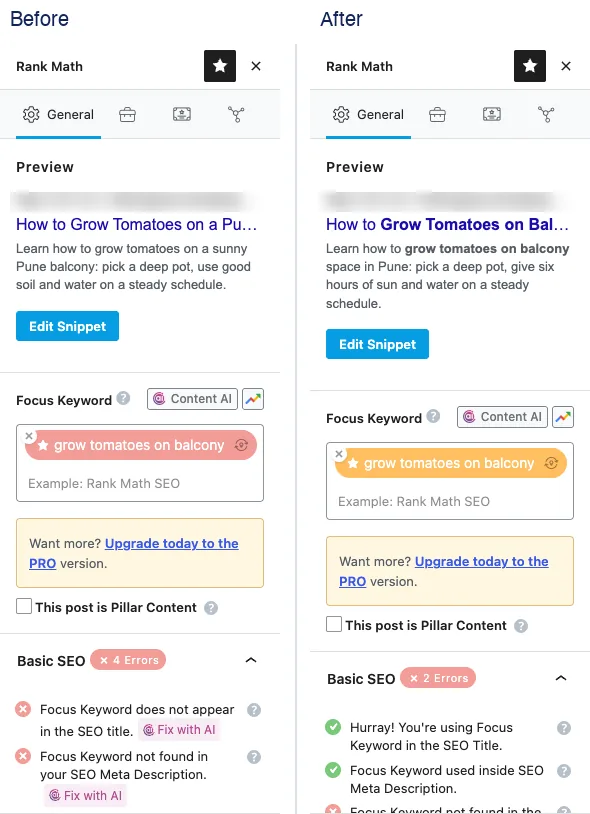
The same demo post, before and after. Rank Math checks that the focus keyword is in the SEO title and in the description. After the fix, those checks turn green and the plugin score moved from 20 to 59 out of 100 in my test.
Treat that score as a hint. Google does not use Rank Math’s score, and a high score is not a ranking promise.
Tip 6: Make the text easy to read
Google says content should be easy to read and well organized. Write naturally and fix spelling mistakes. Break long text into short paragraphs and sections, with headings to guide people.
Short sentences help most readers, including people who read in a second language. Explain every technical word the first time you use it.
Do this today: open your latest post. Split any paragraph longer than four lines and add a heading where the topic changes.
Tips 7 to 13: Page and link basics
Tip 7: Use descriptive URLs
A URL is the web address of a page. Google says words in the URL can show in the results as breadcrumbs, which help people judge a page.
Use a few plain words, such as /keyword-research/. It also says to group similar pages in folders. Keywords in a URL have little other ranking effect.
Do this today: check your newest URLs. Shorten any that are messy or full of numbers.
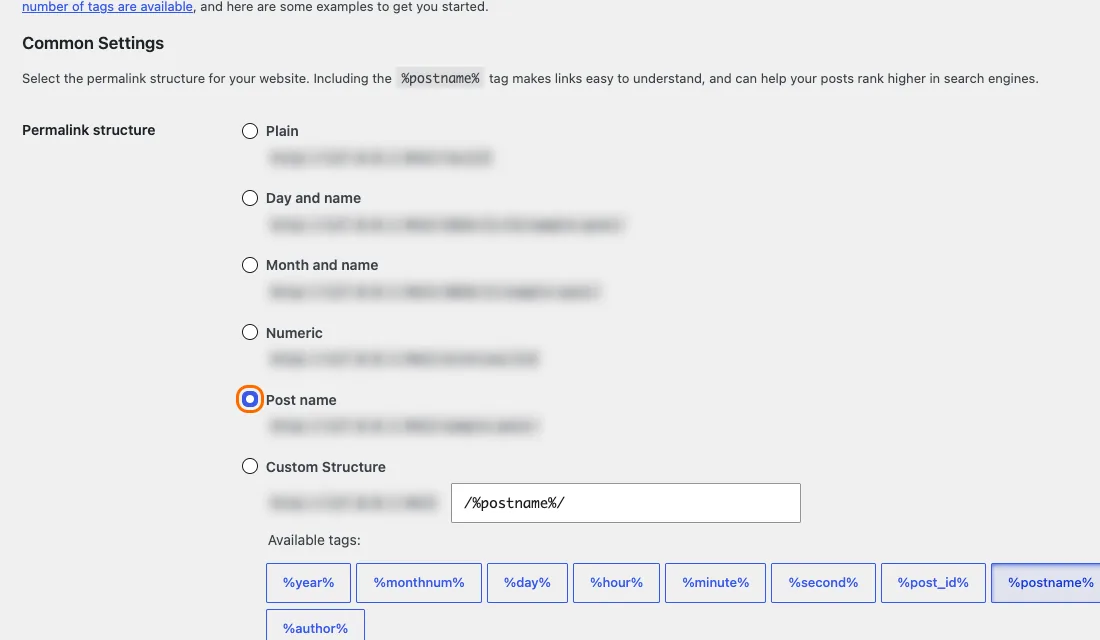
In WordPress, open Settings, then Permalinks, and choose Post name. The web address then uses the words of your post title, such as /grow-tomatoes-pune-balcony/. The picture is from the same test site.
Tip 8: Show who wrote it and why to trust it
Google asks questions about trust. Does the page show clear sources? Does it show who wrote it? Is there an author page or an About page?
It also asks whether an expert or a keen enthusiast wrote or checked the page. Show real names, real background and real sources.
Do this today: add an author line and a short bio. Link to an About page that explains who you are.

This is the byline strip at the top of this page. It shows who wrote it, who checked it, when it was updated and how long it takes to read. A reader does not have to hunt for these facts.

Google groups these ideas as E-E-A-T: experience, expertise, authoritativeness and trust. Its guide says that of these, trust is most important. The other three help a reader trust a page.
Tip 9: Add something original
Google asks whether your page offers original information, analysis or research. It also asks whether you avoid just rewriting other sources.
Original does not need to mean a big study. Your own examples, screenshots, steps or lessons all count. Say clearly what you did and what you did not test.
Do this today: add one example from your own work to your next post.
Tip 10: Keep old pages up to date
Google lists up-to-date content as a sign of useful pages. It says to check older posts and update them, or even delete them when they no longer matter.
Prices, screenshots and steps go out of date fast. A page with old facts can hurt readers.
Do this today: list your five oldest posts. Fix one of them and add the date you checked it.
Tip 11: Link your own pages with clear text
Google says links connect people and search engines to other pages. The words of a link are called link text or anchor text. Good link text tells people what they will find.
Write “our keyword research guide”, not “click here”. Link related pages together, so readers can keep going.
Do this today: add two links from an older post to a newer related one.

This map shows how this page links to other pages on our own site. This page sits in the middle. Each link uses words that say where it goes, such as keyword research or SEO for AI search.
Tip 12: Link to trusted sources
Links to other sites can give readers more context and show where your facts come from. Google says to make sure you trust a page before you link to it.
If you do not trust a page but still want to link, Google says to add a nofollow or similar note. This avoids tying your site to that page.
Do this today: add a source link under any number or claim in your latest post.
Tip 13: Use sharp images with alt text
Google says to use clear, high-quality images and place them near text that matches. That text helps Google understand the image.
Alt text is a short description added to an image. It helps people who use screen readers, and it helps search engines understand the image.
Do this today: add true, short alt text to every image on your top three pages.
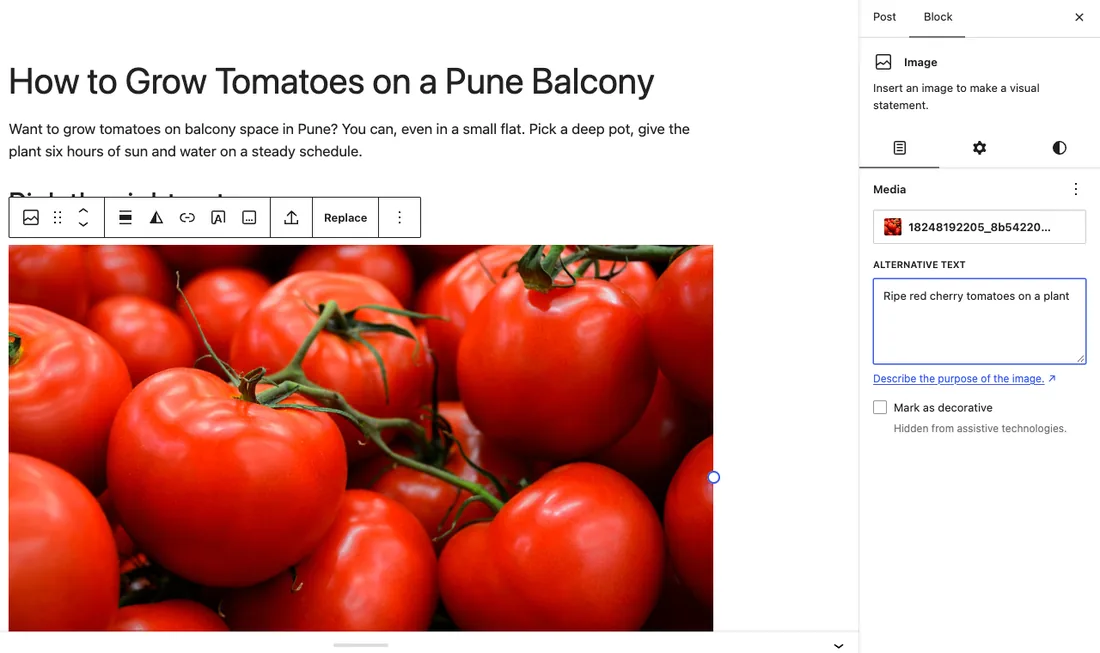
In the WordPress block editor, click an image and fill in the Alternative text box. Describe what the picture shows in one short sentence. The demo says Ripe red cherry tomatoes on a plant. If an image is only decoration, tick Mark as decorative.
Tips 14 to 16: Technical basics
Tip 14: Pass the Core Web Vitals
Core Web Vitals are three scores about how a page feels. Google’s guide at web.dev lists them with their “good” levels.
| Score | What it measures | Good level |
|---|---|---|
| Largest Contentful Paint (LCP) | How fast the main content loads | Within 2.5 seconds |
| Interaction to Next Paint (INP) | How fast the page reacts to a tap or click | 200 milliseconds or less |
| Cumulative Layout Shift (CLS) | How much the page jumps while loading | 0.1 or less |
Prices from mangools.com and seranking.com, read 15 Nov 2026. US dollars before tax.
The web.dev guide suggests checking the 75th percentile of page loads, on both mobile and desktop. Google also says to look at the whole page experience, not just one or two parts.
Do this today: test your top page on a phone. See our fastest WordPress themes list if your theme is slow.

I ran this page through PageSpeed Insights on 15 Nov 2026 at 6:00 pm, with a phone-sized test. It scored 92 for performance, 97 for accessibility, 100 for best practices and 92 for SEO. The main content loaded in 2.7 seconds. The page layout moved by 0.046, and total blocking time was 0 ms.
The honest part: 2.7 seconds is a little over Google’s 2.5 second good level. This is a lab test, not real visitors, and the report had no field data for this page yet. I ran it before this guide got its extra images, so a new run may differ. It is a number to improve, not a trophy.

A light theme helps. The demo site uses GeneratePress, a small theme. We did not run a speed test on the demo site, so we make no speed claim about it.
Tip 15: Let Google find your pages
Google says it finds most new pages through links from pages it already knows. It also says a sitemap is optional.
In Search Console, the URL Inspection tool shows how Google sees a page. Check that nothing blocks your page from showing. Also check that your host or CDN lets Google crawl it.
Do this today: inspect your newest post in Search Console. If it is not indexed, link to it from a page that is.
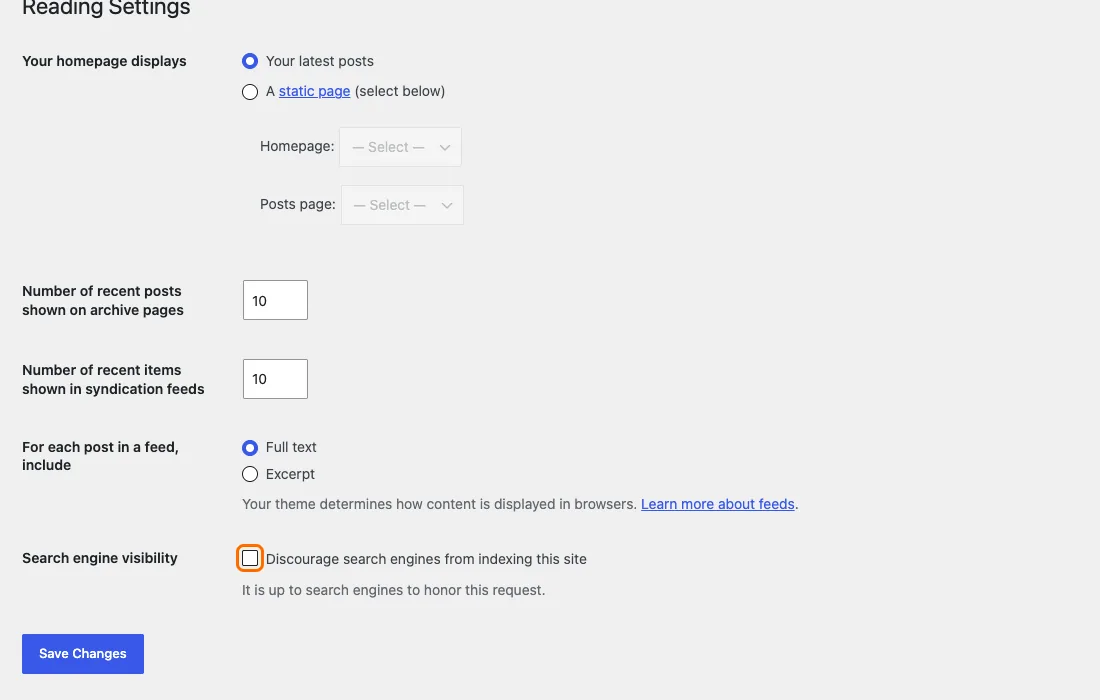
First, check one setting. In WordPress, open Settings, then Reading. The box named Discourage search engines from indexing this site must stay unticked on a live site. Many people tick it while building and forget.
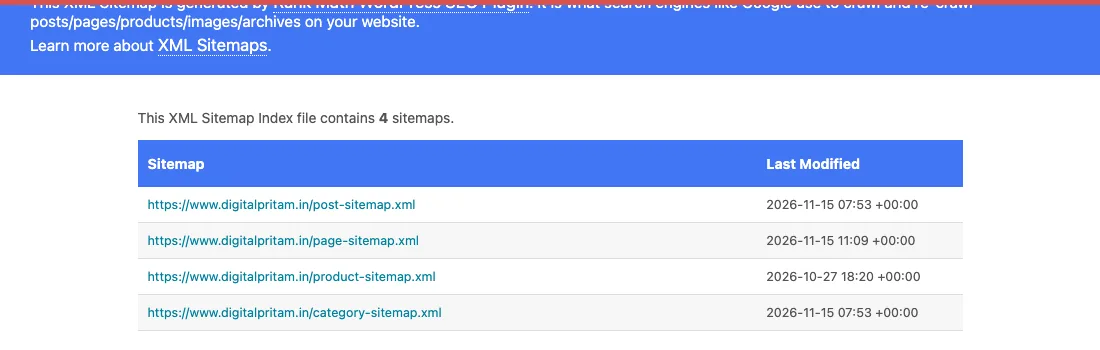
A sitemap is a list of your pages for search engines. Rank Math builds one for you. This is the sitemap index of digitalpritam.in, with sitemaps for posts, pages, products and categories.
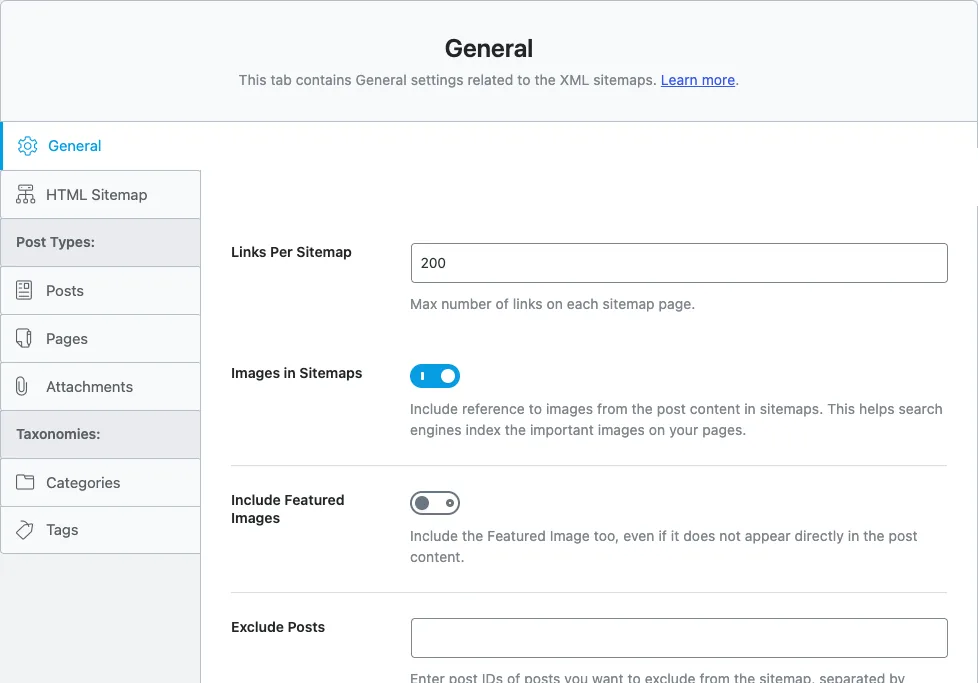
In Rank Math, open Rank Math SEO, then Sitemap Settings. You can choose which post types and groups to list.

The robots.txt file tells crawlers which folders to skip. Ours blocks admin and shop pages, and it points to the sitemap. Google also says to make sure your host or CDN does not block crawling.
Tip 16: Avoid duplicate pages
Sometimes one piece of content sits under several URLs. Google says this is not a spam violation, but it makes a poor experience, and search engines may waste time on extra URLs.
Google says each piece of content should live at one URL. Use a redirect, or a canonical link, to point the extra URLs to the best one.
Do this today: search your site for two pages that answer the same question. Merge them or redirect one.

Rank Math puts the canonical link in the Advanced tab of each post. Leave it empty and it uses the page’s own address. Set it only when a duplicate page needs to point to the main one. The same tab holds the robots options, such as noindex.
Bonus: check your page markup
Structured data is code that tells search engines what a page is, such as an article or a FAQ. Google says it must match the visible text on the page.

Rank Math adds an Article schema for you. You can open the Schema tab to change the type.
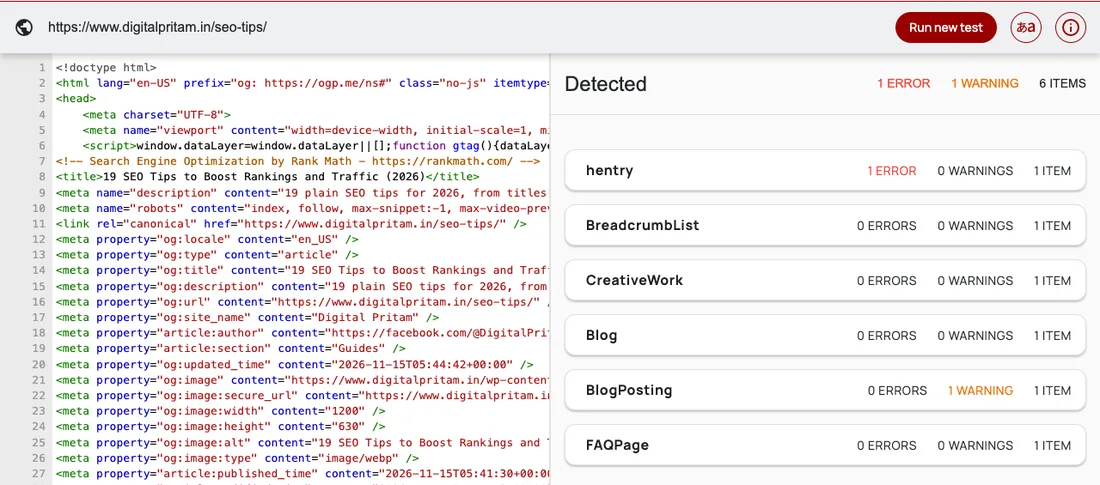
I ran this page through the Schema.org Validator on 15 Nov 2026. It found a FAQPage, a BreadcrumbList and a BlogPosting. It also flagged one error on hentry and one warning on BlogPosting. Hentry is old microformat markup that our theme adds. We are looking into both.
Tips 17 to 19: Growth and AI answers
Tip 17: Skip tricks and heavy ads
Google says repeating the same words again and again is tiring for readers and against its spam policies. It also says it does not use the keywords meta tag.
Ads are fine, but Google says they must not make a page hard to use. Ads or pop-up pages that get in the way of reading are a problem.
Do this today: read your top page on a phone. Remove anything that blocks the text.
Tip 18: Learn from Search Console
Search Console is a free tool from Google. Its Performance report shows clicks, impressions, click-through rate and average position, and the searches that show your site.
Use it to find searches where you appear but get few clicks. Those are good places to improve a title or a description.
Do this today: open the report, choose the last three months and sort the queries by impressions.
We did not capture Search Console screens for this page. Our own report needs a sign-in and shows private data, so we describe the Performance report in words instead.
Tip 19: Answer the follow-up questions
Google says AI Overviews and AI Mode may use a technique called query fan-out. In plain words, they run several related searches before they answer.
So a page that answers the main question and its follow-ups has a better chance to fit. Use a heading for each question, and give each a short, clear answer.
Do this today: add three follow-up questions to your best post, each with its own heading and a two-sentence answer.
This is the start of what people call AI SEO. The full story is in the types section below, and in our deep guide: SEO for AI search, ChatGPT, Claude and Gemini.
How to read your SEO plugin score
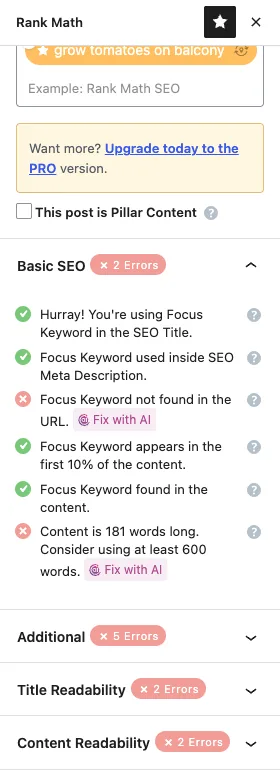
This is Rank Math’s Basic SEO list for the demo post. The list is a helper. For example, it says the content is 181 words long and asks for at least 600. That 600 is Rank Math’s rule, not Google’s. Google gives no word count.
Fix what helps the reader. Ignore a check that does not fit your page.
Before you publish: a 10-point checklist
Use this short list on every new page. It takes a few minutes and catches most problems.
- The first paragraph answers the main question.
- The title says what the page is about, in a few clear words.
- The description is unique to this page.
- Headings split the page, and paragraphs are short.
- There is one real example, screenshot or lesson from your own work.
- Every number has a source link and a date.
- Images are sharp, sit near matching text and have alt text.
- The page links to two related pages with clear link text.
- The page looks right and loads quickly on a phone.
- The author name, bio and date are visible.
After you publish, inspect the page in Search Console. Then wait a few weeks before you judge it.
Types of SEO: from the basics to AI answers
People use many names for SEO. Some are real jobs with their own rules. Some are new names for old ideas. This section explains each one in plain words and says what to do first. Every type has a source that I read on 15 Nov 2026.

| Type | In plain words | Start with | Source |
|---|---|---|---|
| On-page SEO | Making each page clear for readers and search | Title, headings, text and images | Google SEO Starter Guide |
| Off-page SEO | What happens away from your site: links, mentions, reviews | Pages worth linking to | Google spam policies |
| Technical SEO | Making your site easy to crawl and use | Crawling, sitemap, speed, mobile | Google: how Search works |
| Content SEO | Planning pages that answer real questions | Questions first, then clear answers | Google: helpful content |
| Mobile SEO | Making the phone version complete and fast | Same content on phone and desktop | Google: mobile-first indexing |
| Local SEO | Helping nearby customers find a business | A Business Profile with true details | Google: business details |
| Ecommerce SEO | Helping an online shop show its products in search | Product data and clean URLs | Google: ecommerce guide |
| International SEO | Sites in more than one language or country | One URL for each language | Google: international guide |
| Image and video SEO | Being found in image and video results | Sharp images, real captions, clear video pages | Google: images and video guides |
| Programmatic SEO | Building many pages from a template and data | A quality check on every page | Ahrefs; Google spam policies |
| Agency and enterprise SEO | SEO done by a team for clients or a very big site | Clear goals and plain reports | No official source |
Prices from mangools.com and seranking.com, read 15 Nov 2026. US dollars before tax.
On-page SEO
On-page SEO is everything you do on the page itself so readers and search engines understand it. That means the title, description, headings, text, images and links on the page.
- Write a clear title and a unique description (tips 4 and 5).
- Use short paragraphs and headings (tip 6).
- Add alt text to every image (tip 13).
Example: the Rank Math snippet editor in tip 4 is on-page SEO at work. Source: Google SEO Starter Guide.
Off-page SEO
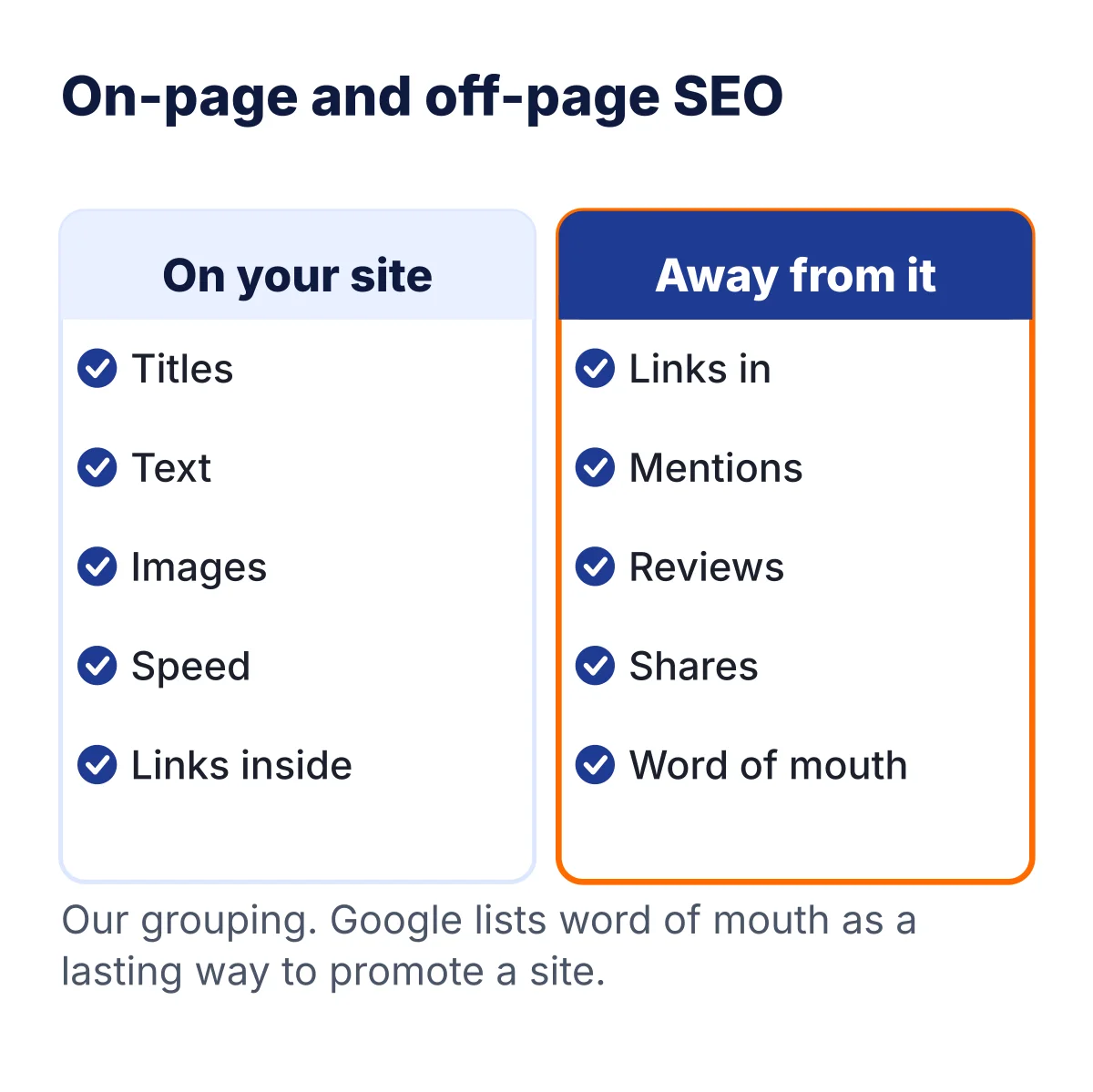
Off-page SEO is what happens away from your site. Links from other sites, mentions, reviews and word of mouth are the main parts. You cannot control them, but you can earn them with pages that are worth sharing.
- Make something people want to link to, such as a clear guide or your own data.
- Never buy links to push rankings. Google calls links made mainly to manipulate rankings link spam.
- Share your work where your readers already are, and let links come naturally.
Source: Google spam policies, updated 28 Aug 2026.
Technical SEO
Technical SEO makes sure search engines can reach, read and store your pages, and that people can use them. Google describes three stages: crawling, indexing and serving results.
- Let Google crawl your pages. Check robots.txt and any CDN or host rules (tip 15).
- Keep a sitemap and fix broken pages.
- Pass the Core Web Vitals (tip 14).
- Avoid duplicate pages (tip 16).
Example: our own robots.txt and sitemap are in tip 15. Sources: Google: how Search works and Google: AI features and your website.
Content SEO
Content SEO means planning and writing pages that answer real questions well. Google says its ranking systems aim to reward helpful, reliable, people-first content.
- Pick the question first. Our keyword research guide shows how.
- Answer it in the first paragraph, then explain.
- Add your own example, and update old posts.
Source: Google: helpful, reliable, people-first content, updated 5 Oct 2026.
Mobile SEO
Google uses the mobile version of a site’s content, crawled with its smartphone agent, for indexing and ranking. So the phone version must have the same content as the desktop version.
- Use a theme that works well on phones.
- Keep the same text, images and links on phone and desktop.
- Test your top page on a phone (tip 14).
Example: the PageSpeed report in tip 14 is a phone-sized test. Source: Google: mobile-first indexing.
Local SEO

Local SEO helps people near you find a shop, clinic or service. The main tool is a Google Business Profile with your true address, contact details, business type and photos.
- Claim your Business Profile and keep every detail true.
- Add your website to Search Console.
- Add structured data, such as a logo and breadcrumbs, if you can.
For example, a bakery in Pune would fill every field and add real photos of the shop. Source: Google: add business details.
Ecommerce SEO
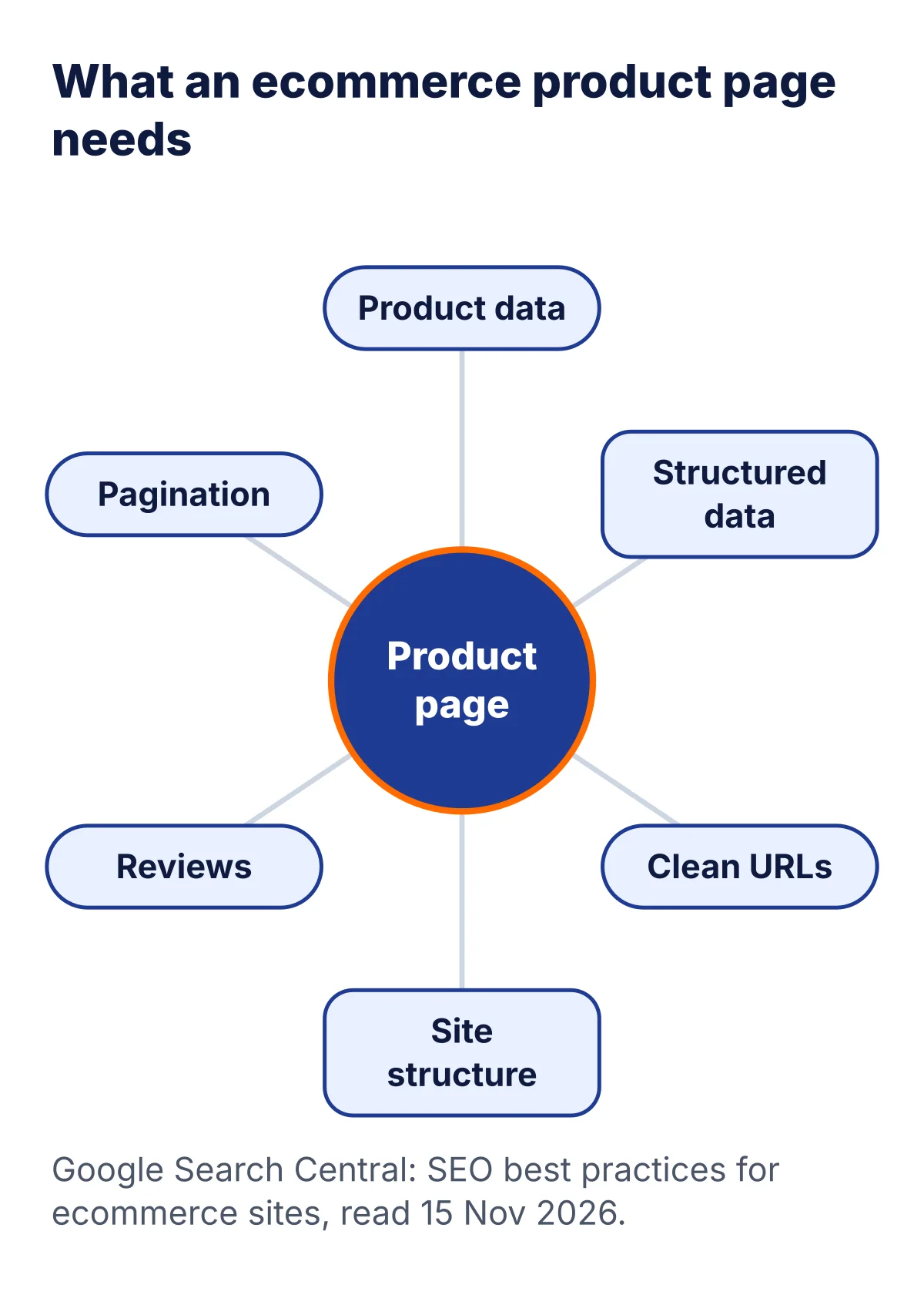
Ecommerce SEO helps an online shop appear in search. Google’s guide covers product data, structured data, clean URLs, site structure and pagination. New to online shops? Start with our guide, what is ecommerce.
- Give each product its own page with clear details.
- Add structured data that matches what the page shows.
- Avoid many URLs for the same product (tip 16).
Source: Google: SEO best practices for ecommerce sites, updated 10 Dec 2025.
International SEO
International SEO is for sites in more than one language or country. Google has a set of guides for multilingual and multi-regional sites. For example, a site with pages in English, Hindi and Marathi would read them first.
- Keep each language on its own URL.
- Translate the whole page, not only the title.
- Follow Google’s guide on telling it about each version.
Source: Google: international and multilingual sites.
Image and video SEO

Image and video SEO helps your pictures and videos show in image and video results. Google has a separate guide for each. One topic can be found in five places, as the picture shows.
- Use sharp images near matching text, with alt text (tip 13).
- Give each video its own page with a clear title and description.
Sources: Google: image SEO and Google: video SEO.
Programmatic SEO
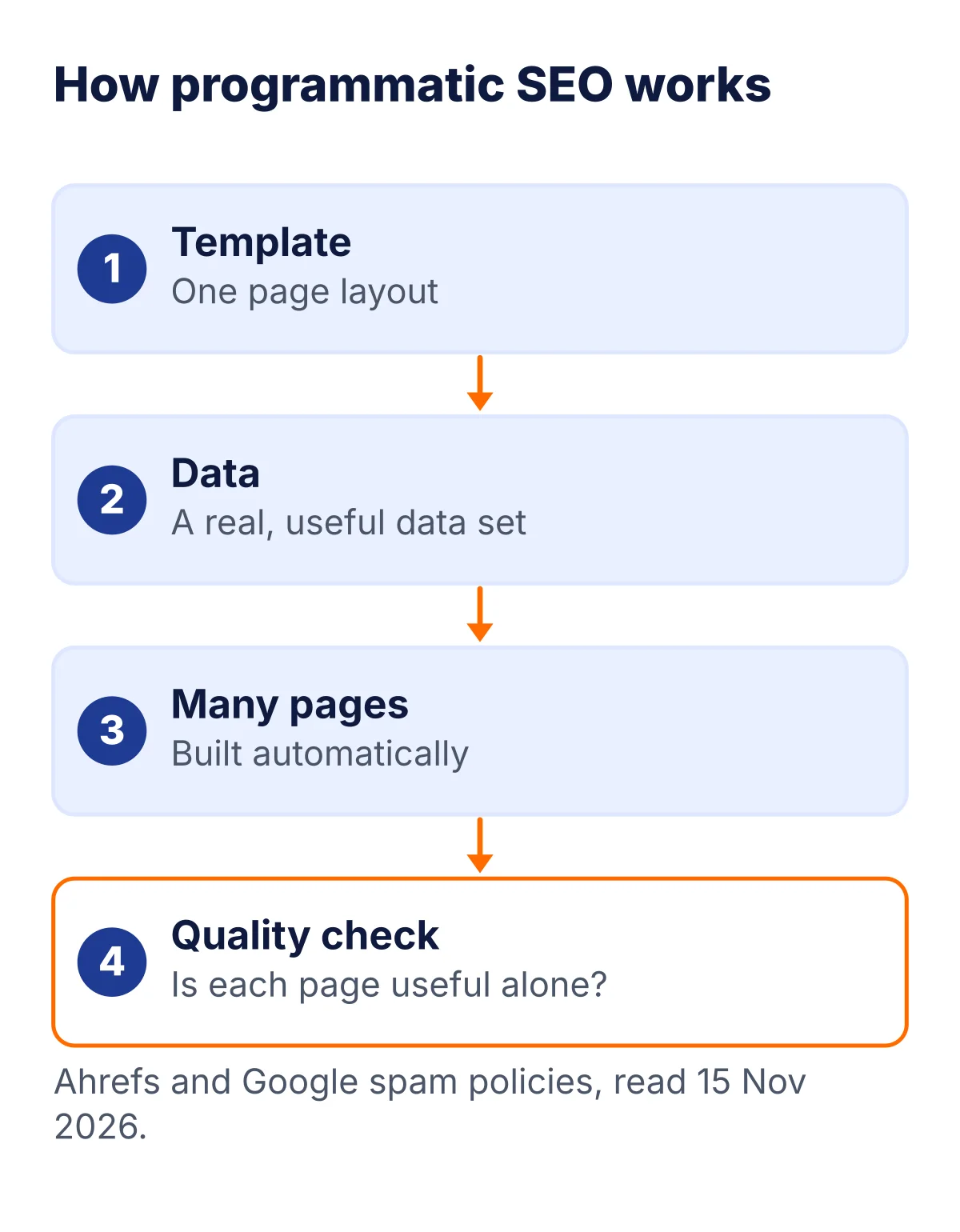
Programmatic SEO builds many pages from a template and a data set. Ahrefs describes it as creating keyword-targeted pages in an automatic way, and it names sites such as Canva and Notion as examples. Its main risk is thin pages with little value.
- Start with a real data set that people want.
- Check that each page is useful on its own.
- Do not make pages only to rank. Google calls mass pages made to manipulate rankings scaled content abuse.
Sources: Ahrefs: programmatic SEO explained, updated 2 Sep 2026, and Google spam policies.
Agency and enterprise SEO
Agency SEO is SEO done for clients by a company. Enterprise SEO is SEO for a very large site with many teams. There is no official definition of either, so these are plain words.
- Ask what they will change on your site and how they will show results.
- Be careful with anyone who guarantees rankings. Google says there are no secrets that will automatically rank a site first.
- Check their work against Google’s own guide.
Source for the last point: Google SEO Starter Guide.
AI-era SEO: GEO, AEO, LLMO, AIO and agentic SEO
Many new names have appeared for SEO in the age of AI answers. Before you pay for any of them, read what Google says.
Google's guide says optimizing for generative AI features on Google Search is still SEO. It also lists things you can ignore: special AI text files such as llms.txt, chopping content into chunks, rewriting content just for AI, chasing fake mentions, and focusing too much on structured data.
That does not make the new terms fake. They describe real places, such as AI Overviews, AI Mode and chatbots. But most describe the same work with a different emphasis. Here is what each term means and where it comes from.

| Term | What it means | Where it comes from | Plain advice |
|---|---|---|---|
| GEO | Generative engine optimization: helping your content show up in answers written by generative AI engines | A 2023 research paper by Princeton and other authors, published at KDD 2024. The authors report up to 40 percent more visibility in their tests | Use clear facts, quotes and sources, and test it yourself |
| AEO | Answer engine optimization: shaping a page so AI tools and answer boxes can quote its answer | Used by publishers such as Search Engine Land and HubSpot. Google names AEO and GEO in its mythbusting list | Put the answer first, then explain |
| LLMO | Large language model optimization: improving how accurately models such as ChatGPT, Claude and Gemini describe and cite a brand | Used by publishers such as Search Engine Land and Serpstat. It overlaps with GEO | Keep your brand facts the same everywhere |
| AIO | No fixed meaning: it can mean Google’s AI Overviews, or AI optimization in general | Field guides note the confusion | Ask which one the person means |
| Agentic SEO | Two meanings: AI agents that do SEO tasks, or preparing a site for AI agents that search, compare and buy | Visilay explains both. Google’s guide has a section on agentic experiences | Use clean HTML and forms that work |
| AI SEO | SEO for AI answers, or SEO work done with AI tools. People use it both ways | General publisher use | Ask which meaning is used |
Prices from mangools.com and seranking.com, read 15 Nov 2026. US dollars before tax.
GEO and AEO in practice
In practice, GEO and AEO ask for the same habits that this guide already teaches. You make the page easy to quote, and you make it easy to trust.
- Answer the main question in the first two sentences of a section.
- Add a source and a date next to each fact.
- Use headings that match real questions, and add a short FAQ.
- Make sure structured data matches the visible text. Google says so.
Example: this page has a FAQ at the end, and the Schema.org Validator screenshot in tip 16 shows it found as FAQPage. To see how AI answers are built and what to do for ChatGPT, Claude and Gemini, read our deep guide, SEO for AI search.
Agentic SEO and SEO for agents
An AI agent is a program that can search, compare and sometimes buy for a person. Visilay describes agentic SEO as two things: agents that do SEO work, and sites built so agents can use them. Google’s guide has a section on agentic experiences for site owners.
- Use clean, semantic HTML. Many agents read the page’s accessibility tree, not how it looks.
- Make forms and buttons work without hidden steps.
- Do not block AI search bots in robots.txt by mistake.
- If you sell online, show prices in a readable way and use structured data.
Sources: Visilay: agentic SEO, 10 Oct 2026, and Google: optimizing for generative AI features, updated 10 Jul 2026.
Two terms we could not verify
You may see the labels IEO or OOG. We searched and found no credible source that defines either one as an SEO term, so we left them out of this guide. If someone sells you either one, ask them for a definition and a source.
To watch how your pages do in Google’s AI features, Google’s guide points to the Generative AI performance report in Search Console. Source for the AI terms above: GEO: Generative Engine Optimization (arXiv), Search Engine Land on AEO, HubSpot AEO guide and Serpstat on LLMO.
Tools that make the tips easier
You can do all 19 tips for free. A paid tool saves time when you want daily rank tracking, site checks and reports in one place. Two we compare most are Mangools and SE Ranking.
| Mangools Basic | SE Ranking Core | |
|---|---|---|
| Price on the yearly plan | $18.85 a month ($226.20 a year) | $103.20 a month |
| Yearly cost with 18% GST | ₹25,346 | ₹1,38,766 |
| Rank tracking | 200 keywords, weekly updates | 2,000 keywords, daily |
| Keyword research | 100 lookups a day | Unlimited |
| Site checks | 20 site analyses a day | Website and on-page audit |
| Backlink data | 100,000 a month | Unlimited research |
| AI search tracking | AI Search Watcher PRO, 500 prompts | 25 prompts daily, 5 AI engines |
| Try before paying | Free account, 5 lookups a day | 14-day free trial, no card |
Prices from mangools.com and seranking.com, read 15 Nov 2026. US dollars before tax.
US dollars before tax, from mangools.com and seranking.com on 15 Nov 2026. Rupees at US$1 = ₹94.96 (16 Oct 2026 ECB rate) plus 18% GST.
For the full price breakdown, read our Mangools pricing and SE Ranking pricing guides. For a wider list, see our AI SEO tools comparison.
Pick Mangools ifOur pick- You want the lowest paid price
- You track a small set of keywords
- You are a solo writer or blogger
- Rank tracking updates weekly on Basic.
Pick SE Ranking if- You want daily rank tracking and a site audit
- You manage several sites
- You want to try free for 14 days first
- It costs more: $103.20 a month on the yearly plan.
A seven-day start
- 1Day 1: Check your titles
Rewrite any title that does not say what the page is about.
- 2Day 2: Add alt text
Describe every image on your top three pages.
- 3Day 3: Fix links
Add clear links between related posts.
- 4Day 4: Test on a phone
Open your top page and note slow or jumpy parts.
- 5Day 5: Open Search Console
Read the Performance report and note the top searches.
- 6Day 6: Update one old post
Fix facts, add sources and write the date you checked it.
- 7Day 7: Add follow-up questions
Answer three related questions in your best post.
SEO tips for a brand new site
A new site starts with no history, and that is normal. Google says that following its Search Essentials makes a site more likely to show up. It also says there is no guarantee that any site is added to its index.
So begin with the basics. Publish a few really helpful pages. Give each one a clear title and a clear purpose. Link the pages together so Google can find them.
Google says links from other pages are how it finds most new pages. It also says that links from other sites happen naturally over time. You can help by sharing your work, and by talking to people who care about the topic.
Do not buy shortcuts. Be patient, keep improving, and keep a record of what you changed. In a few weeks, the Performance report will start to show you what works.
Your 30-day SEO plan
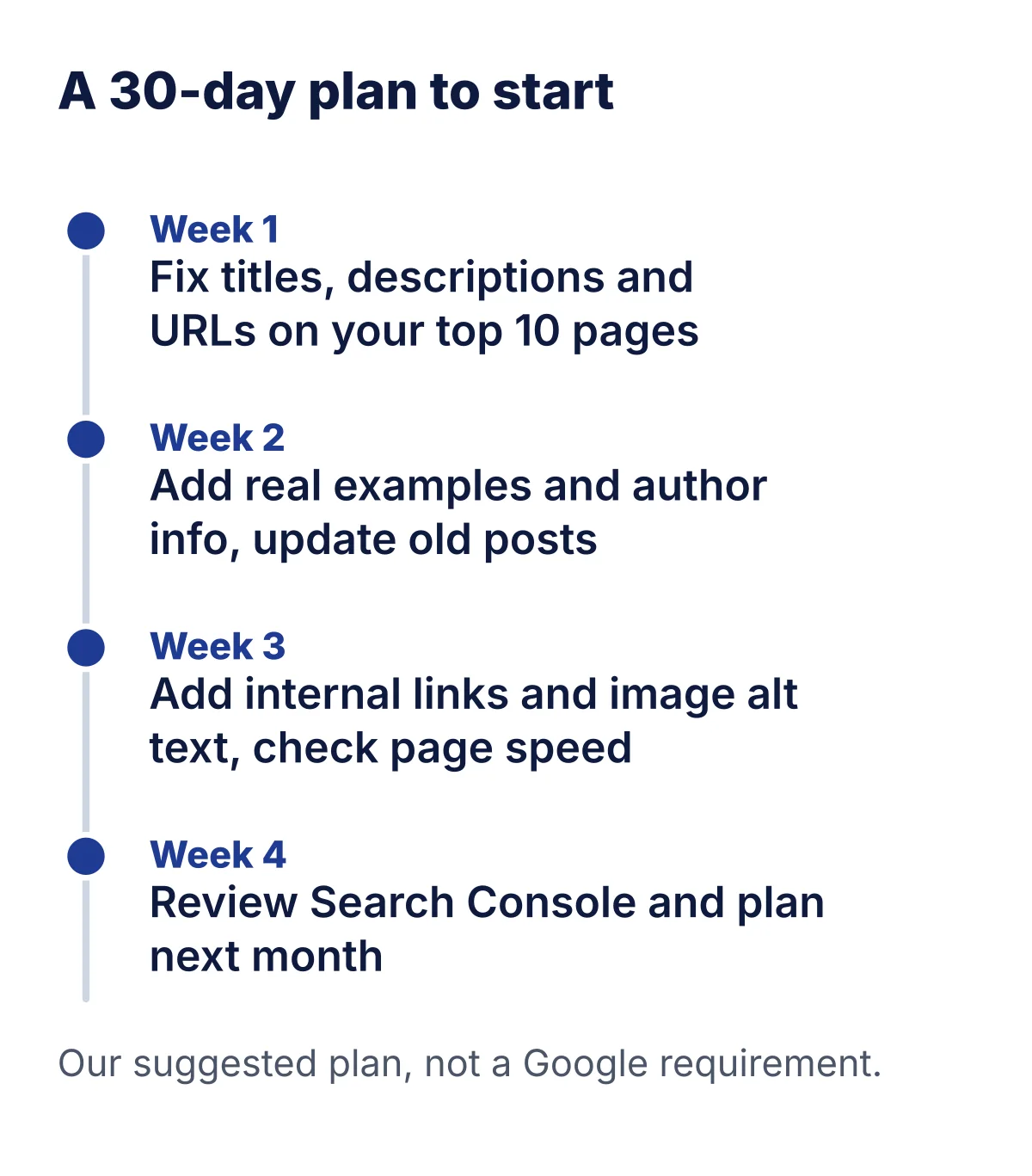
Do not try to do everything at once. This plan spreads the work over four weeks. It is our suggestion, not a Google rule.
- Week 1: fix the titles, descriptions and URLs of your top 10 pages.
- Week 2: add one real example to each page, add author info and update old posts.
- Week 3: add internal links and alt text, and check page speed on a phone.
- Week 4: read the Performance report in Search Console, then plan next month.
Write down the date of each change. In a few weeks you can look back and see what helped.
How long until SEO works?
Google is honest about this. A change can show in a few hours or take several months. Some changes make no visible difference at all.
Google suggests waiting a few weeks before you decide whether a change helped. Write down the date of each change, so you can look back.
Check the Performance report in Search Console now and then. Look for rising impressions first. Clicks usually follow.
Mistakes to avoid
- Doing everything at once. Change a few things, then wait and look.
- Writing for the keyword. Write for the reader and let the keyword fit naturally.
- Copying a rival’s page. Google asks for original value.
- Forgetting old posts. Out-of-date facts hurt trust.
- Chasing tricks. Stuffing words and hiding text are against Google’s rules.
- Judging in a week. Wait a few weeks, as Google suggests.
How we chose
Frequently asked questions
What are the best SEO tips for beginners?
Start with three: write for people first, match the reason behind each search, and make every page easy to read. Then fix titles, links and page speed. The 19 tips on this page are in a sensible order.
How long does SEO take to work?
Google says a change can show in a few hours or take several months. It suggests waiting a few weeks before you judge the result. Not every change makes a visible difference.
Is SEO still worth it with AI answers?
Google says the usual SEO practices still apply to AI Overviews and AI Mode, and it lists no extra requirement. A page must be indexed and able to show with a snippet.
Do I need a paid SEO tool?
No. Search Console and Google’s own guides cost nothing. A paid tool helps when you want daily rank tracking, site checks and reports in one place.
How many keywords should I use on a page?
Google gives no number. Pick one main keyword and a few related phrases, and write naturally. Repeating the same words again and again is against Google’s spam policies.
Does Google use the keywords meta tag?
No. Google’s SEO Starter Guide says Google Search does not use the keywords meta tag. You can leave it out.
What are Core Web Vitals?
They are three page experience scores from Google. Largest Contentful Paint should happen within 2.5 seconds. Interaction to Next Paint should be 200 milliseconds or less. Cumulative Layout Shift should be 0.1 or less.
Do links from other sites matter?
Google says it finds most new pages through links, and that links from other sites happen naturally over time. It lists word of mouth as one of the most lasting ways to promote a site.
Can I do SEO myself?
Yes. Google says there are no secrets that will automatically rank a site first. If you are short on time, you can hire a professional. Check their work against Google’s own guide.
What is GEO?
GEO means generative engine optimization. It is the work of helping your content show up in answers written by generative AI engines. The term comes from a 2023 research paper. Google says the basics are still SEO.
Is AEO different from SEO?
AEO means answer engine optimization. It shapes a page so AI tools and answer boxes can quote it. It overlaps with SEO. Clear answers, trust and a good page help both.
Do I need an llms.txt file?
For Google Search, no. Google’s guide says you can ignore special AI text files such as llms.txt. Other tools may read them, but there is no Google benefit.
What do IEO and OOG mean?
We found no credible source that defines IEO or OOG as SEO terms, so we do not use them. If someone sells you either one, ask for a definition and a source.
Which type of SEO should I start with?
Start with on-page and content SEO. They fit every site. Add local SEO if you serve nearby customers, or ecommerce SEO if you sell products online.
About this page

- WordPress developer and designer, builds sites for clients
- WordCamp Asia Communication Co-Lead
- 14K+ subscribers on the DigitalPritam YouTube channel
How we checked
Updated 15 Nov 2026How I got these numbers
I read Google’s guides and the Web Vitals page on 15 Nov 2026. Tool prices and limits come from the Mangools and SE Ranking pages read that day. Rupee figures use the 16 Oct 2026 ECB rate (US$1 = ₹94.96) with 18% GST. The sums are mine, and prices change.
What we tested and what we only read. The Rank Math screens, WordPress settings and checks are real screenshots from a throwaway local test site. The PageSpeed and Schema.org results are real runs on this page on 15 Nov 2026. Everything else is read from the sources listed here. We did not capture Search Console, Google results pages or any logged-in account.
Sources
- Google Search Central: Optimizing your website for generative AI features, updated 10 Jul 2026, read 15 Nov 2026
- Google Search Central: How Search works, read 15 Nov 2026
- Google Search Central: Spam policies, updated 28 Aug 2026, read 15 Nov 2026
- Google Search Central: Mobile-first indexing, Ecommerce, Business details, International and Image guides, read 15 Nov 2026
- Murahari et al.: GEO: Generative Engine Optimization (arXiv 2311.09735; KDD 2024), read 15 Nov 2026
- Ahrefs: Programmatic SEO explained, updated 2 Sep 2026; Visilay: Agentic SEO, 10 Oct 2026; Search Engine Land, HubSpot and Serpstat on AEO and LLMO, read 15 Nov 2026
- PageSpeed Insights report for this page, 15 Nov 2026, 6:00 pm IST; Schema.org Validator run on this page, 15 Nov 2026
- Google Search Central: SEO Starter Guide, read 15 Nov 2026
- Google Search Central: Creating helpful, reliable, people-first content, read 15 Nov 2026
- Google Search Central: AI features and your website, read 15 Nov 2026
- Google Search Central: Influencing your title links, read 15 Nov 2026
- web.dev: Web Vitals, read 15 Nov 2026
- Search Console Help: Performance report, read 15 Nov 2026
- Mangools plans and pricing (mangools.com/plans-and-pricing), read 15 Nov 2026
- SE Ranking pricing (seranking.com/pricing), read 15 Nov 2026
What to do next
Pick three tips and do them this week. Start with a clear title, one real example and a check in Search Console. Then come back and work down the list.
Keep reading
 SEO for AI search
 How to do keyword research
 Best AI SEO tools
 Best WordPress SEO plugin
 SE Ranking vs Semrush
Try the free trial, and check the price on the day you buy. Plans change.
 FREE PDF
Get the Hostinger setup checklist, plus every sale alert
The exact steps we use on our lab sites, and an email when each big hosting sale opens.
Sent instantly. Deal alerts until 1 Dec. Unsubscribe in one click.


 Pritam Sonone