








Disclosure: some links on this page are affiliate links. If you buy through them we may earn a commission, at no extra cost to you.
VPS hosting gives you your own slice of a powerful server. Nobody else can use your CPU, memory or storage. The slice has its own operating system, and you control it.
Think of a block of flats. Shared hosting is one big room that many families share. A VPS is your own flat: your own door, your own lights, and you decide what goes inside. A dedicated server is the whole building.
This guide explains what a VPS is, how it works and who needs one. It shows real screenshots of Hostinger’s VPS pages, a demo of a first VPS session, a map of server locations and Hostinger’s prices in rupees, all read on 15 Nov 2026.
Hostinger VPS plans most people look at

₹14,376 upfront. Renews at ₹999 a month.
- 1 vCPU and 4 GB RAM
- 50 GB NVMe and 4 TB bandwidth
- Free weekly backups
₹18,696 upfront. Renews at ₹1,199 a month.
- 2 vCPU and 8 GB RAM
- 100 GB NVMe and 8 TB bandwidth
- Free weekly backups
₹26,376 upfront. Renews at ₹2,399 a month.
- 4 vCPU and 16 GB RAM
- 200 GB NVMe and 16 TB bandwidth
- Free weekly backups
Prices as shown on hostinger.com/in/vps-hosting on 15 Nov 2026, paid upfront for 24 months, before GST.
This site runs on Hostinger. Hostinger is also our affiliate partner. The prices and facts below come from Hostinger’s own pages, read on 15 Nov 2026.
We have not tested Hostinger VPS for this page. We read its plans, prices, locations and guides on 15 Nov 2026 and took dated screenshots of its public pages. The terminal demo further down ran on our own Mac, not on a Hostinger server.
On this page15 sections
What does VPS mean?
VPS means virtual private server. A host splits one physical server into several virtual ones. Each gets its own share of CPU, RAM and storage.
Hostinger says a VPS sits between shared hosting and a dedicated server. You get more control and steadier power than shared hosting. You pay less than for a whole machine.
Virtual means the server is made of software on top of real hardware. Private means your slice is set apart. Server means it stays on and answers requests from the internet, all day, every day.
How does a VPS work?
A program called a hypervisor runs on the physical server. It splits the server’s CPU, RAM, storage and bandwidth into separate parts. Each part is one virtual server. Hostinger’s VPS plans are called KVM, which is a common hypervisor.
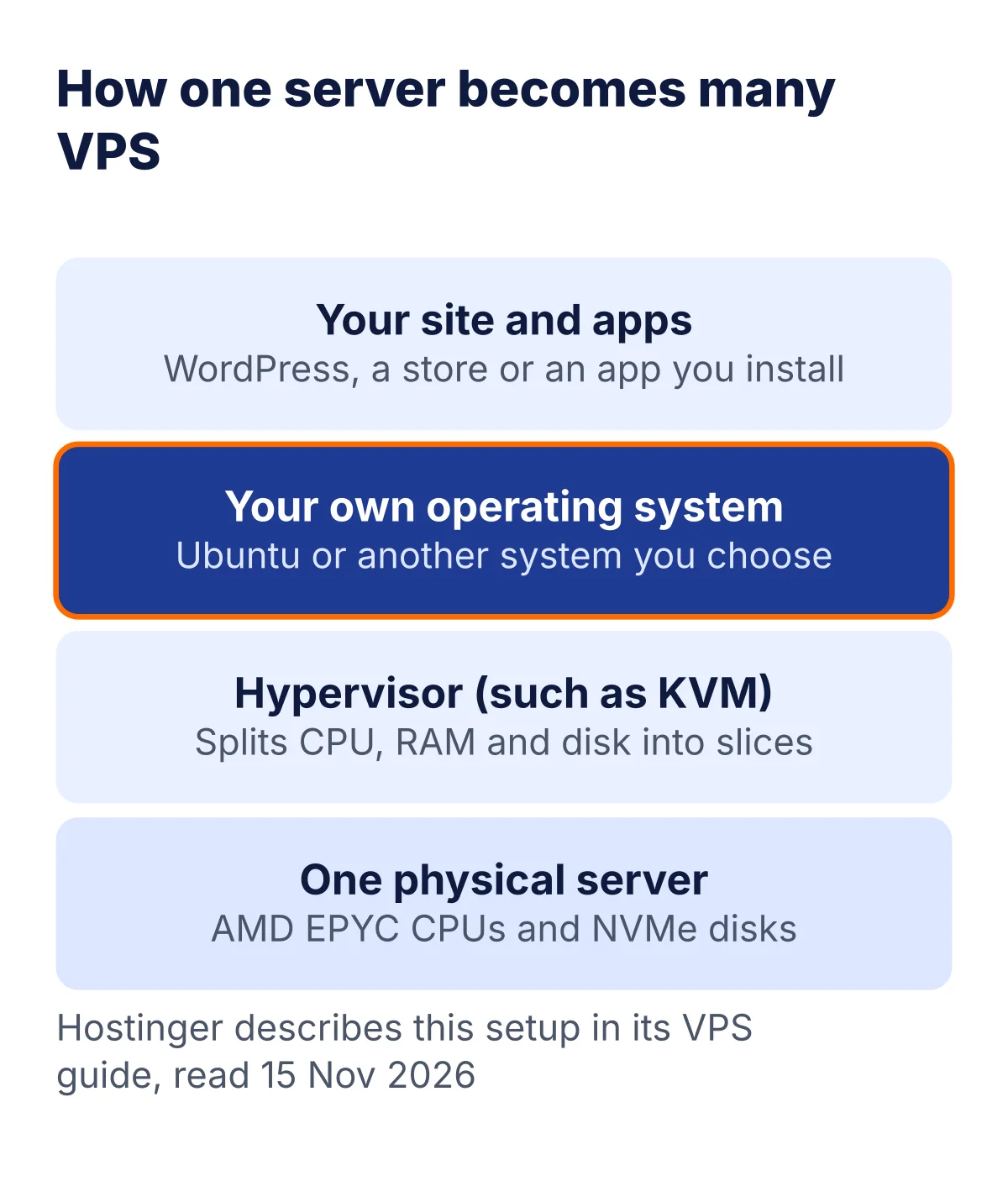
Each virtual server runs its own operating system. If a neighbour on the same machine gets busy, your reserved share stays yours. You also get root access. That means you can install and change almost anything. It also means you can break almost anything.
- Your slice has a fixed number of vCPU cores, GB of RAM and GB of disk.
- You pick the operating system, such as Ubuntu or AlmaLinux.
- You can reinstall, restart and resize the server from a control page.
- The host looks after the hardware, the power and the network.
VPS vs shared, cloud and dedicated hosting
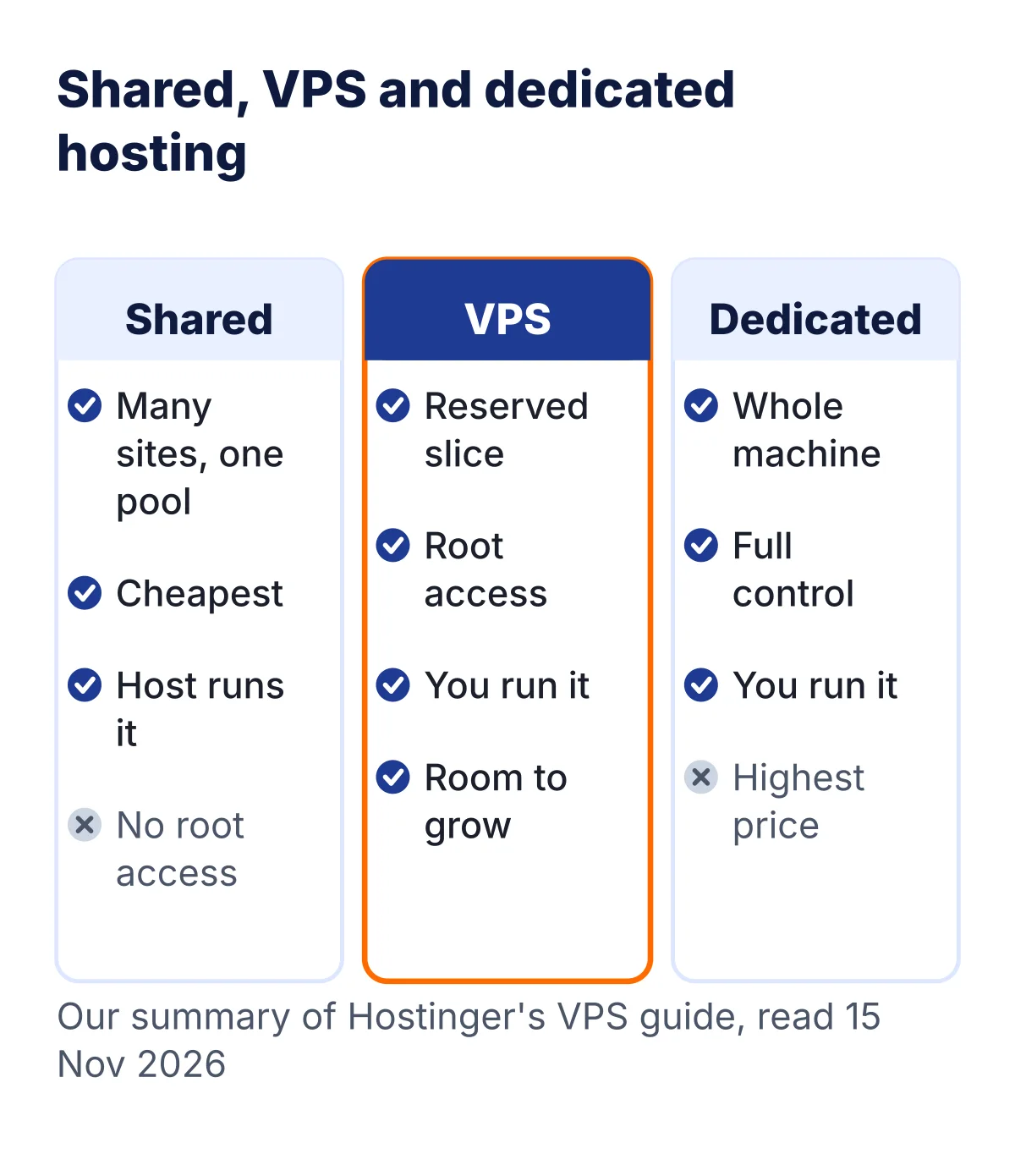
| Shared | VPS | Cloud | Dedicated | |
|---|---|---|---|---|
| Resources | Shared | Reserved for you | Spread over servers | A whole machine |
| Root access | No | Yes | Not read | Yes |
| Who manages it | The host | Mostly you | The host | You |
| Hostinger price from | ₹69 a month, 48 months | ₹599 a month, 24 months | ₹599 a month, 48 months | Not read |
Prices from hostinger.com, read 15 Nov 2026.
Our WordPress hosting vs web hosting guide explains the shared side. For Hostinger’s shared plans, see our pricing guide.
Pros and cons of a VPS
What you get
- Reserved CPU, RAM and storage
- Root access and full control
- Room to upgrade as you grow
- A server in the country you choose
What to watch
- You handle updates and security
- More to learn than shared hosting
- Costs more than a basic plan
- Moving country later means a reinstall
Managed or self-managed: who does the work?
A self-managed VPS means the server is yours to look after. A managed plan means the host does much of that work for you. Hostinger’s VPS plans on this page are self-managed.
What you do on a self-managed VPS
Apply system and software updates on a schedule.
Your jobOpen only the ports you use, such as 22, 80 and 443.
Your jobHostinger lists free weekly backups. Decide if that is often enough.
Shared jobHostinger says its AI web terminal and its assistant, Kodee, can run server tasks from plain-language instructions, and that a beginner can use a VPS this way. We have not tested these tools. Treat them as a helper, not as a replacement for knowing what you ask the server to do.
Who needs a VPS?
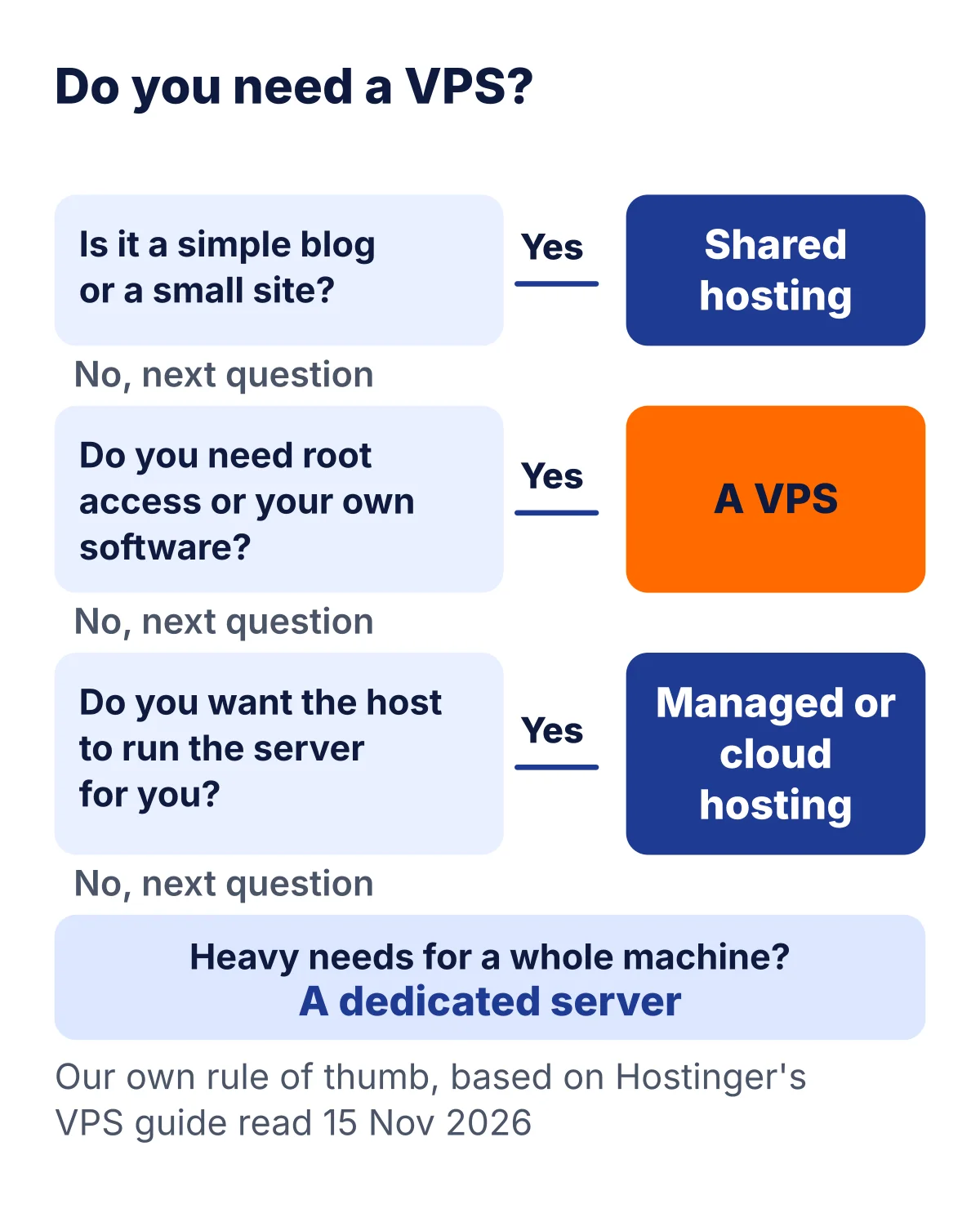
Which one are you?
Shared hosting is easier and cheaper.
Stay sharedYou want reserved power and control.
Try a VPSOne server can hold them all.
Try a VPSNot sure yet? Read how we think about the first host for a new site in our guide on how to start a blog. A VPS is rarely the first step.
What can you run on a VPS?
Hostinger’s page lists these uses. Hostinger’s stack picker also shows one-click templates, which we show below.
- AI agents and automation tools
- Open-source apps you host yourself
- Web apps and APIs
- Databases and storage
- Busy sites and online stores
Want a worked example? Read our cheapest VPS for n8n page and our fuller Hostinger VPS guide. To compare VPS providers, see our best VPS hosting in India list.
Operating systems and control panels
When you set up a VPS, you pick what goes on it. Hostinger’s picker has three tabs: applications, plain operating systems and control panels. A control panel is a web page that does server chores for you, such as creating sites and email.
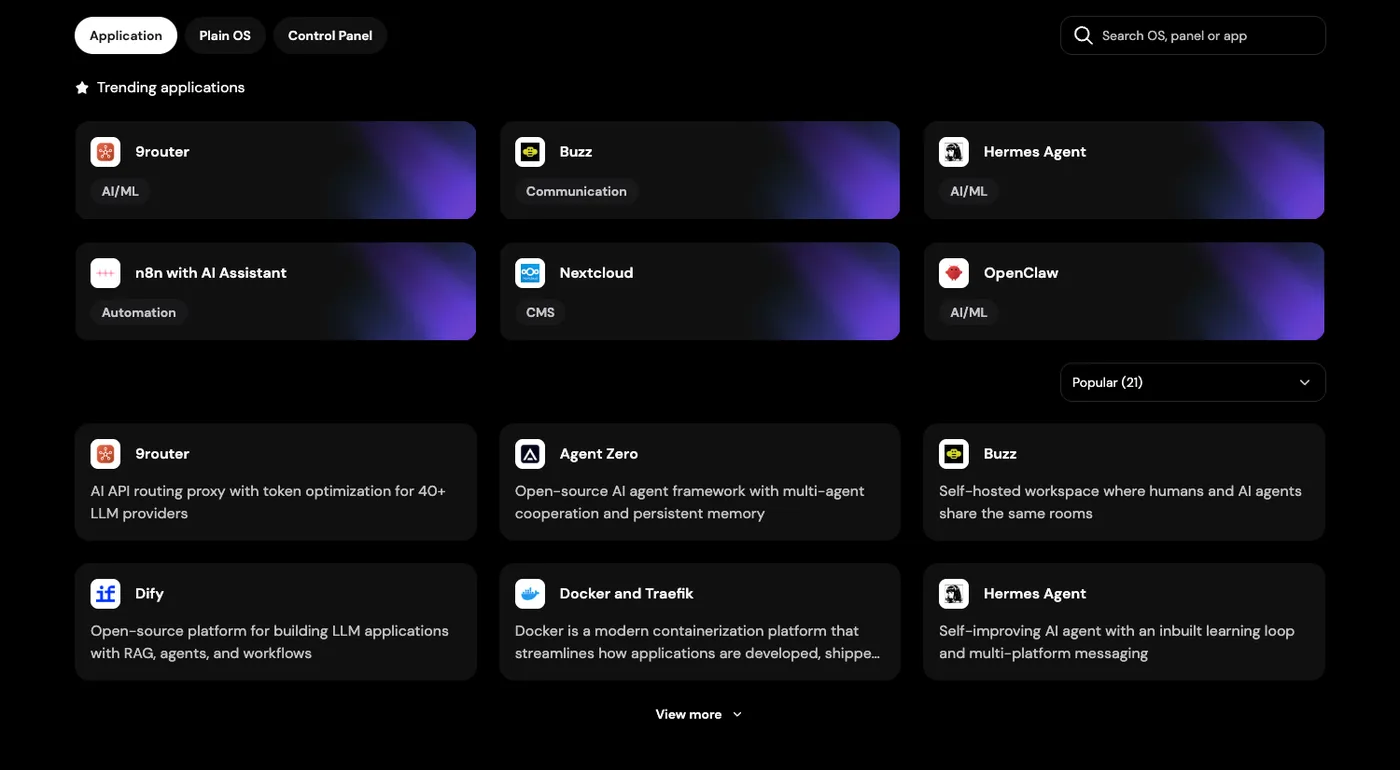
These were some of the choices on Hostinger’s India VPS page on 15 Nov 2026.
- Plain systems: Ubuntu, Debian, AlmaLinux, Rocky Linux, Fedora, CentOS, openSUSE, Alpine and Arch.
- Control panels: cPanel, Plesk, DirectAdmin, CloudPanel, CyberPanel and Webmin.
- App panels: Coolify and Dokploy.
We did not check licence costs for paid panels. Read the page before you pick one.
If you are new to Linux, pick Ubuntu. It is the system most guides and answers online use, so you will find help quickly.
Hostinger VPS plans in rupees

| Plan | vCPU and RAM | Disk and bandwidth | A month, paid upfront | Renews at |
|---|---|---|---|---|
| KVM 1 | 1 vCPU, 4 GB | 50 GB NVMe, 4 TB | ₹599 (₹14,376) | ₹999 a month |
| KVM 2 | 2 vCPU, 8 GB | 100 GB NVMe, 8 TB | ₹779 (₹18,696) | ₹1,199 a month |
| KVM 4 | 4 vCPU, 16 GB | 200 GB NVMe, 16 TB | ₹1,099 (₹26,376) | ₹2,399 a month |
| KVM 8 | 8 vCPU, 32 GB | 400 GB NVMe, 32 TB | ₹2,199 (₹52,776) | ₹4,399 a month |
Prices from hostinger.com, read 15 Nov 2026.
As shown on hostinger.com/in/vps-hosting on 15 Nov 2026, 24-month term paid upfront, before GST.
| Plan | Upfront, 24 months | With 18% GST (our sum) | Renewal term total |
|---|---|---|---|
| KVM 1 | ₹14,376 | ₹16,964 | ₹23,976 (₹999 x 24) |
| KVM 2 | ₹18,696 | ₹22,061 | ₹28,776 (₹1,199 x 24) |
| KVM 4 | ₹26,376 | ₹31,124 | ₹57,576 (₹2,399 x 24) |
| KVM 8 | ₹52,776 | ₹62,276 | ₹105,576 (₹4,399 x 24) |
Prices from hostinger.com, read 15 Nov 2026.
The GST column is our own arithmetic at 18%. Our 23 Oct 2026 cart check showed GST added at checkout, and Hostinger’s page lists the prices without it. The renewal column multiplies Hostinger’s renewal price by 24 months. Check the final total at checkout.
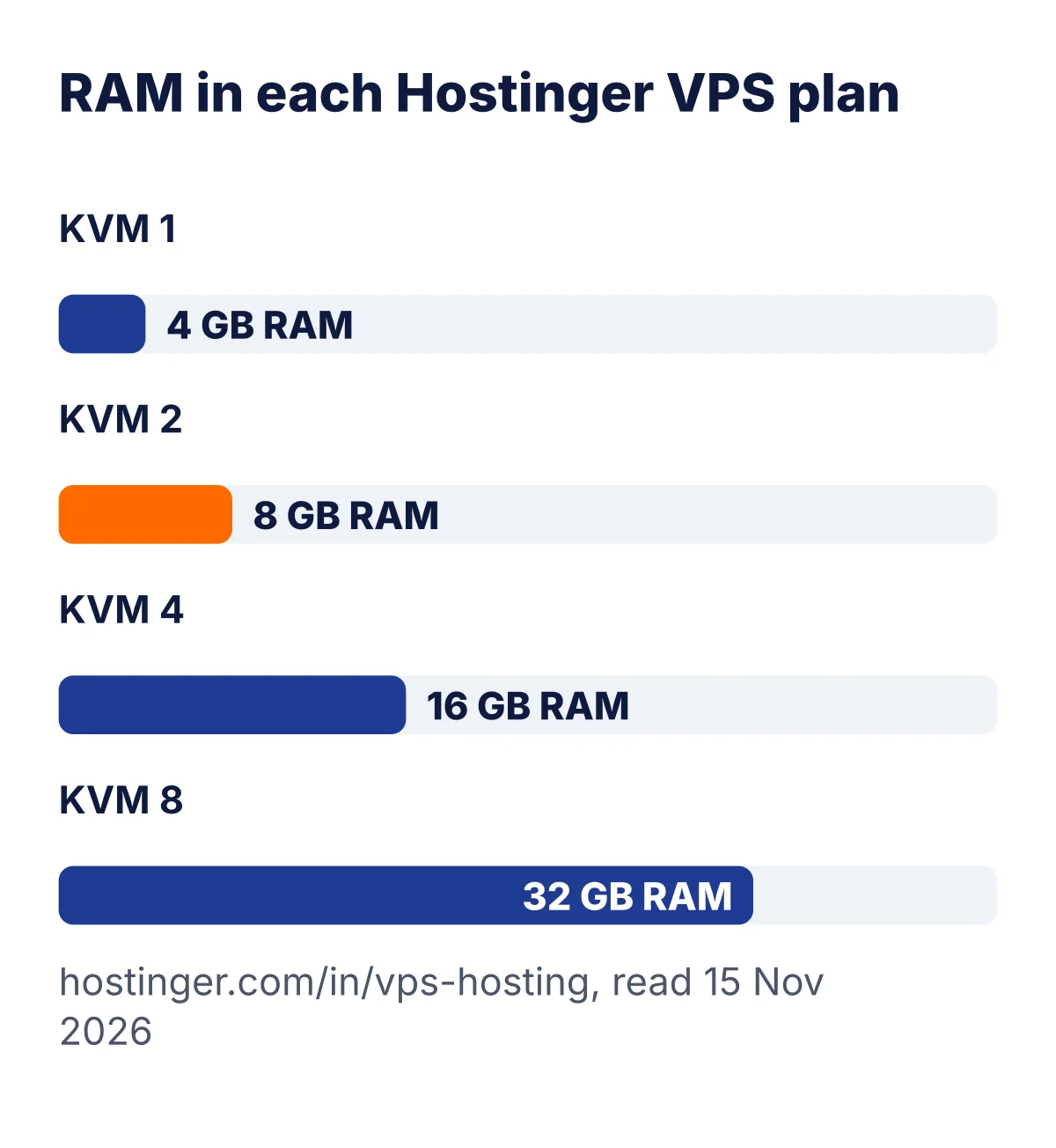

Every plan lists AMD EPYC processors, NVMe storage, a 1 Gbps network, firewall management, a public API and an AI web terminal. Hostinger also lists free weekly backups, no setup fees and a 30-day money-back guarantee. Look at the renewal price too. On KVM 2, it goes from ₹779 to ₹1,199 a month after the first term.
Check the price on the day you buy. Plans and rules change.
Where are the servers? Locations and latency
The place where your server sits matters. Every click travels from your visitor to your server and back, and a shorter trip is faster. Hostinger says its VPS runs in 10 data centres across four continents, from Boston to Jakarta.
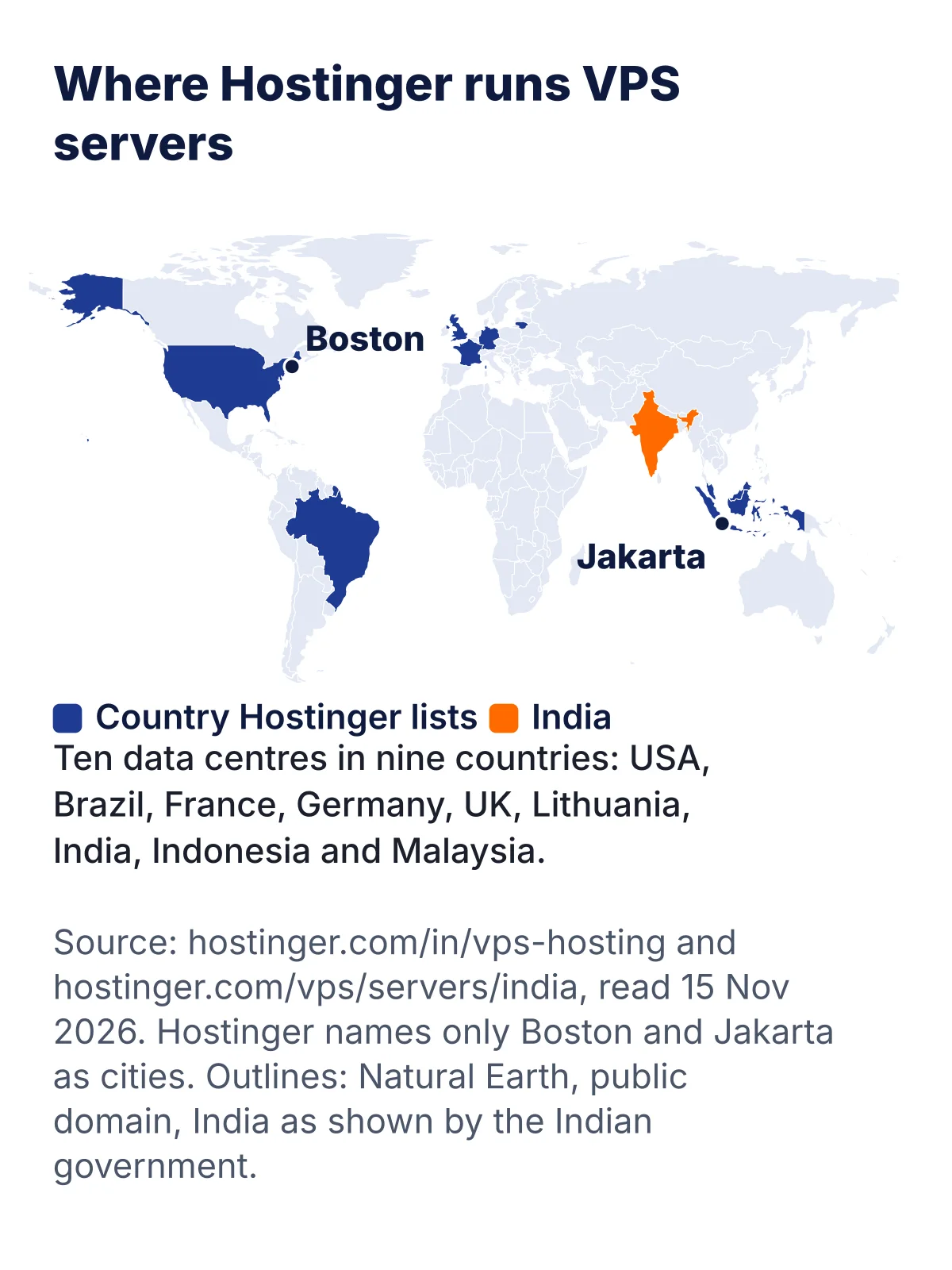
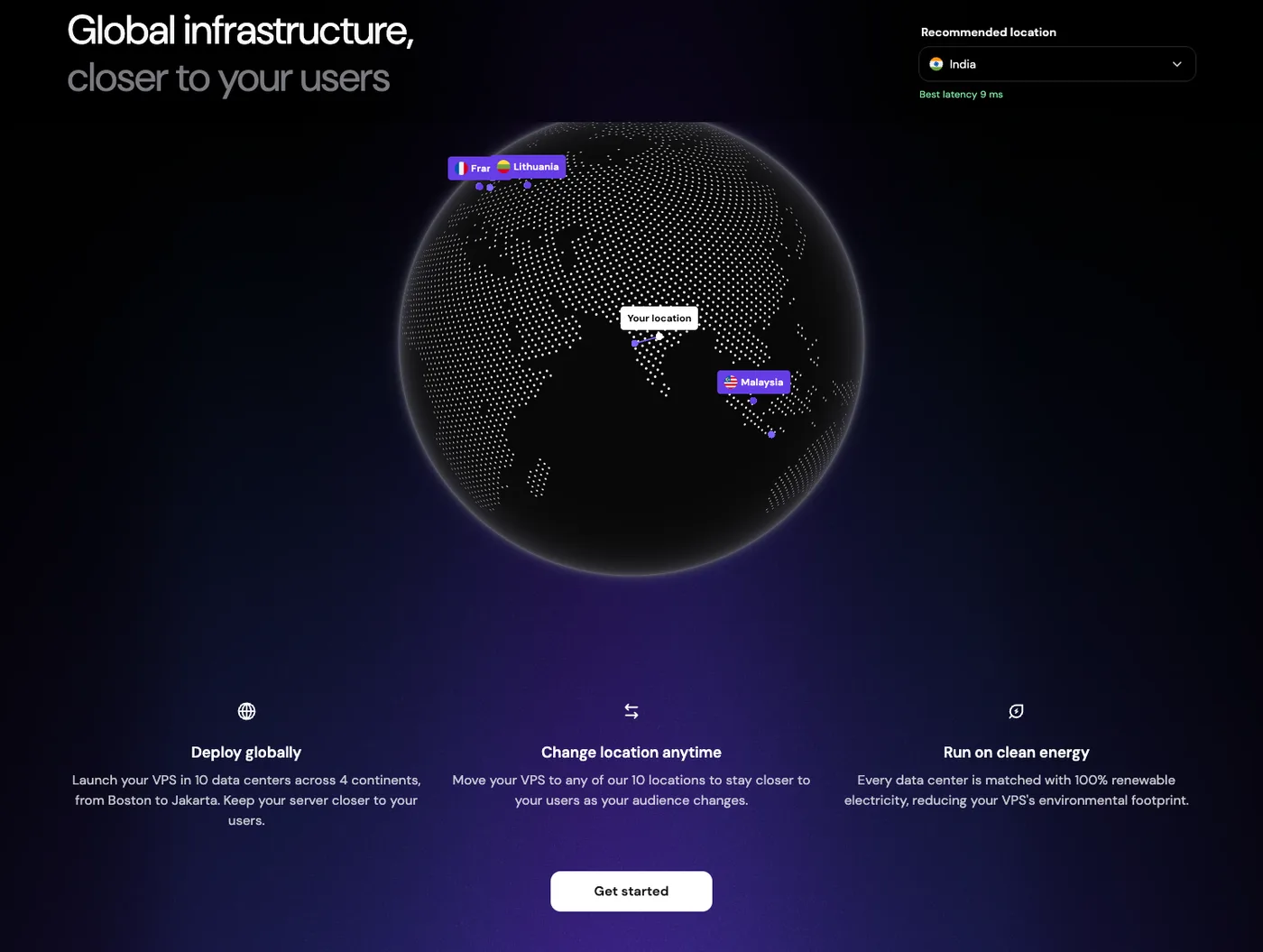
- Hostinger lists data centres in the USA, Brazil, France, Germany, the UK, Lithuania, India, Indonesia and Malaysia.
- If most of your visitors are in India, an India server is the closest choice. Hostinger says it keeps pages quick for users across India and nearby regions.
- Your location is set during setup. Hostinger says moving later means reinstalling the VPS, which permanently deletes all data, including backups and snapshots.
- In Hostinger’s cart on 23 Oct 2026, we saw an India location listed with about 8 ms from Pune.
Choose the location before you pay. Moving a VPS to another country later wipes it, so back up first and plan the move.
See a first VPS session, step by step
To show what using a VPS looks like, we ran a small demo on our own Mac. We started an Ubuntu 24.04 server inside a Docker container, logged in with SSH, set up a firewall and installed the nginx web server. This is a local demo, not a Hostinger server, so its CPU and memory are our Mac’s, not a plan’s.
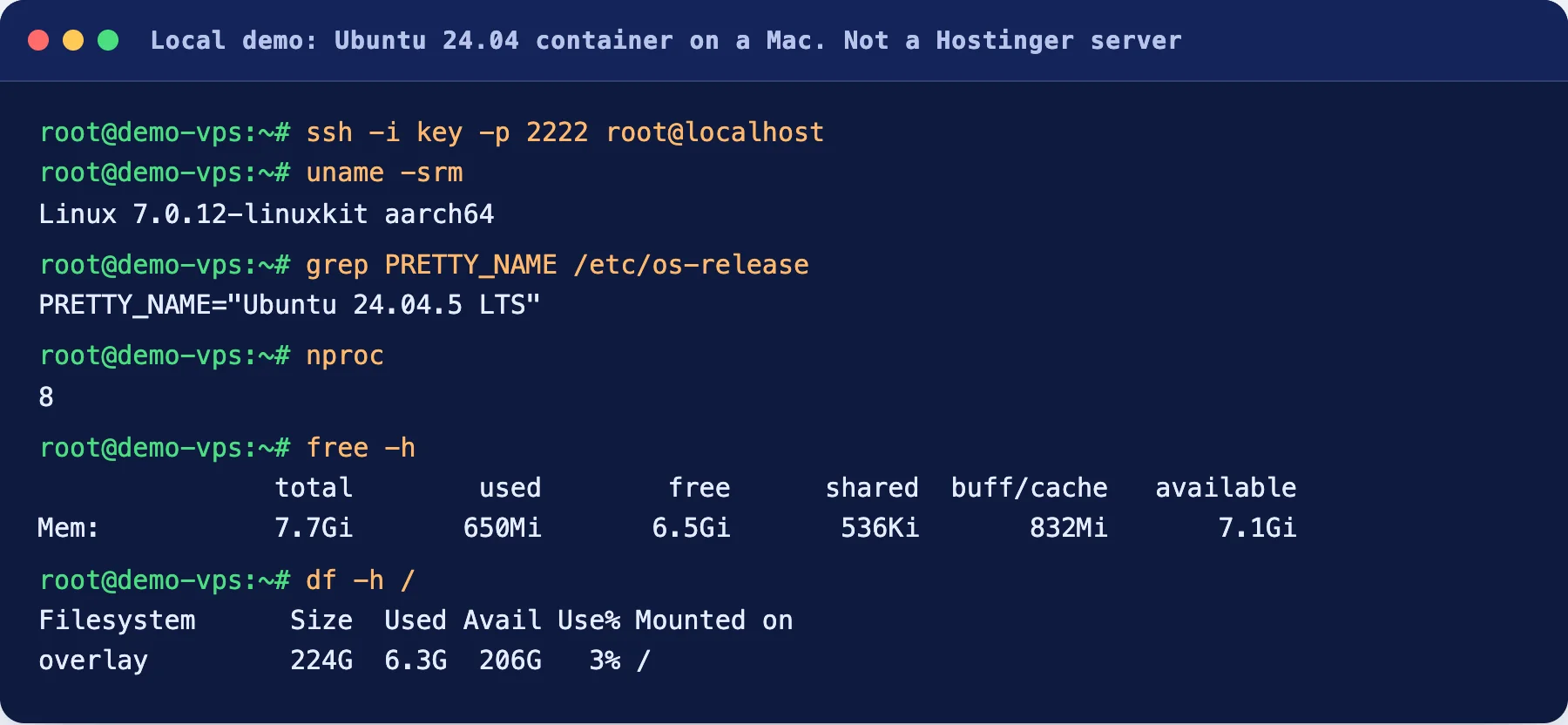
Here you can see the operating system, the number of CPUs, the memory and the disk. On a real VPS, these numbers match the plan you bought.

Always allow port 22 before you turn the firewall on. If you forget, you can lock yourself out of your own server.
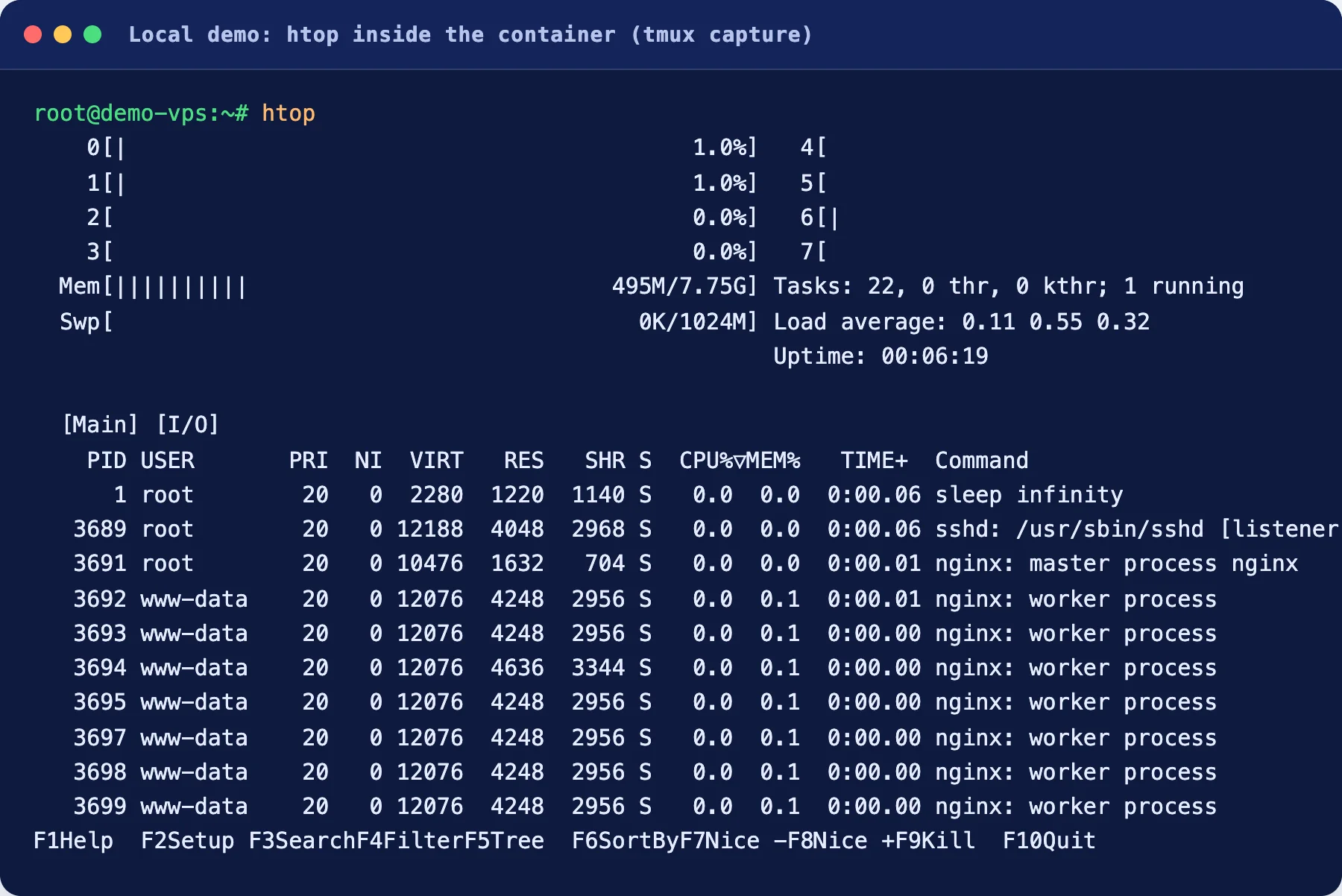
The commands we ran are below. They are the same on most Ubuntu servers. We ran them on the local demo only. We have not tested them on a Hostinger VPS.
ssh root@your-server-ip
apt update && apt upgrade -y
apt install nginx ufw htop -y
ufw allow 22/tcp
ufw allow 80/tcp
ufw default deny incoming
ufw --force enable
ufw status
curl -sI http://localhost | head -3
htop
First 10 things to do on a new VPS
A safe start in ten steps
- 1Log in with SSH
Use the server address and the key or password from your control page.
- 2Update everything
Run the update and upgrade commands before you install anything else.
- 3Make a normal user
Do daily work as a normal user with sudo, not as root. We have not tested this on Hostinger.
- 4Use SSH keys
Keys are safer than passwords. Then turn off password login. We have not tested this on Hostinger.
- 5Turn on the firewall
Allow ports 22, 80 and 443, and block the rest. Allow 22 first.
- 6Install your software
A web server, WordPress, n8n or the app you came for.
- 7Point your domain
Add an A record that points to your server. Learn how in our guide to what DNS is.
- 8Add HTTPS
Install a free certificate so the padlock shows. We have not tested this on Hostinger.
- 9Check backups
Hostinger lists free weekly backups. Keep your own copy of anything you cannot lose.
- 10Watch the load
Open htop or your control page now and then. If memory or CPU stay full, move up a plan.
Mistakes beginners make with a VPS
- Buying on the headline price and ignoring the renewal price.
- Picking a plan that is too small, then blaming the host when it runs out of memory.
- Choosing the wrong country and having to reinstall later.
- Turning on the firewall without allowing SSH first.
- Leaving password login on for root.
- Skipping updates for months.
- Keeping the only copy of the site on the server.
- Using a VPS for a simple blog when shared hosting would do.
How we chose
Frequently asked questions
What does VPS stand for?
VPS stands for virtual private server. It is one slice of a big physical server, set apart so that it acts like a server of its own.
Is a VPS better than shared hosting?
It gives you more control and reserved resources, but it also gives you more work. Shared hosting is easier. Pick a VPS if you need root access, custom software or steady power. Pick shared hosting for a simple blog.
Is a VPS the same as a VPN?
No. A VPS is a server that you rent and run websites or apps on. A VPN hides your internet traffic. The words look alike, but they do different jobs.
Do I need to know coding to use a VPS?
You do not need to write code, but you do need to type commands and read the results. Most plans are self-managed, so you handle the setup and updates. Hostinger says its AI web terminal and its assistant can run server tasks from plain-language instructions. We have not tested them for this page.
How much does a VPS cost in India?
On Hostinger’s page on 15 Nov 2026, KVM 1 was ₹599 a month on a 24-month term, paid upfront as ₹14,376 before GST. It renews at ₹999 a month. Prices change, so check the page.
Can I run WordPress on a VPS?
Yes, but you set up the server yourself: the web server, PHP, the database and HTTPS. WordPress hosting is easier because the host handles that part. Our comparison of WordPress hosting and web hosting can help you choose.
What is the difference between VPS and cloud hosting?
Hostinger says cloud hosting spreads your site over several linked servers. The host handles scaling. A VPS is one virtual server that you control.
Can I move my VPS to another country later?
Hostinger says you choose the location when you set up. To move later, you must reinstall the VPS. That deletes all data, even backups and snapshots. So pick the location closest to your visitors before you buy.
Which Hostinger VPS location is best for India?
If most of your visitors are in India, Hostinger says an India server shortens the trip to them. On 15 Nov 2026, its location picker, opened from India, showed India as the recommended location with the best latency at 9 ms. Your own number may differ.
What happens if I forget to renew?
We did not test this. Read Hostinger’s terms before you buy. Set a calendar reminder a few weeks before your renewal date.
How many websites can I host on a VPS?
It depends on your plan’s CPU, memory and disk, and on how busy each site is. A bigger plan holds more. Start with the smallest plan that fits and move up when your monitoring shows you are running out.
Is a VPS safe?
A VPS is only as safe as you keep it. You apply updates, set the firewall and plan backups. Hostinger lists a managed firewall and free weekly backups on every plan, and the first-ten-steps list in this guide covers the basics.
About this page

- WordPress developer and designer, builds sites for clients
- WordCamp Asia Communication Co-Lead
- 14K+ subscribers on the DigitalPritam YouTube channel
How we checked
Updated 2026-11-15Sources
- Hostinger VPS hosting (hostinger.com/in/vps-hosting), read 15 Nov 2026
- Hostinger India VPS hosting (hostinger.com/vps/servers/india), read 15 Nov 2026
- Hostinger Tutorials, What is VPS hosting (hostinger.com/in/tutorials/what-is-vps-hosting), read 15 Nov 2026
- Hostinger web hosting (hostinger.com/in/web-hosting), read 15 Nov 2026
- World outlines: Natural Earth, public domain
Keep reading
 Hostinger VPS guide
 Cheapest VPS for n8n
 What is DNS?
 Best VPS hosting in India
 WordPress vs web hosting
Check the price on the day you buy. Plans and rules change.
 FREE PDF
Get the Hostinger setup checklist, plus every sale alert
The exact steps we use on our lab sites, and an email when each big hosting sale opens.
Sent instantly. Deal alerts until 1 Dec. Unsubscribe in one click.


 Pritam Sonone