









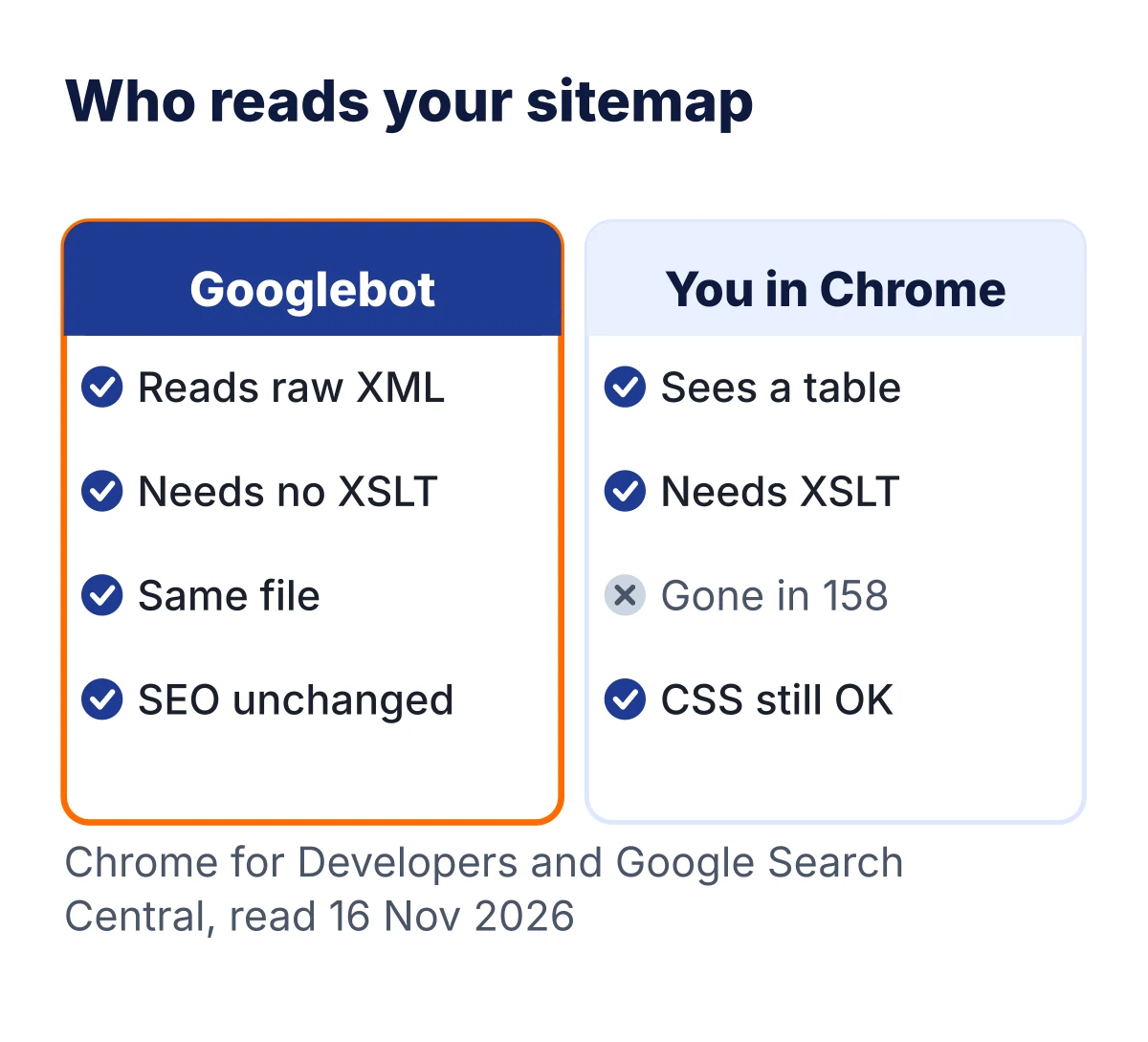
The red “This site uses XSLT” warning on your sitemap is not an SEO problem. It only means Chrome will soon stop drawing your sitemap as a pretty table for people. Google reads the raw XML code, and that code does not change. Your sitemap keeps working.
I saw the same banner on our own Rank Math sitemap on 16 Nov 2026. So I tested it. Below you will see the real before and after, what each SEO plugin is doing, and the two checks worth doing today. It takes about five minutes.
Short on time? Tap through the short Web Story version of this guide.
We opened our own sitemap in Chrome 157 with XSLT switched off, to see the view Chrome 158 brings. We compared a plain download of the file with a Chrome download, and checked five plugin websites' sitemaps. We have not seen Chrome 158 itself, because it is not out yet in our browser.
On this page14 sections
What the red warning says
Open almost any WordPress sitemap in Chrome today and you see this red bar on top:
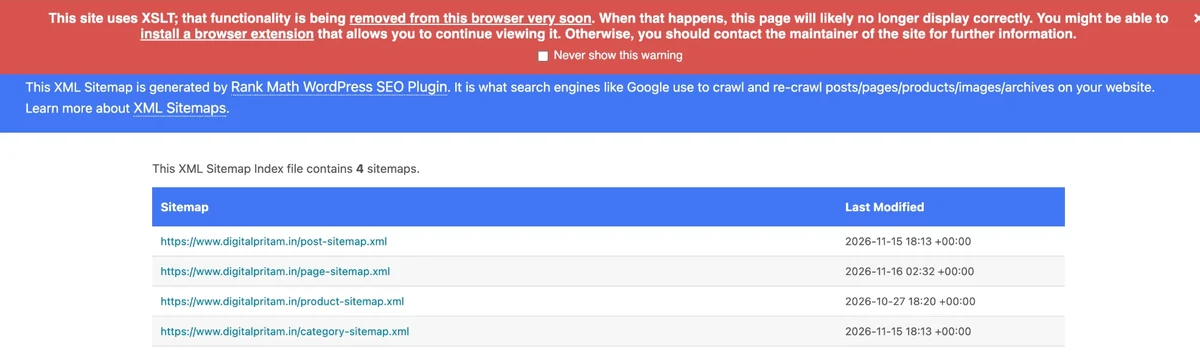
The bar starts with: “This site uses XSLT; that functionality is being removed from this browser very soon.” It goes on to say the page may not display correctly, and that you can install a browser extension or contact the site owner.
Here is the key point. The warning is about how the page looks to a person. It says nothing about search engines, and nothing is wrong with your site. If you only visit the site, you can close the bar or tick “Never show this warning”.
What is XSLT? Three words, in plain English
You need three short ideas. Here they are.
- XML sitemap: a plain list of your page links, written in code for search engines. Think of it as the table of contents of your site.
- XSLT: an old browser feature from 1999 that turns XML code into a nice page for people. Think of it as a costume that the list wears in your browser.
- XSL stylesheet: the costume file itself. SEO plugins add one line at the top of the sitemap that points to it.
So the sitemap is the list. The XSL file is only the costume. Chrome is taking away the costume, not the list.
You can see that one line in your own sitemap. On our site it reads like this:
<?xml-stylesheet type="text/xsl" href="//www.digitalpritam.in/main-sitemap.xsl"?>What changes on 17 November 2026
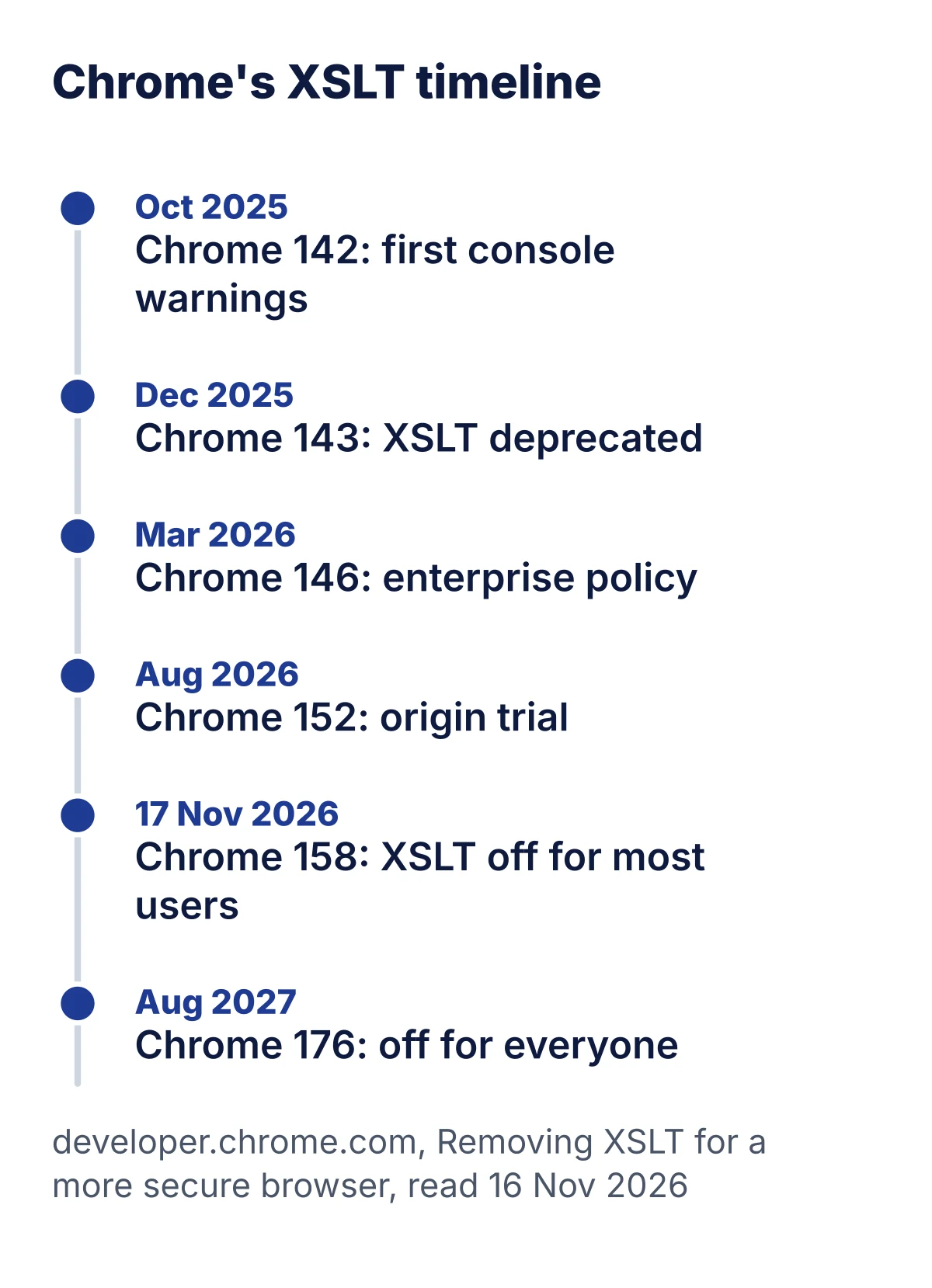
Chrome’s own page gives the date. XSLT stops working in Chrome 158, on 17 November 2026. A few companies and test sites can keep it a bit longer. They lose it too in Chrome 176, on 17 August 2027.
We wanted to see the after view now, not guess it. Chrome has a switch for this feature. We opened our sitemap in Chrome 157 with XSLT turned off. This is what people will see from Chrome 158:
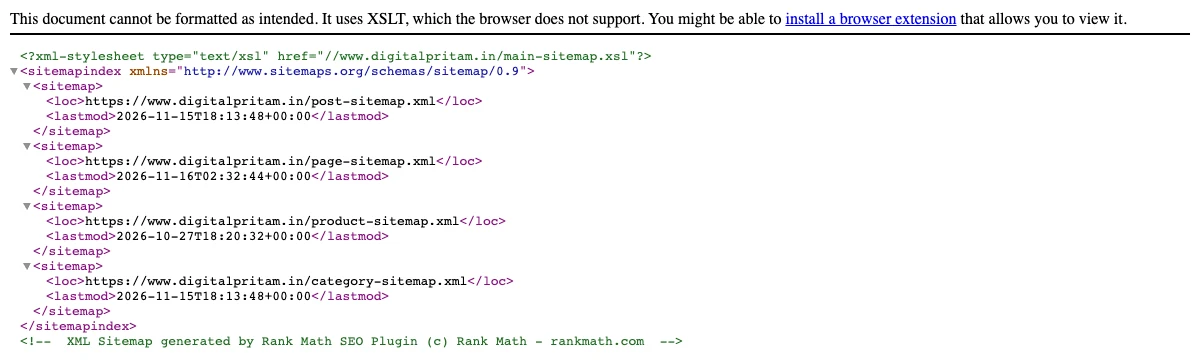
The table is gone. A short notice sits on top, and the raw XML code shows below it. Every link is still there. Click the small arrows and the lines fold and unfold. That is the whole change.
Why is Chrome doing this? Chrome says the code behind XSLT is old, has had serious security bugs, and is used on only about 0.02% of page loads. Removing it makes the browser safer for everyone.
Does the XSLT warning affect SEO?
No. The XSLT warning does not affect your SEO, your crawling or your rankings. Here is why, in three facts.
- Google reads the raw file. Googlebot downloads the XML code. It never needed the costume. Google’s guide to building a sitemap (updated 8 July 2026) does not mention any stylesheet at all.
- The file does not change. We downloaded our sitemap twice on 16 Nov 2026, once as a plain tool and once as Chrome. The two files were the same, byte for byte (same SHA-256 hash).
- The plugin makers agree. Yoast support wrote on 3 Nov 2026 that the change is only about looks and will not affect SEO. Rank Math support wrote on 25 Oct 2026 that search engines read the XML itself, so they are not affected.
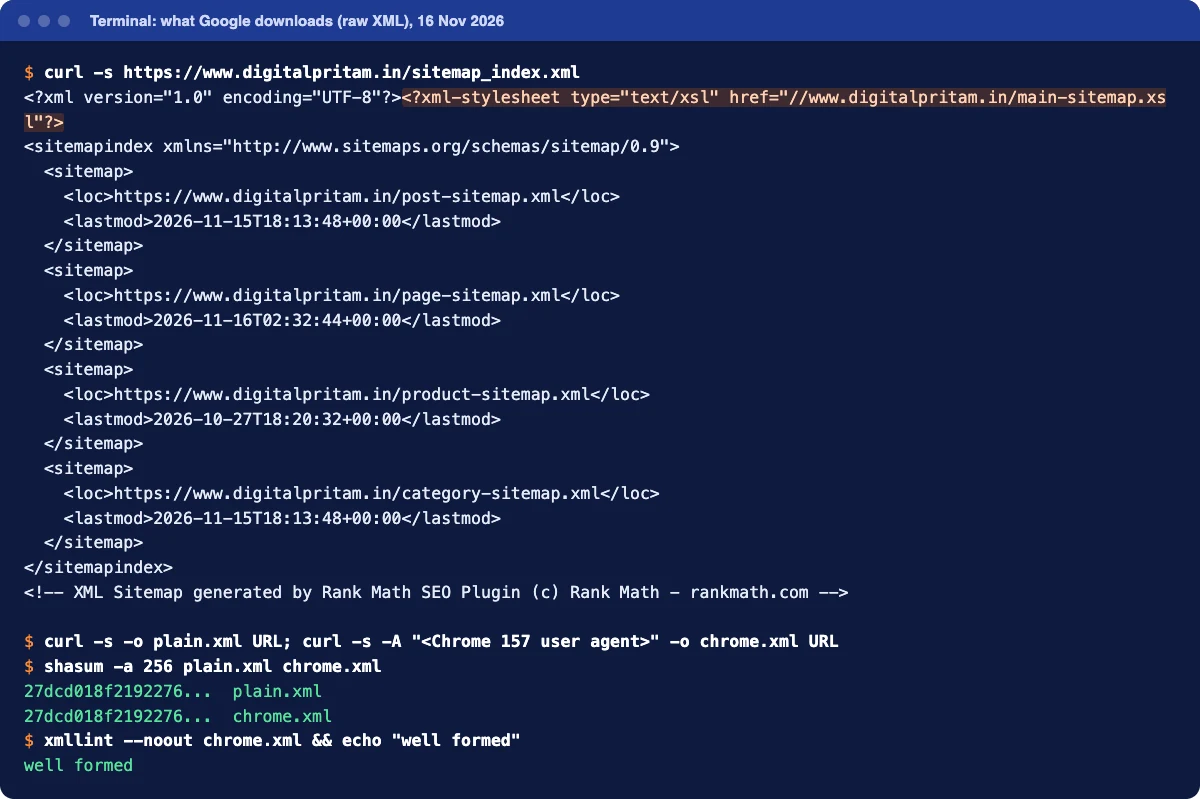
In the terminal above, the orange line is the costume line. Everything under it is what Google reads. Four child sitemaps, all well formed. Nothing about Chrome touches it.
What each SEO plugin is doing (checked 16 Nov 2026)
We opened each plugin maker’s own sitemap on 16 Nov 2026 and read their changelog and support replies. If we could not find an official word, the table says “not confirmed”.
| Plugin (version on 16 Nov) | Uses XSL today? | What you see from Chrome 158 | What to do |
|---|---|---|---|
| Rank Math 1.0.282 | Yes. rankmath.com and our own site still use it | Raw XML with a short notice | Nothing. Support says no announcement yet. Watch the changelog |
| Yoast SEO 28.8 | 28.8 uses XSL. 28.9 switches to CSS (yoast.com already does) | On 28.9: still a table | Update to 28.9. Its readme gives 17 Nov 2026 as the release date |
| All in One SEO 5.0.5.1 | Yes. aioseo.com still uses it | Raw XML with a short notice | Nothing. Fix not confirmed |
| SEOPress 10.4 | Yes. seopress.org still uses it | Raw XML with a short notice | Nothing. Fix not confirmed |
| WordPress core sitemap (wp-sitemap.xml) | Yes, up to WordPress 7.1 | 7.1: raw XML. 7.2: plain XML with no notice | Update to WordPress 7.2 when it ships (planned for 8 Dec 2026) |
Plugin versions from WordPress.org and live sitemaps checked 16 Nov 2026.
Yoast’s add-ons are a small exception. Yoast’s own task page says the News, Video and Local add-on sitemaps keep XSLT until each add-on ships its own change.
Here is proof the CSS way works. This is yoast.com’s sitemap in Chrome with XSLT switched off. The table is still there, because CSS is not being removed:
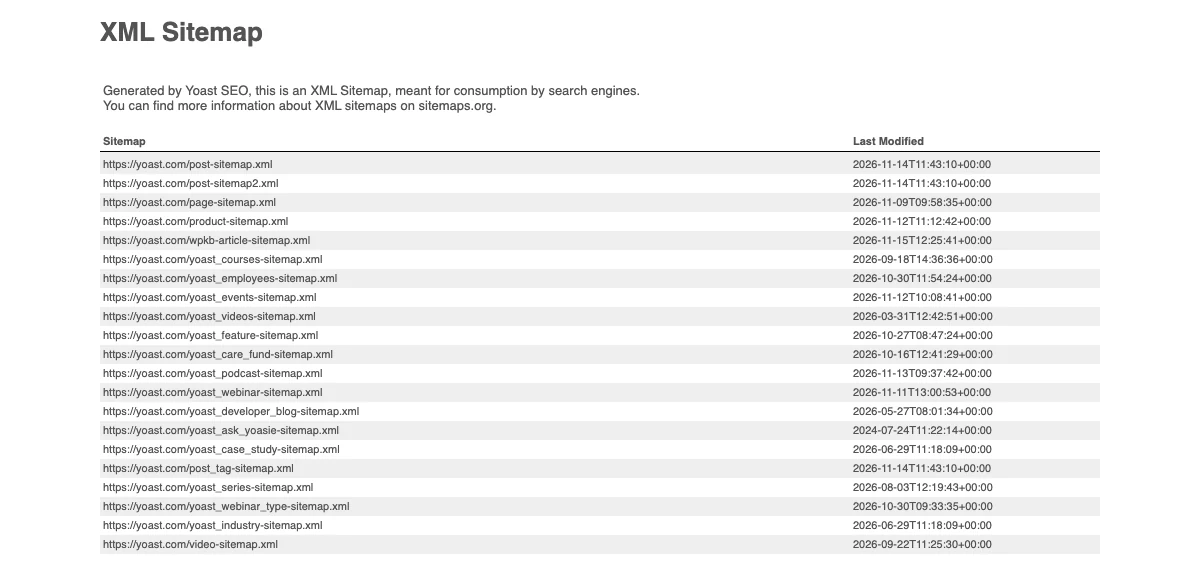
Chrome’s page says this plainly: XML with a CSS stylesheet stays supported. Only XSLT goes.
How to see the raw XML of your sitemap
Want to see what Google sees? Use any one of these. All are free.
- View source in Chrome. Type
view-source:in front of your sitemap address, for exampleview-source:https://yoursite.com/sitemap_index.xml, and press Enter. - Wait for Chrome 158. After the update, just open your sitemap. You will see the raw code with a notice on top, like our after screenshot.
- Use the terminal. On a Mac or Linux, run
curl -s https://yoursite.com/sitemap_index.xml. It prints the exact file, like our terminal image.
Look for three things: the file starts with <?xml, every page sits inside a <loc> tag, and the addresses are your real pages.
Not sure of your sitemap address? Rank Math and Yoast use /sitemap_index.xml. All in One SEO uses /sitemap.xml. SEOPress uses /sitemaps.xml. WordPress core uses /wp-sitemap.xml. We read these from each maker’s live site on 16 Nov 2026.
The 5 minute check: is Google still reading my sitemap?
This is the check that matters, much more than the banner. Google’s help page says the Sitemaps report shows when Googlebot read your sitemap and any errors. Want a faster first look? Paste your address into our free XSLT sitemap checker to see which plugin made your sitemap and whether it uses XSLT.
- Open Google Search Console and pick your site.
- In the left menu, click Sitemaps (under Indexing).
- Find your sitemap in the Submitted sitemaps table.
- Check the Status column. Success means Google can fetch and read it.
- Check Last read. A recent date means Google keeps visiting it.
- If the status is not Success, click the row to see the error. That error has nothing to do with XSLT, so fix what it says.
- Optional: open your robots.txt and make sure it has a
Sitemap:line with your sitemap address. Ours does.
You do not need to resubmit anything because of the banner. Google’s guide says you only resubmit after big changes to the sitemap, and the costume is not part of the list.
We did not put a screenshot of our Search Console here, because it is a private account. The steps above follow Google's own help page.
Should you remove the stylesheet yourself?
Short answer: you do not have to. Search engines do not care either way. Still, here is what is officially possible today.
WordPress core sitemap, before 7.2
WordPress has an official filter for this. Its own code says a false value means no stylesheet, so the raw XML shows. Add these two lines with a code snippets plugin or a child theme:
add_filter( 'wp_sitemaps_stylesheet_url', '__return_false' );
add_filter( 'wp_sitemaps_stylesheet_index_url', '__return_false' );
From WordPress 7.2 you can delete them. The core commit for 7.2 removes the stylesheets and ignores these filters, so they only show a notice to developers.
Yoast SEO
Just update to 28.9 when it arrives. It swaps the XSL file for a CSS one, so the table stays. There is nothing to remove.
Rank Math, All in One SEO and SEOPress
We did not find a documented setting or filter to remove the stylesheet in their official help pages on 16 Nov 2026. Rank Math’s plugin code has a filter hook for the stylesheet line, but Rank Math does not document it, so we do not suggest it. Wait for an official fix in the changelog. We are doing the same on this site.
What not to do
- Do not delete or switch off your sitemap. That would hurt you. The banner would not.
- Do not remove the sitemap from Search Console. It is still read the same way.
- Do not swap SEO plugins in a panic. Moving plugins can break titles, redirects and schema. The banner is only about looks.
- Do not install random “XSLT fix” extensions. Some ask to read every site you visit. Want the table back? Use only the extension that Chrome’s own page links to.
- Do not edit plugin files. An update will undo the change, and a typo can break the sitemap.
- Do not hire someone to “fix” it. There is nothing broken for search.
Just a visitor? Here is what to do
If the warning shows on someone else’s site, nothing is wrong with your computer or your Chrome. Close the bar, or tick “Never show this warning”. If you need that page for work, tell the site owner. Chrome’s banner says the same.
If you run a company tool that still needs XSLT, your IT team can use Chrome’s XSLTEnabled policy. Chrome says that policy stops working in Chrome 176, so it only buys time.
How we chose
Frequently asked questions
What does “This site uses XSLT” mean?
It means the page you opened uses an old browser feature called XSLT to turn XML code into a nice table. Chrome is removing that feature. On a sitemap, it only changes how the file looks to a person in Chrome.
Will the XSLT warning hurt my Google rankings?
No. Google downloads the raw XML file, and that file does not change. Google’s own sitemap guide does not mention any stylesheet. Yoast and Rank Math support both say search engines are not affected.
Is my sitemap broken?
No. The sitemap still lists all your pages. Only the pretty table view in Chrome goes away. From Chrome 158 you will see plain XML code instead, unless your plugin switches to a CSS stylesheet.
When does Chrome remove XSLT?
Chrome’s plan says XSLT stops working on Chrome 158 Stable, dated 17 November 2026. Companies that use a special Chrome policy, and sites in Chrome’s origin trial, can keep it until Chrome 176, dated 17 August 2027.
Do I need to resubmit my sitemap in Search Console?
No. Nothing about the file Google reads has changed. Just open the Sitemaps report once and check that the status still says Success.
Why is Chrome removing XSLT?
For safety. Chrome says the code behind XSLT is old and has had serious security bugs, and very few pages use it. Chrome puts it at about 0.02% of page loads.
Should I switch from Rank Math to Yoast because of this?
No. Your SEO does not depend on the table view. Yoast 28.9 keeps a table by using CSS, but that is only a looks thing. Changing SEO plugins brings far more risk than this banner does.
Should I install an XSLT extension in Chrome?
You do not need one for SEO. If you really want the old table view, Chrome’s own help page links to an XSLT polyfill extension. Do not install random extensions that ask for access to every site.
Do Firefox and Safari show the same thing?
Chrome says the teams behind Firefox and Safari also support removing XSLT. Their own dates are not on Chrome’s page, so we do not give one.
Does this affect my WordPress RSS feed?
Not on a normal WordPress site. We checked our own feed on 16 Nov 2026 and it has no XSL stylesheet line, so nothing changes there.
About this page

- WordPress developer and designer, builds sites for clients
- WordCamp Asia Communication Co-Lead
- 14K+ subscribers on the DigitalPritam YouTube channel
How we checked
Updated 16 Nov 2026How I got these facts
I read Chrome’s page and status entry on 16 Nov 2026. I took plugin versions from WordPress.org the same day. Then I opened each plugin maker’s live sitemap to see its stylesheet line. The after screenshots come from Chrome 157 with the XSLT feature switched off. That is the same feature Chrome 158 turns off. Plugin plans can change, so check your own plugin’s changelog too.
Sources
- Chrome for Developers: Removing XSLT for a more secure browser (published 29 Oct 2025), read 16 Nov 2026
- Chrome Platform Status: Deprecate and remove XSLT (last updated 4 Nov 2026), read 16 Nov 2026
- Chrome Enterprise: XSLTEnabled policy, read 16 Nov 2026
- WordPress core: commit f4350cd, Sitemaps: Remove XSL stylesheets (trunk r64073, 3 Oct 2026, ticket 65593), read 16 Nov 2026
- Make WordPress Core: WordPress 7.2 release page (release 8 Dec 2026), read 16 Nov 2026
- Yoast SEO readme, version 28.9 changelog (release date 17 Nov 2026), and GitHub issue 23663, read 16 Nov 2026
- WordPress.org support: Yoast reply of 3 Nov 2026 and Rank Math replies of 23 and 25 Oct 2026, read 16 Nov 2026
- WordPress.org plugin pages: Rank Math 1.0.282, Yoast SEO 28.8, All in One SEO 5.0.5.1, SEOPress 10.4, read 16 Nov 2026
- Google Search Central: Build and submit a sitemap (last updated 8 Jul 2026) and Search Console Help: Sitemaps report, read 16 Nov 2026
- Live sitemaps of rankmath.com, yoast.com, aioseo.com, seopress.org and digitalpritam.in, opened 16 Nov 2026
What to do next
Open the Sitemaps report in Search Console and check for Success. Then go back to work on what moves rankings: good pages. Our SEO tips are a good place to start.
Keep reading
 What is SEO?
 SEO tips
 SEO for AI search
 Rank Math review
 FREE PDF
Get the Hostinger setup checklist, plus every sale alert
The exact steps we use on our lab sites, and an email when each big hosting sale opens.
Sent instantly. Deal alerts until 1 Dec. Unsubscribe in one click.

 Pritam Sonone